
Join the Conversation
- Find Answers
- :
- Using Splunk
- :
- Dashboards & Visualizations
- :
- Is it possible to have the annotation for only one...
- Subscribe to RSS Feed
- Mark Topic as New
- Mark Topic as Read
- Float this Topic for Current User
- Bookmark Topic
- Subscribe to Topic
- Mute Topic
- Printer Friendly Page
- Mark as New
- Bookmark Message
- Subscribe to Message
- Mute Message
- Subscribe to RSS Feed
- Permalink
- Report Inappropriate Content
Is it possible to have the annotation for only one chart when view by Trellis?

Hi,
Is it possible to have the annotation for only one chart when view by Trellis, for example in the image below, I only want to have notation for the first chart.
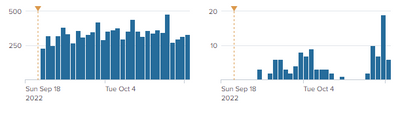
Knowing that:
- I'm using the visualization by Trellis.
- The annotation is now established by adding this part in the XML source.
        <search type="annotation">
          <query>| makeresults
| eval _time="2022-09-20 00:00:00", message="Change equipement", type="type1"
 | eval annotation_label = message </query>
          <earliest>0</earliest>
          <latest></latest>
        </search>
<option name="charting.annotation.categoryColors">{"type1":"0xffcc00"}</option>
- The list of id with the date of changement is stored in a lookup csv
I did this but it show annotation for every chart
<search type="annotation">
          <query>|inputlookup list_id.csv
|search NoEq=$id$
| eval _time=_time, message="Change", type="type1"
 | eval annotation_label = message </query>
          <earliest>0</earliest>
          <latest></latest>
        </search>
- Mark as New
- Bookmark Message
- Subscribe to Message
- Mute Message
- Subscribe to RSS Feed
- Permalink
- Report Inappropriate Content

Splunk has the mechanism in place to make it work: $trellis.name$ and $trellis.value$, but instead of these being available for ALL searches, they are only available for the trellis search/chart. I have tried many things but all have failed. If annotations are supported in Studio, you could try there. That is my next step, but I don't know Studio so don't know if I will try or how long it would take. The next best thing to do is make the "annotation_category" set to the value of the split-by field for the Trellis so that a hover makes it clear which ones are for which trellis panel.

Join the Splunk Community Slack to learn, troubleshoot, and make connections with fellow Splunk practitioners in real time!
Join Splunk User Groups to connect and learn in-person by region or remotely by topic or industry.
Design, Compete, Win: Submit Your Best Splunk Dashboards for a .conf26 Pass
May 2026 Splunk Expert Sessions: Security & Observability
Network to App: Observability Unlocked [May & June Series]
