
Join the Conversation
- Find Answers
- :
- Using Splunk
- :
- Dashboards & Visualizations
- :
- Invalid Date using Job in the UI
- Subscribe to RSS Feed
- Mark Topic as New
- Mark Topic as Read
- Float this Topic for Current User
- Bookmark Topic
- Subscribe to Topic
- Mute Topic
- Printer Friendly Page
- Mark as New
- Bookmark Message
- Subscribe to Message
- Mute Message
- Subscribe to RSS Feed
- Permalink
- Report Inappropriate Content

I am trying to display the selected start and end time in the UI. I followed particularly the below answer given by you.
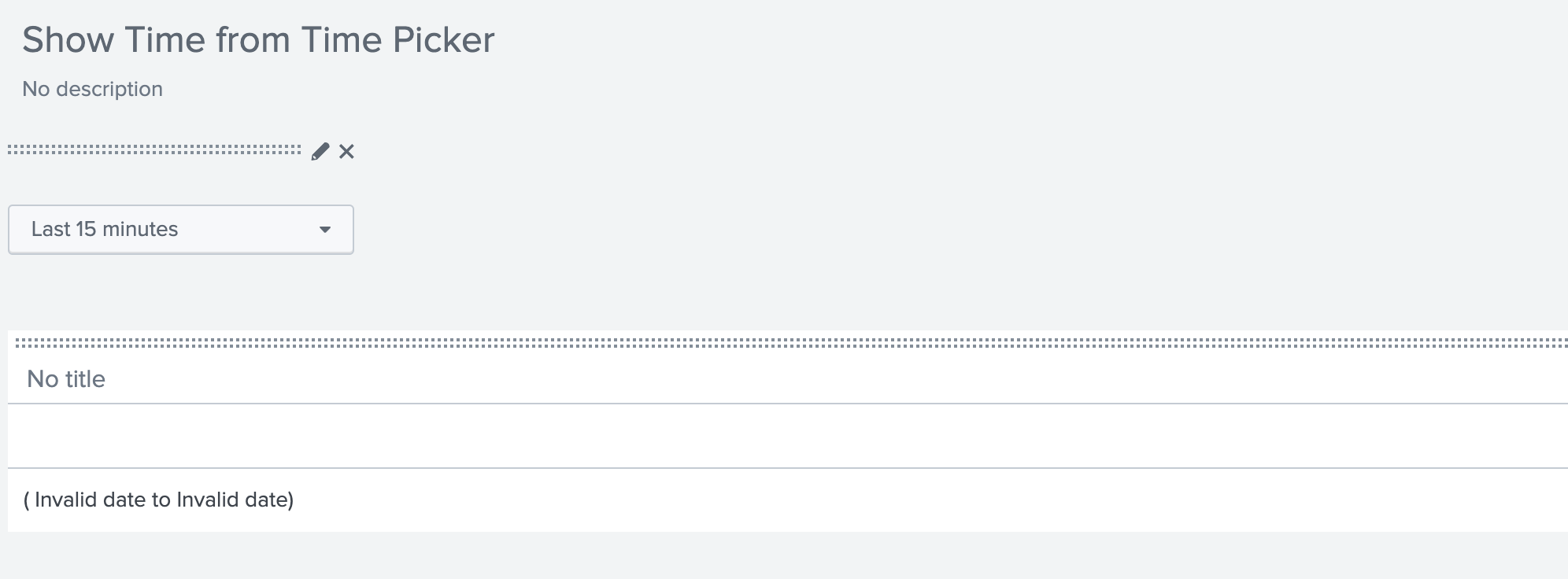
It was working fine but suddenly it stopped saying Invalid Date. We recently had a splunk Upgrade to Version:8.0.4.1. Could it be due to the upgrade? Was there any change. I couldnt narrow down to exact issue.
Here is the code which you have shared
<form>
  <label>Show Time from Time Picker</label>
  <!-- Dummy search to pull selected time range earliest and latest date/time -->
  <search>
    <query>| makeresults | addinfo </query>
    <earliest>$field1.earliest$</earliest>
    <latest>$field1.latest$</latest>
    <done>
      <eval token="tokEarliestTime">strftime(strptime('$job.earliestTime$',"%Y/%m/%dT%H:%M:%S.%3N %p"),"%m/%d/%y %I:%M:%S.%3N %p")</eval>
      <eval token="tokLatestTime">strftime(strptime('$job.latestTime$',"%Y/%m/%dT%H:%M:%S.%3N %p"),"%m/%d/%y %I:%M:%S.%3N %p")</eval>
    </done>
  </search>
  <fieldset submitButton="false">
    <input type="time" token="field1">
      <label></label>
      <default>
        <earliest>-24h@h</earliest>
        <latest>now</latest>
      </default>
    </input>
  </fieldset>
  <row>
    <panel>
      <!-- sample HTML Panel to display results in required format -->
      <html>
        (  $tokEarliestTime$ to $tokLatestTime$)
      </html>
    </panel>
  </row>
</form>
Attaching the screenshot of what is shown in the UI. Could you please suggest.
- Mark as New
- Bookmark Message
- Subscribe to Message
- Mute Message
- Subscribe to RSS Feed
- Permalink
- Report Inappropriate Content


Try this,
<form>
  <label>Show Time from Time Picker</label>
  <!-- Dummy search to pull selected time range earliest and latest date/time -->
  <search>
    <query>| makeresults | addinfo</query>
    <earliest>$field1.earliest$</earliest>
    <latest>$field1.latest$</latest>
    <done>
      <eval token="tokEarliestTime">strftime($result.info_min_time$,"%Y/%m/%dT%H:%M:%S.%3N %p")</eval>
      <eval token="tokLatestTime">strftime($result.info_max_time$,"%Y/%m/%dT%H:%M:%S.%3N %p")</eval>
    </done>
  </search>
  <fieldset submitButton="false">
    <input type="time" token="field1">
      <label></label>
      <default>
        <earliest>-24h@h</earliest>
        <latest>now</latest>
      </default>
    </input>

  </fieldset>
  <row>
    <panel>
      <!-- sample HTML Panel to display results in required format -->
      <html>
        (  $tokEarliestTime$ to $tokLatestTime$)
      </html>
    </panel>
  </row>
</form>
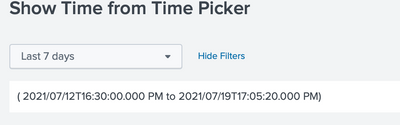
Thanks
KV
▄︻̷̿┻̿═━一 ?
If any of my reply helps you to solve the problem Or gain knowledge, an upvote would be appreciated.
- Mark as New
- Bookmark Message
- Subscribe to Message
- Mute Message
- Subscribe to RSS Feed
- Permalink
- Report Inappropriate Content
Try this,
<form>
  <label>Show Time from Time Picker</label>
  <!-- Dummy search to pull selected time range earliest and latest date/time -->
  <search>
    <query>| makeresults | addinfo</query>
    <earliest>$field1.earliest$</earliest>
    <latest>$field1.latest$</latest>
    <done>
      <eval token="tokEarliestTime">strftime($result.info_min_time$,"%Y/%m/%dT%H:%M:%S.%3N %p")</eval>
      <eval token="tokLatestTime">strftime($result.info_max_time$,"%Y/%m/%dT%H:%M:%S.%3N %p")</eval>
    </done>
  </search>
  <fieldset submitButton="false">
    <input type="time" token="field1">
      <label></label>
      <default>
        <earliest>-24h@h</earliest>
        <latest>now</latest>
      </default>
    </input>

  </fieldset>
  <row>
    <panel>
      <!-- sample HTML Panel to display results in required format -->
      <html>
        (  $tokEarliestTime$ to $tokLatestTime$)
      </html>
    </panel>
  </row>
</form>
Thanks
KV
▄︻̷̿┻̿═━一 ?
If any of my reply helps you to solve the problem Or gain knowledge, an upvote would be appreciated.
- Mark as New
- Bookmark Message
- Subscribe to Message
- Mute Message
- Subscribe to RSS Feed
- Permalink
- Report Inappropriate Content
This works. Thanks for looking into this.
- Mark as New
- Bookmark Message
- Subscribe to Message
- Mute Message
- Subscribe to RSS Feed
- Permalink
- Report Inappropriate Content

Hi
Replace the eval lines with this ones:
<eval token="tokEarliestTime">strftime(strptime($job.earliestTime$,"%Y-%m-%dT%H:%M:%S.%3N%z"),"%m/%d/%y %I:%M:%S.%3N %p")</eval>
<eval token="tokLatestTime">strftime(strptime($job.latestTime$,"%Y-%m-%dT%H:%M:%S.%3N%z"),"%m/%d/%y %I:%M:%S.%3N %p")</eval>
Also, I'm sad to say that Niket is no longer with us. He passed away last year.
Hope I was able to help you. If so, some karma would be appreciated.
- Mark as New
- Bookmark Message
- Subscribe to Message
- Mute Message
- Subscribe to RSS Feed
- Permalink
- Report Inappropriate Content
This doesnt work either
- Mark as New
- Bookmark Message
- Subscribe to Message
- Mute Message
- Subscribe to RSS Feed
- Permalink
- Report Inappropriate Content
I am so sorry hear that. I didnt know. May his soul rest in peace. Didnt expect

Join the Splunk Community Slack to learn, troubleshoot, and make connections with fellow Splunk practitioners in real time!
Join Splunk User Groups to connect and learn in-person by region or remotely by topic or industry.
Why Splunk Customers Should Attend Cisco Live 2026 Las Vegas
What Is the Name of the USB Key Inserted by Bob Smith? (BOTS Hint, Not the Answer)
Automating Threat Operations and Threat Hunting with Recorded Future
