
Join the Conversation
- Find Answers
- :
- Using Splunk
- :
- Dashboards & Visualizations
- :
- Re: In Splunk 4.3.2, I used the variable $search.t...
- Subscribe to RSS Feed
- Mark Topic as New
- Mark Topic as Read
- Float this Topic for Current User
- Bookmark Topic
- Subscribe to Topic
- Mute Topic
- Printer Friendly Page
- Mark as New
- Bookmark Message
- Subscribe to Message
- Mute Message
- Subscribe to RSS Feed
- Permalink
- Report Inappropriate Content
In Splunk 4.3.2, I used the variable $search.timeRange.label$. Is there any equivalent value for this in 6.4.0?

Hi All,
Is there any equivalent variable for this in Splunk 6.4.0?
$search.timeRange.label$
I have used the above variable to display the selected time label, but I'm looking for any equivalent with the new Splunk version we are using. of course i have come across to use to earliest and latest separately in 6.4.0, but couldn't actually get the label name displayed.
i.e able to get something like this:
selected Time is **-7d@d and now** in SPLUNK 6.4.0
whereas earlier in SPLUNK 4.3.2, I used to get:
selected Time **Last 7 days**
How can we get this back again?
Many thanks,
Rakesh.
- Mark as New
- Bookmark Message
- Subscribe to Message
- Mute Message
- Subscribe to RSS Feed
- Permalink
- Report Inappropriate Content


Here is what you want:
<form>
<label>test</label>
<fieldset submitButton="true">
<input type="time" token="time">
<change>
<set token="time_label">$label$</set>
</change>
</input>
</fieldset>
<row>
<panel>
<html>
the time_label token is: $time_label$
<br/>
the time.earliest token is: $time.earliest$
<br/>
the time.latest token is: $time.latest$
</html>
</panel>
</row>
</form>
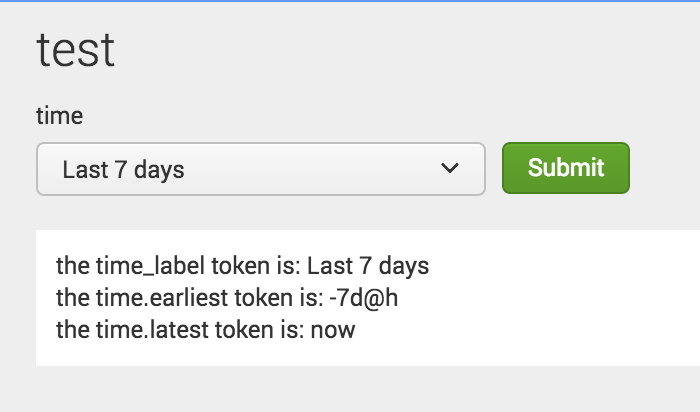

- Mark as New
- Bookmark Message
- Subscribe to Message
- Mute Message
- Subscribe to RSS Feed
- Permalink
- Report Inappropriate Content
Thanks a lot alijohson..its working like a charm !!! 🙂
- Mark as New
- Bookmark Message
- Subscribe to Message
- Mute Message
- Subscribe to RSS Feed
- Permalink
- Report Inappropriate Content
alijohnson on the initial load of the form can we get the label printed ... Cause until i change the timepicker value label was not disaplaying ..is there a way to display the label on form load ??? i.e show the default value of timepicker in the label in the form load. ??
- Mark as New
- Bookmark Message
- Subscribe to Message
- Mute Message
- Subscribe to RSS Feed
- Permalink
- Report Inappropriate Content
Hi @Rakesh_498115 - please mark this answer as "accepted" if this solved your problem.
And yes - you can specify what you'd like the default value of the token to be. Here is an example:
<input type="dropdown" token="sourcetype_tok">
  <label>Select a source type</label>
  <default>splunkd</default>
  <choice value="splunkd">splunkd</choice>
  <choice value="splunk_web_access">splunk_web_access</choice>
  <choice value="splunkd_ui_access">splunkd_ui_access</choice>
</input>

Join the Splunk Community Slack to learn, troubleshoot, and make connections with fellow Splunk practitioners in real time!
Join Splunk User Groups to connect and learn in-person by region or remotely by topic or industry.
Why Splunk Customers Should Attend Cisco Live 2026 Las Vegas
What Is the Name of the USB Key Inserted by Bob Smith? (BOTS Hint, Not the Answer)
Automating Threat Operations and Threat Hunting with Recorded Future
