
Join the Conversation
- Find Answers
- :
- Using Splunk
- :
- Dashboards & Visualizations
- :
- Re: How to set different Trend colors in single va...
- Subscribe to RSS Feed
- Mark Topic as New
- Mark Topic as Read
- Float this Topic for Current User
- Bookmark Topic
- Subscribe to Topic
- Mute Topic
- Printer Friendly Page
- Mark as New
- Bookmark Message
- Subscribe to Message
- Mute Message
- Subscribe to RSS Feed
- Permalink
- Report Inappropriate Content
How to set different Trend colors in single value dashboard?

Hello Splunkers,
I am trying to change the color of the Trend symbol in the single value dashboard.
As per Splunk docs, if it is positive then green else red. So, I need to change the color instead of red.
I have read the answer which the color of the single value can be changed based on the trend percentage, but it does not change the color of the trend.
https://answers.splunk.com/answers/659702/how-to-configure-single-value-dashboard-color-base.html
Any help here much appreciated, thank you and happy splunking.
Regards,
Purush
- Mark as New
- Bookmark Message
- Subscribe to Message
- Mute Message
- Subscribe to RSS Feed
- Permalink
- Report Inappropriate Content
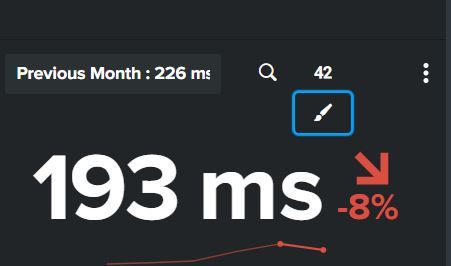

- Mark as New
- Bookmark Message
- Subscribe to Message
- Mute Message
- Subscribe to RSS Feed
- Permalink
- Report Inappropriate Content

@impurush I have provided both the answers mentioned in the post. Both answers do not override the color of trend. If you need to do the same what is your requirement to color the trend? Please add more details for your use case for the community to assist you better.
| makeresults | eval message= "Happy Splunking!!!"
- Mark as New
- Bookmark Message
- Subscribe to Message
- Mute Message
- Subscribe to RSS Feed
- Permalink
- Report Inappropriate Content
I have posted the reply below, any leads are appreciated.
- Mark as New
- Bookmark Message
- Subscribe to Message
- Mute Message
- Subscribe to RSS Feed
- Permalink
- Report Inappropriate Content


can you post your dashboard html and a screenshot of what you are trying to do, also take a look at this post changing both the value and the trend:
https://answers.splunk.com/answers/583539/can-we-set-two-different-colors-for-single-value-a.html
- Mark as New
- Bookmark Message
- Subscribe to Message
- Mute Message
- Subscribe to RSS Feed
- Permalink
- Report Inappropriate Content
I have posted the reply below, any leads are appreciated.

Splunk Observability for AI
[Puzzles] Solve, Learn, Repeat: Dereferencing XML to Fixed-length events
Stay Connected: Your Guide to December Tech Talks, Office Hours, and Webinars!
