
Join the Conversation
- Find Answers
- :
- Using Splunk
- :
- Dashboards & Visualizations
- :
- Re: How to search and mark the locations on Google...
- Subscribe to RSS Feed
- Mark Topic as New
- Mark Topic as Read
- Float this Topic for Current User
- Bookmark Topic
- Subscribe to Topic
- Mute Topic
- Printer Friendly Page
- Mark as New
- Bookmark Message
- Subscribe to Message
- Mute Message
- Subscribe to RSS Feed
- Permalink
- Report Inappropriate Content

I am trying to fully customize the dashboard in which i need to include Google Maps to show the different IP addresses.. How can write this search?
- Mark as New
- Bookmark Message
- Subscribe to Message
- Mute Message
- Subscribe to RSS Feed
- Permalink
- Report Inappropriate Content

- do your query by ex:
your_base_search| iplocation device_ip | geostats latfield=lat longfield=lon count by IP_address. - saved as dashboard
- after view my dashboard, go to edit > edit source XML
- in your XML code change
chart or tablemark bymapmark - after you saved it to see results
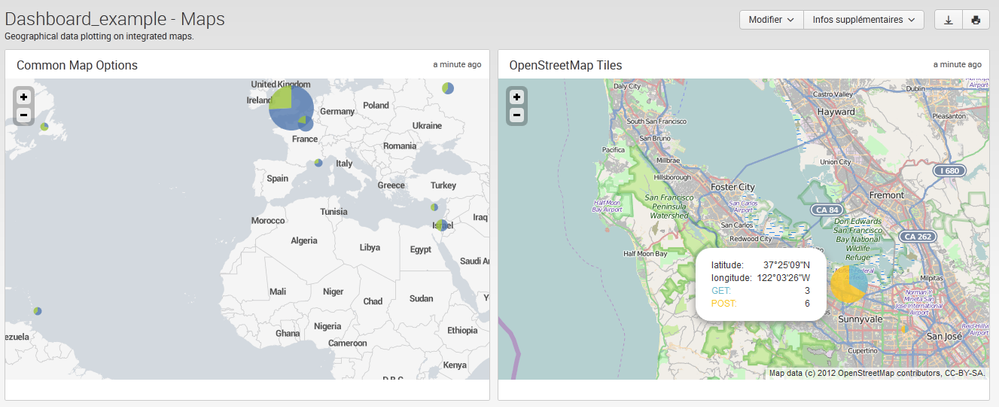
see my ex in two panel of my dashboard:
- my query: | inputlookup geomaps_data.csv | iplocation device_ip | geostats latfield=lat longfield=lon count by method
- see my XML code dashboard:
Dashboard_example - Maps
Geographical data plotting on integrated maps.
<map>
  <title>Common Map Options</title>
  <searchString>| inputlookup geomaps_data.csv | iplocation device_ip | geostats latfield=lat longfield=lon count by method</searchString>
  <option name="height">400px</option>

  <!-- use custom colors -->
  <option name="mapping.seriesColors">[0x5379af,0x9ac23c,0xf7902b,0x956d95,0x6ab7c7,0xd85d3c,0xfac51c,0xdd86af]</option>

  <!-- adjust marker opacity and size range -->
  <option name="mapping.markerLayer.markerOpacity">0.8</option>
  <option name="mapping.markerLayer.markerMinSize">10</option>
  <option name="mapping.markerLayer.markerMaxSize">60</option>

  <!-- set initial map center and zoom level -->
  <option name="mapping.map.center">(30.810646,-10.556976)</option>
  <option name="mapping.map.zoom">2</option>
</map>
..........
- save see results below:

- Mark as New
- Bookmark Message
- Subscribe to Message
- Mute Message
- Subscribe to RSS Feed
- Permalink
- Report Inappropriate Content
- do your query by ex:
your_base_search| iplocation device_ip | geostats latfield=lat longfield=lon count by IP_address. - saved as dashboard
- after view my dashboard, go to edit > edit source XML
- in your XML code change
chart or tablemark bymapmark - after you saved it to see results
see my ex in two panel of my dashboard:
- my query: | inputlookup geomaps_data.csv | iplocation device_ip | geostats latfield=lat longfield=lon count by method
- see my XML code dashboard:
Dashboard_example - Maps
Geographical data plotting on integrated maps.
<map>
  <title>Common Map Options</title>
  <searchString>| inputlookup geomaps_data.csv | iplocation device_ip | geostats latfield=lat longfield=lon count by method</searchString>
  <option name="height">400px</option>

  <!-- use custom colors -->
  <option name="mapping.seriesColors">[0x5379af,0x9ac23c,0xf7902b,0x956d95,0x6ab7c7,0xd85d3c,0xfac51c,0xdd86af]</option>

  <!-- adjust marker opacity and size range -->
  <option name="mapping.markerLayer.markerOpacity">0.8</option>
  <option name="mapping.markerLayer.markerMinSize">10</option>
  <option name="mapping.markerLayer.markerMaxSize">60</option>

  <!-- set initial map center and zoom level -->
  <option name="mapping.map.center">(30.810646,-10.556976)</option>
  <option name="mapping.map.zoom">2</option>
</map>
..........
- save see results below:
- Mark as New
- Bookmark Message
- Subscribe to Message
- Mute Message
- Subscribe to RSS Feed
- Permalink
- Report Inappropriate Content
Thanks a lot
- Mark as New
- Bookmark Message
- Subscribe to Message
- Mute Message
- Subscribe to RSS Feed
- Permalink
- Report Inappropriate Content
Can i use google map api to add some features through javascript .??

.conf25 technical session recap of Observability for Gen AI: Monitoring LLM ...
A Season of Skills: New Splunk Courses to Light Up Your Learning Journey
Announcing the Migration of the Splunk Add-on for Microsoft Azure Inputs to ...
