
Join the Conversation
- Find Answers
- :
- Using Splunk
- :
- Dashboards & Visualizations
- :
- How to re-position the paginator in a dashboard pa...
- Subscribe to RSS Feed
- Mark Topic as New
- Mark Topic as Read
- Float this Topic for Current User
- Bookmark Topic
- Subscribe to Topic
- Mute Topic
- Printer Friendly Page
- Mark as New
- Bookmark Message
- Subscribe to Message
- Mute Message
- Subscribe to RSS Feed
- Permalink
- Report Inappropriate Content

I have a dashboard with a table and I want to move the paginator from the bottom-right to the top-left. How do I do this? I've tried editing $SplunkHome/share/splunk/search_mrsparkle/modules/paginator/paginator.css but haven't been able to get it right. I've tried a few things, position: absolute, top: 10px, float: left.
Can I get some help with this? Especially if you've done this before.
- Mark as New
- Bookmark Message
- Subscribe to Message
- Mute Message
- Subscribe to RSS Feed
- Permalink
- Report Inappropriate Content

@matstap, you can use CSS within dashboard to position paginator as per your need.
PS:
Following example sets Paginator using
abosolutepositioning from top to keep it simple (however it means for each panel you would need to adjust thetopsettings).If you want to apply
relativepositioning as per number of results in the table you would needjQueryto find total results in the table and which page is selected to decide the position of paginator. Each row in the table is 25px by default, So if you have 5 rows the relative top position would be 7*25px + 5px (including 25px for Table Header and Paginator Row each and 5px above the table) i.e. -180px. This kind of calculation is required because usually last tab will have lesser number of rows compared to previous rows.Table will require 25 px padding on top to accommodate for paginator to be displayed.
<style>
  #table1 .splunk-table{
    padding-top:25px !important;
  }
  #table1 .splunk-table .splunk-paginator{
    position: absolute !important;
    top: -2px !important;
    padding-left: 45% !important;
  }
</style>
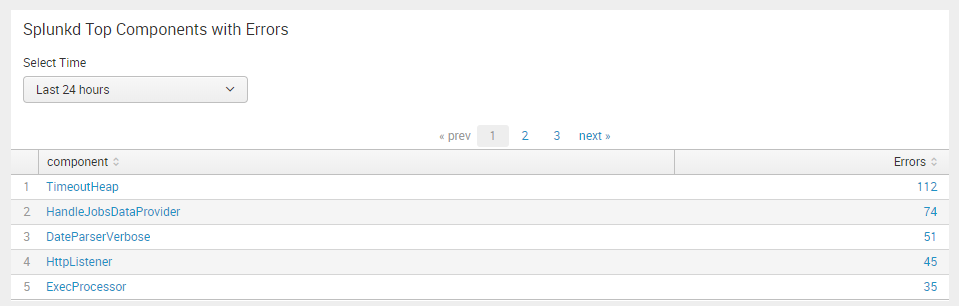
Following is the Simple XML code with hidden <html> <panel> having css <style> override.
<form>
  <label>Paginator Reposition</label>
  <fieldset submitButton="false"></fieldset>
  <row>
    <panel depends="$alwaysHideCSS$">
      <html>
        <style>
          #table1 .splunk-table{
            padding-top:25px !important;
          }
          #table1 .splunk-table .splunk-paginator{
            position: absolute !important;
            top: -2px !important;
            padding-left: 45% !important;
          }
        </style>
      </html>
    </panel>
  </row>
  <row>
    <panel>
      <title>Splunkd Top Components with Errors</title>
      <input type="time" token="tokTime" searchWhenChanged="true">
        <label>Select Time</label>
        <default>
          <earliest>-24h@h</earliest>
          <latest>now</latest>
        </default>
      </input>
      <table id="table1">
        <search>
          <query>index=_internal sourcetype=splunkd log_level!=INFO
| top 20 component showperc=f countfield="Errors"</query>
          <earliest>$tokTime.earliest$</earliest>
          <latest>$tokTime.latest$</latest>
          <sampleRatio>1</sampleRatio>
        </search>
        <option name="count">5</option>
        <option name="dataOverlayMode">none</option>
        <option name="drilldown">cell</option>
        <option name="percentagesRow">false</option>
        <option name="rowNumbers">true</option>
        <option name="totalsRow">false</option>
        <option name="wrap">true</option>
        <drilldown>
          <set token="tokComponent">$click.value$</set>
        </drilldown>
      </table>
    </panel>
  </row>
  <row depends="$tokComponent$">
    <panel>
      <title>Error for Splunk component $tokComponent$ over selected time</title>
      <chart>
        <search>
          <query>index=_internal sourcetype=splunkd log_level!=INFO component="$tokComponent$"
          | timechart count as "Errors"</query>
          <earliest>$tokTime.earliest$</earliest>
          <latest>$tokTime.latest$</latest>
        </search>
        <option name="charting.axisTitleX.text">Time</option>
        <option name="refresh.display">progressbar</option>
      </chart>
    </panel>
  </row>
</form>
| makeresults | eval message= "Happy Splunking!!!"

- Mark as New
- Bookmark Message
- Subscribe to Message
- Mute Message
- Subscribe to RSS Feed
- Permalink
- Report Inappropriate Content
@matstap, you can use CSS within dashboard to position paginator as per your need.
PS:
Following example sets Paginator using
abosolutepositioning from top to keep it simple (however it means for each panel you would need to adjust thetopsettings).If you want to apply
relativepositioning as per number of results in the table you would needjQueryto find total results in the table and which page is selected to decide the position of paginator. Each row in the table is 25px by default, So if you have 5 rows the relative top position would be 7*25px + 5px (including 25px for Table Header and Paginator Row each and 5px above the table) i.e. -180px. This kind of calculation is required because usually last tab will have lesser number of rows compared to previous rows.Table will require 25 px padding on top to accommodate for paginator to be displayed.
<style>
  #table1 .splunk-table{
    padding-top:25px !important;
  }
  #table1 .splunk-table .splunk-paginator{
    position: absolute !important;
    top: -2px !important;
    padding-left: 45% !important;
  }
</style>
Following is the Simple XML code with hidden <html> <panel> having css <style> override.
<form>
  <label>Paginator Reposition</label>
  <fieldset submitButton="false"></fieldset>
  <row>
    <panel depends="$alwaysHideCSS$">
      <html>
        <style>
          #table1 .splunk-table{
            padding-top:25px !important;
          }
          #table1 .splunk-table .splunk-paginator{
            position: absolute !important;
            top: -2px !important;
            padding-left: 45% !important;
          }
        </style>
      </html>
    </panel>
  </row>
  <row>
    <panel>
      <title>Splunkd Top Components with Errors</title>
      <input type="time" token="tokTime" searchWhenChanged="true">
        <label>Select Time</label>
        <default>
          <earliest>-24h@h</earliest>
          <latest>now</latest>
        </default>
      </input>
      <table id="table1">
        <search>
          <query>index=_internal sourcetype=splunkd log_level!=INFO
| top 20 component showperc=f countfield="Errors"</query>
          <earliest>$tokTime.earliest$</earliest>
          <latest>$tokTime.latest$</latest>
          <sampleRatio>1</sampleRatio>
        </search>
        <option name="count">5</option>
        <option name="dataOverlayMode">none</option>
        <option name="drilldown">cell</option>
        <option name="percentagesRow">false</option>
        <option name="rowNumbers">true</option>
        <option name="totalsRow">false</option>
        <option name="wrap">true</option>
        <drilldown>
          <set token="tokComponent">$click.value$</set>
        </drilldown>
      </table>
    </panel>
  </row>
  <row depends="$tokComponent$">
    <panel>
      <title>Error for Splunk component $tokComponent$ over selected time</title>
      <chart>
        <search>
          <query>index=_internal sourcetype=splunkd log_level!=INFO component="$tokComponent$"
          | timechart count as "Errors"</query>
          <earliest>$tokTime.earliest$</earliest>
          <latest>$tokTime.latest$</latest>
        </search>
        <option name="charting.axisTitleX.text">Time</option>
        <option name="refresh.display">progressbar</option>
      </chart>
    </panel>
  </row>
</form>
| makeresults | eval message= "Happy Splunking!!!"
- Mark as New
- Bookmark Message
- Subscribe to Message
- Mute Message
- Subscribe to RSS Feed
- Permalink
- Report Inappropriate Content

We can be more direct in our manipulation of the dashboard in newer versions of Splunk.
The structure of the nested div elements for tables is as follows
[ .splunk-view .splunk-table -
[ .shared-reportvisualizer - contains the table ]
[ .splunk-view .splunk-paginator - contains the paginator ]
]
All we have to do is reverse the display order of the div elements in the .splunk-table container ...
<row depends="$always_hide_css$">
  <panel>
    <html>
      <style>
        div[id^="topPaginatorTable"] .splunk-table { display: flex; flex-wrap: wrap; }
        div[id^="topPaginatorTable"] .shared-reportvisualizer { position: relative; order: 2; }
        div[id^="topPaginatorTable"] .splunk-paginator { position: relative; order: 1; }
      </style>
    </html>
  <panel>
<row>
Then add id="topPaginatorTable1", id=topPaginatorTable2, etc, to each table in the dashboard where you want to move the paginator to the top.
I like this method better as it leaves no padding artifacts in the case that no paginator is required, and rest of the box model of HTML formats correctly for width constrained panels.

Splunk Search APIを使えば調査過程が残せます
Integrating Splunk Search API and Quarto to Create Reproducible Investigation ...
Congratulations to the 2025-2026 SplunkTrust!
