
Join the Conversation
- Find Answers
- :
- Using Splunk
- :
- Dashboards & Visualizations
- :
- How to parse JSON Arrays together to create a tabl...
- Subscribe to RSS Feed
- Mark Topic as New
- Mark Topic as Read
- Float this Topic for Current User
- Bookmark Topic
- Subscribe to Topic
- Mute Topic
- Printer Friendly Page
- Mark as New
- Bookmark Message
- Subscribe to Message
- Mute Message
- Subscribe to RSS Feed
- Permalink
- Report Inappropriate Content

I've recently onboarded data from Gsuite to Splunk. I'm currently trying to create a few queries, but I'm having problem creating queries do to the JSON format. I'm currently just trying to create a table with owner name, file name, time, etc.
I've tried using the spath command and json formatting, but I can't seem to get the data in a table. Here's an example query
index="gsuite" sourcetype="gws:reports:drive"
| spath events{}.parameters{}.value.doc_title
but the field isn't created.
Here's the data in the events{}.parameters{}.value field
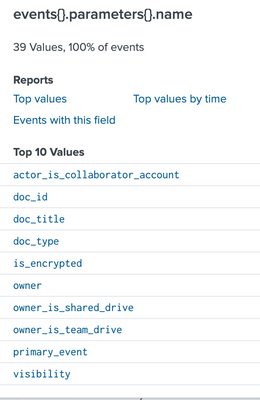
Here's a sample of the data.
{
	"actor": {
		"profileId": "Sample Text"
	},
	"etag": "\"Sample Text\"",
	"events": [{
		"name": "sheets_import_range",
		"parameters": [{
			"boolValue": true,
			"name": "primary_event"
		}, {
			"name": "billable"
		}, {
			"name": "recipient_doc",
			"value": "123456789"
		}, {
			"name": "doc_id",
			"value": "123456789"
		}, {
			"name": "doc_type",
			"value": "spreadsheet"
		}, {
			"name": "is_encrypted"
		}, {
			"name": "doc_title",
			"value": "sampletext.xls"
		}, {
			"name": "visibility",
			"value": "shared_externally"
		}, {
			"name": "actor_is_collaborator_account"
		}, {
			"name": "owner",
			"value": "johndoe@gmail.com"
		}, {
			"name": "owner_is_shared_drive"
		}, {
			"name": "owner_is_team_drive"
		}],
		"type": "access"
	}],
	"id": {
		"applicationName": "drive",
		"customerId": "123456789",
		"time": "2022-05-06T20:55:00.285Z",
		"uniqueQualifier": "-123456789"
	},
	"kind": "admin#reports#activity"
}
I would like the data to look like this
owner              doc_title        doc_type      visibility
johndoe@gmail.com. sampletext.xls  spreadsheet   shared_externally
- Mark as New
- Bookmark Message
- Subscribe to Message
- Mute Message
- Subscribe to RSS Feed
- Permalink
- Report Inappropriate Content


Try something like this
| spath events{}.parameters{} output=parameters
| mvexpand parameters
| spath input=parameters
| eval {name}=value
| stats values(*) as * by _raw
| fields - parameters name value- Mark as New
- Bookmark Message
- Subscribe to Message
- Mute Message
- Subscribe to RSS Feed
- Permalink
- Report Inappropriate Content
Try something like this
| spath events{}.parameters{} output=parameters
| mvexpand parameters
| spath input=parameters
| eval {name}=value
| stats values(*) as * by _raw
| fields - parameters name value- Mark as New
- Bookmark Message
- Subscribe to Message
- Mute Message
- Subscribe to RSS Feed
- Permalink
- Report Inappropriate Content
Thanks so much. This worked. If you have time could you explain each line so I can understand what's going on? If not that's fine. I'm grateful you were able to help
- Mark as New
- Bookmark Message
- Subscribe to Message
- Mute Message
- Subscribe to RSS Feed
- Permalink
- Report Inappropriate Content
The first spath extracts the parameters array / collection into a multi-value field called parameters
The mvexpand creates separate events for each of the values in the parameters field
The second spath extracts the fields from the parameters field
The eval uses the value in the name field to create a field with that name and the value from the value field
The stats collected the values of all the fields grouped by the original _raw field i.e. the original event
Finally, the fields command removes (-) the extra unwanted fields.
- Mark as New
- Bookmark Message
- Subscribe to Message
- Mute Message
- Subscribe to RSS Feed
- Permalink
- Report Inappropriate Content

Hi @tayvionp,
did you tried to use the "spath" command without options?
It should extract all fields that you need to use in the table command.
Otherwise you should use the spath command more times to extract one by one all the fields you need (https://docs.splunk.com/Documentation/Splunk/latest/SearchReference/Spath).
Ciao.
Giuseppe

Join the Splunk Community Slack to learn, troubleshoot, and make connections with fellow Splunk practitioners in real time!
Join Splunk User Groups to connect and learn in-person by region or remotely by topic or industry.
Why Splunk Customers Should Attend Cisco Live 2026 Las Vegas
What Is the Name of the USB Key Inserted by Bob Smith? (BOTS Hint, Not the Answer)
Automating Threat Operations and Threat Hunting with Recorded Future
