
Join the Conversation
- Find Answers
- :
- Using Splunk
- :
- Dashboards & Visualizations
- :
- How to make ranges (from predict command) initiall...
- Subscribe to RSS Feed
- Mark Topic as New
- Mark Topic as Read
- Float this Topic for Current User
- Bookmark Topic
- Subscribe to Topic
- Mute Topic
- Printer Friendly Page
- Mark as New
- Bookmark Message
- Subscribe to Message
- Mute Message
- Subscribe to RSS Feed
- Permalink
- Report Inappropriate Content
How to make ranges (from predict command) initially highlighted? (a.k.a. gain focus upon loading)

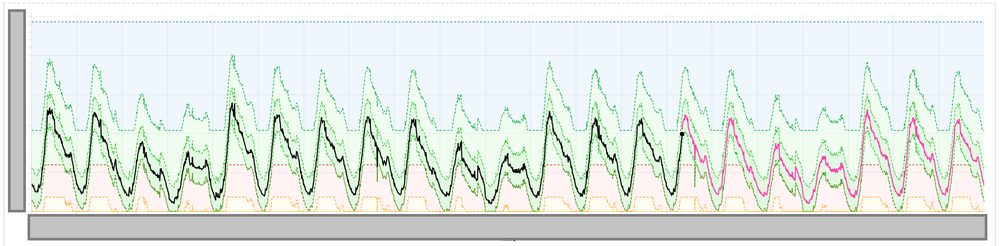
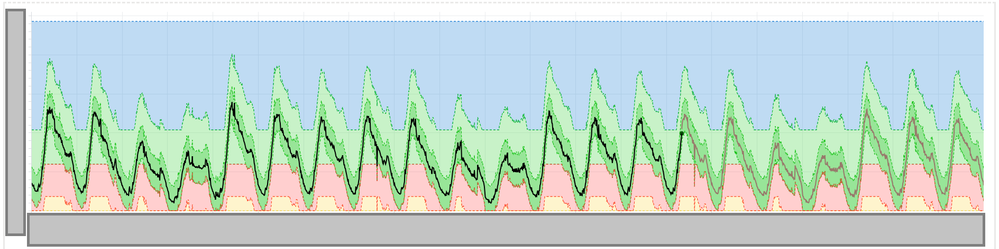
I have created a timechart visualization using a single predict command and several eval commands to produce several faux predict-style ranges.
I'll briefly describe my technique so that those who are unfamiliar can understand what I'm doing (it's a bit hackish).
First, I have at least three fields which represent some set of values over time. These three fields should represent a "lower" range boundary (let's call this lower), some value for the "middle" of the range ( middle ), and a value for the "upper" range boundary ( upper ), though the visualization will still produce... something... if the values are not correctly oriented (this, I'm pretty sure, would be an unintended use case).
You'll use evalto trick Splunk's timechart visualization module into believing your three fields are the result of a predict command.
eval _lower=lower, _predicted=middle, _upper=upper
If you want to make more than one of these, you can add numbers to the end of each internal field name (starting with 2).
eval _lower2=lower2, _predicted2=middle2, _upper=upper2 (assuming you have three fields lower2, middle2, and upper2)
Now, my question is:
How can I force my timecharts to never show "dull" or "unsaturated" colors for my predicted ranges? The first picture above shows my timechart when it first loads. The second shows it after I've hovered my mouse over any of the ranges on the timechart and then moved my mouse away.
I want the colors to start out vibrant and stay that way. Is there anything I can do, other than make some CSS hacks to target the visualization, to make the colors show up how I want them?




Join the Splunk Community Slack to learn, troubleshoot, and make connections with fellow Splunk practitioners in real time!
Join Splunk User Groups to connect and learn in-person by region or remotely by topic or industry.
Data Management Digest – September 2026
Federated Search for CloudWatch Unified Data Store Is Generally Available
Announcing Modern Navigation: A New Era of Splunk User Experience
