
Join the Conversation
- Find Answers
- :
- Using Splunk
- :
- Dashboards & Visualizations
- :
- Re: How to Splunk Dashboard Studio table column al...
- Subscribe to RSS Feed
- Mark Topic as New
- Mark Topic as Read
- Float this Topic for Current User
- Bookmark Topic
- Subscribe to Topic
- Mute Topic
- Printer Friendly Page
- Mark as New
- Bookmark Message
- Subscribe to Message
- Mute Message
- Subscribe to RSS Feed
- Permalink
- Report Inappropriate Content
How to make Splunk Dashboard Studio table column align to the left?

Hi,
I created a table using Splunk Dashboard Studio (Absolute). However a column contains results like A, B, C, 0, 1.
A, B and C display align left and 0 and 1 displays aligned right.
I want all to be align left.
When selecting code option to add align command, I keep getting error and it does not align left.
How should I code this:
"options": {
"columnFormat": {"align": "left"}
}
- Mark as New
- Bookmark Message
- Subscribe to Message
- Mute Message
- Subscribe to RSS Feed
- Permalink
- Report Inappropriate Content

you can use left , Right, Center
{
Thankyou.
- Mark as New
- Bookmark Message
- Subscribe to Message
- Mute Message
- Subscribe to RSS Feed
- Permalink
- Report Inappropriate Content
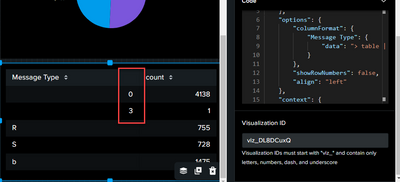
Unfortunately, it makes no difference.
0 and 3 still aligned right instead of left ( R, S b ).
See attached
- Mark as New
- Bookmark Message
- Subscribe to Message
- Mute Message
- Subscribe to RSS Feed
- Permalink
- Report Inappropriate Content
Can you Please try this Code once,
Let me know is this works.
- Mark as New
- Bookmark Message
- Subscribe to Message
- Mute Message
- Subscribe to RSS Feed
- Permalink
- Report Inappropriate Content

I have tried to center align the table using the method below. But the table always align the data to the left irrespective of center or right
- Mark as New
- Bookmark Message
- Subscribe to Message
- Mute Message
- Subscribe to RSS Feed
- Permalink
- Report Inappropriate Content
Try this Sample Dashboard Code and understand the code and then apply to u r scenario, it should work.
- Mark as New
- Bookmark Message
- Subscribe to Message
- Mute Message
- Subscribe to RSS Feed
- Permalink
- Report Inappropriate Content
- Mark as New
- Bookmark Message
- Subscribe to Message
- Mute Message
- Subscribe to RSS Feed
- Permalink
- Report Inappropriate Content
It's working
Thanks,
- Mark as New
- Bookmark Message
- Subscribe to Message
- Mute Message
- Subscribe to RSS Feed
- Permalink
- Report Inappropriate Content

Your solution works, though I was being tripped up by two separate "option" clauses. I had drill downs enabled on my table, but left the other options default. This left the base "options" clause out, but a second "options" clause was nested on the eventHandlers clause. I had to change something to fix this. In my case, I turned on Column Formatting for two of the fields in the table.
This is my table with your alignment option added. Thanks!
		"viz_tbl_cnt_by_user": {
			"type": "splunk.table",
			"dataSources": {
				"primary": "ds_qWJPJZ6C"
			},
			"eventHandlers": [
				{
					"type": "drilldown.setToken",
					"options": {
						"tokens": [
							{
								"token": "tkn_user",
								"key": "row.identity.value"
							}
						]
					}
				}
			],
			"options": {
				"tableFormat": {
					"align": "> table |pick(alignment)"
				},
				"columnFormat": {
					"identity": {
						"data": "> table | seriesByName(\"identity\") | formatByType(identityColumnFormatEditorConfig)"
					},
					"usernames": {
						"data": "> table | seriesByName(\"usernames\") | formatByType(usernamesColumnFormatEditorConfig)"
					}
				}
			},
			"context": {
				"identityColumnFormatEditorConfig": {
					"string": {
						"unitPosition": "after"
					}
				},
				"usernamesColumnFormatEditorConfig": {
					"string": {
						"unitPosition": "after"
					}
				},
				"alignment": [
					"left"
				]
			}
		}
Join the Splunk Community Slack to learn, troubleshoot, and make connections with fellow Splunk practitioners in real time!
Join Splunk User Groups to connect and learn in-person by region or remotely by topic or industry.
May 2026 Splunk Expert Sessions: Security & Observability
Network to App: Observability Unlocked [May & June Series]
SPL2 Deep Dives, AppDynamics Integrations, SAML Made Simple and Much More on Splunk ...
