
Join the Conversation
- Find Answers
- :
- Using Splunk
- :
- Dashboards & Visualizations
- :
- Re: How to extract the timestamp from csv file?
- Subscribe to RSS Feed
- Mark Topic as New
- Mark Topic as Read
- Float this Topic for Current User
- Bookmark Topic
- Subscribe to Topic
- Mute Topic
- Printer Friendly Page
- Mark as New
- Bookmark Message
- Subscribe to Message
- Mute Message
- Subscribe to RSS Feed
- Permalink
- Report Inappropriate Content
How to extract the timestamp from csv file?


It configure the timestamp to be the date when I upload the file. I want the timestamp to be like the highlighted one. How can I do that?
- Mark as New
- Bookmark Message
- Subscribe to Message
- Mute Message
- Subscribe to RSS Feed
- Permalink
- Report Inappropriate Content

Assuming your Splunk timezone is set to the same timezone of the servicenow timestamp:
| rex "\,(?<event_time>\d{2}\/\d{2}\/\d{4}\s\d{2}\:\d{2})\,\d{2}\/"
| eval _time=strptime(event_time,"%m/%d/%Y %H:%M")
- Mark as New
- Bookmark Message
- Subscribe to Message
- Mute Message
- Subscribe to RSS Feed
- Permalink
- Report Inappropriate Content
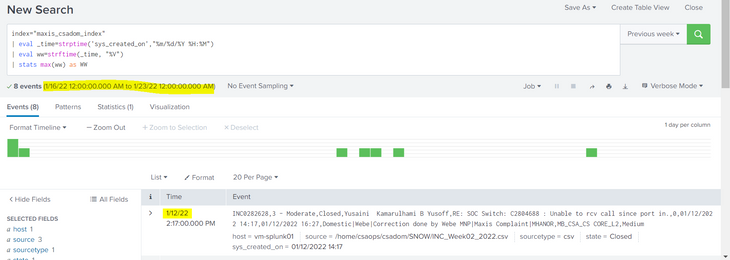
Why did the 1/12/22 still come out as the result?
Thank you
- Mark as New
- Bookmark Message
- Subscribe to Message
- Mute Message
- Subscribe to RSS Feed
- Permalink
- Report Inappropriate Content


Because you're in US or somewhere similar and use the illogical format m/d/y whereas your responder is used to a normal format and showed you parsing for d/m/y 🙂
Anyway, the "solution" with parsing and overwriting _time at search time works only in search time (obviously) after you've already found the events. So it will not affect your search time ranges.
If you want the events to be indexed at the right time, you need to configure proper timestamp recognition for your sourcetype (define columns extraction and proper time format and time column(s))

Join the Splunk Community Slack to learn, troubleshoot, and make connections with fellow Splunk practitioners in real time!
Join Splunk User Groups to connect and learn in-person by region or remotely by topic or industry.
Announcing Modern Navigation: A New Era of Splunk User Experience
Modernize your Splunk Apps – Introducing Python 3.13 in Splunk
Step into “Hunt the Insider: An Splunk ES Premier Mystery” to catch a cybercriminal ...
