
Join the Conversation
- Find Answers
- :
- Using Splunk
- :
- Dashboards & Visualizations
- :
- Re: How to edit my Simple XML to set a default val...
- Subscribe to RSS Feed
- Mark Topic as New
- Mark Topic as Read
- Float this Topic for Current User
- Bookmark Topic
- Subscribe to Topic
- Mute Topic
- Printer Friendly Page
- Mark as New
- Bookmark Message
- Subscribe to Message
- Mute Message
- Subscribe to RSS Feed
- Permalink
- Report Inappropriate Content
How to edit my Simple XML to set a default value for the input time label token in my dashboard?

Check the code attached below.
default time = 1 week window. Setting the drop-down label to "time_selected" token.
set token="time_selected" ==> $label$
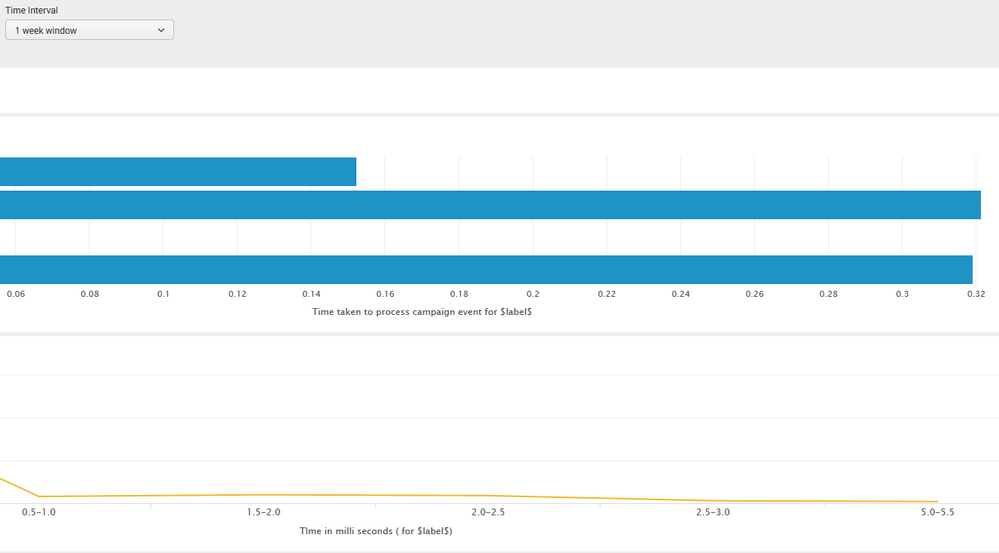
When i open the dashboard, $time_selected$ = $label$
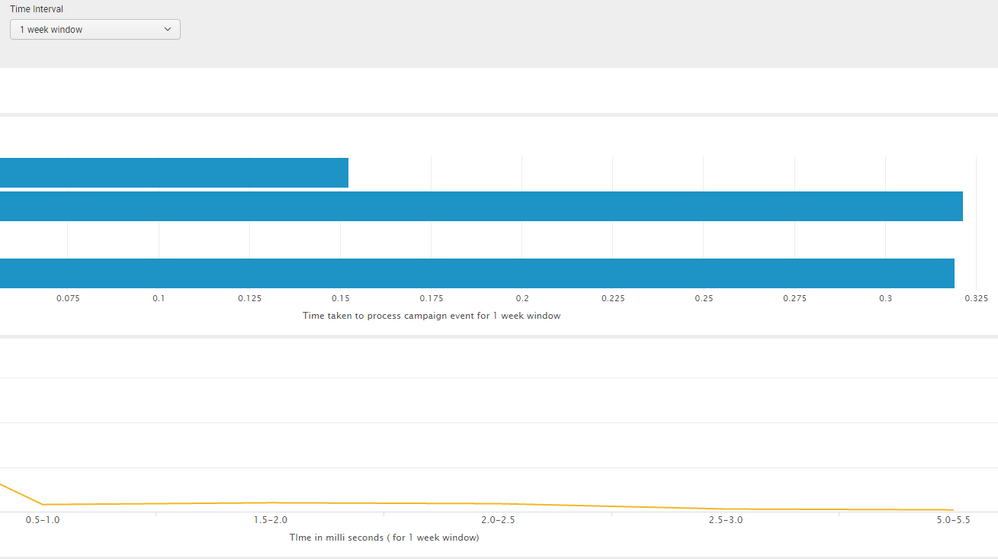
When i change the Time to (1 week window or All time), $time_selected$ = 1 week window.
Issue:
By default we set the time to 1 week window, but $label$ token is not set.
When we change the time, it's working fine.
Expected:
it to work by default.
When i open the dashboard, $time_selected$ should be "1 week window"
Code:

Any help is appreciated!
- Mark as New
- Bookmark Message
- Subscribe to Message
- Mute Message
- Subscribe to RSS Feed
- Permalink
- Report Inappropriate Content


- Mark as New
- Bookmark Message
- Subscribe to Message
- Mute Message
- Subscribe to RSS Feed
- Permalink
- Report Inappropriate Content

The code in your question works for me Splunk 6.5. Here is the code that I used to test (run anywhere sample). What version of Splunk you're on?
<form>
  <label>TestsrchFilter</label>
  <fieldset submitButton="false">
    <input type="time" token="time" searchWhenChanged="true">
      <label>Select Time</label>
      <default>
        <earliest>rt-1w</earliest>
        <latest>rtnow</latest>
      </default>
      <change>
        <set token="selected_time">$label$</set>
      </change>
    </input>
  </fieldset>
  <row>
    <panel>
      <title>$selected_time$</title>
      <table>
        <search>
          <query>index=_internal | timechart span=1h count</query>
          <earliest>-15m</earliest>
          <latest>now</latest>
          <sampleRatio>1</sampleRatio>
        </search>
        <option name="count">20</option>
        <option name="dataOverlayMode">none</option>
        <option name="drilldown">cell</option>
        <option name="percentagesRow">false</option>
        <option name="rowNumbers">false</option>
        <option name="totalsRow">false</option>
        <option name="wrap">true</option>
      </table>
    </panel>
  </row>
</form>
- Mark as New
- Bookmark Message
- Subscribe to Message
- Mute Message
- Subscribe to RSS Feed
- Permalink
- Report Inappropriate Content
Version is 6.3
I tried with 6.4 also. Still same issue.
- Mark as New
- Bookmark Message
- Subscribe to Message
- Mute Message
- Subscribe to RSS Feed
- Permalink
- Report Inappropriate Content
Its browser issue. Working fine with chrome, but not with firefox
- Mark as New
- Bookmark Message
- Subscribe to Message
- Mute Message
- Subscribe to RSS Feed
- Permalink
- Report Inappropriate Content
Can you try in IE?
- Mark as New
- Bookmark Message
- Subscribe to Message
- Mute Message
- Subscribe to RSS Feed
- Permalink
- Report Inappropriate Content
Its fine in IE. So issue with Mozilla
- Mark as New
- Bookmark Message
- Subscribe to Message
- Mute Message
- Subscribe to RSS Feed
- Permalink
- Report Inappropriate Content

If what you are doing would work (which I am not sure it will) , you need to add the "condition" xml element.
<change>
    <condition label="*">
      <set token="time_selected">$label$</set>
    </condition>
</change>
The other thing to try is anywhere you have $time_selected$ in the dashboard, substitute it with $form.globalTime$. Still not confident it is possible, but are the only two things I can think of.
- Mark as New
- Bookmark Message
- Subscribe to Message
- Mute Message
- Subscribe to RSS Feed
- Permalink
- Report Inappropriate Content

I am not sure that the realtime search times are supported in simple XML. Did you really want a realtime search in your dashboard?
- Mark as New
- Bookmark Message
- Subscribe to Message
- Mute Message
- Subscribe to RSS Feed
- Permalink
- Report Inappropriate Content
Yes. We need a live dashboard.
Real time search is working fine. But the only issue is label is not setting on load of dashboard.
Its working fine, when we change it.

Join the Splunk Community Slack to learn, troubleshoot, and make connections with fellow Splunk practitioners in real time!
Join Splunk User Groups to connect and learn in-person by region or remotely by topic or industry.
May 2026 Splunk Expert Sessions: Security & Observability
Network to App: Observability Unlocked [May & June Series]
SPL2 Deep Dives, AppDynamics Integrations, SAML Made Simple and Much More on Splunk ...
