
Join the Conversation
- Find Answers
- :
- Using Splunk
- :
- Dashboards & Visualizations
- :
- How to customize pie chart total value with nested...
- Subscribe to RSS Feed
- Mark Topic as New
- Mark Topic as Read
- Float this Topic for Current User
- Bookmark Topic
- Subscribe to Topic
- Mute Topic
- Printer Friendly Page
- Mark as New
- Bookmark Message
- Subscribe to Message
- Mute Message
- Subscribe to RSS Feed
- Permalink
- Report Inappropriate Content

Hello,
I'm a newbie in splunk and I'd like to draw a pie chart where the total value is taken from a csv sheet.
e.g. X = 2 & Y = 10 and I'd like the pie chart total to take the value of (Y) and (X) to be part of it with its percentage. So, total pie chart value is 100% where the 100% represents the $value of Y and X represents 20% of it.
The best query I reached is (index="A" source="*B*" | chart values(X) over Y | transpose) however the chart represents the percentage of X & Y as if the total value of the pie chart is (X+Y) which is not the case I want.
- Mark as New
- Bookmark Message
- Subscribe to Message
- Mute Message
- Subscribe to RSS Feed
- Permalink
- Report Inappropriate Content


Here you can do some tricks to get the value of the remaining field (assume Z) and work with this Z field to represent data.
Like, this
| makeresults
| eval X=2,Y=10
| eval Z=Y-X
| chart values(X) over Z | transpose
Here we are getting Z from the total value(Y) minus field value(X).
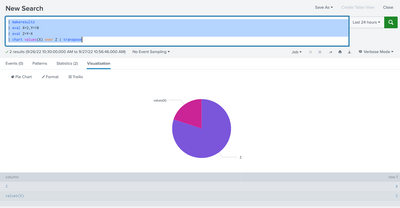
I hope this will help you.
Thanks
KV
If any of my replies help you to solve the problem Or gain knowledge, an upvote would be appreciated.
- Mark as New
- Bookmark Message
- Subscribe to Message
- Mute Message
- Subscribe to RSS Feed
- Permalink
- Report Inappropriate Content
Here you can do some tricks to get the value of the remaining field (assume Z) and work with this Z field to represent data.
Like, this
| makeresults
| eval X=2,Y=10
| eval Z=Y-X
| chart values(X) over Z | transpose
Here we are getting Z from the total value(Y) minus field value(X).
I hope this will help you.
Thanks
KV
If any of my replies help you to solve the problem Or gain knowledge, an upvote would be appreciated.
- Mark as New
- Bookmark Message
- Subscribe to Message
- Mute Message
- Subscribe to RSS Feed
- Permalink
- Report Inappropriate Content
That's what I've done exactly. I couldn't find any other way.
Thank You.


Join the Splunk Community Slack to learn, troubleshoot, and make connections with fellow Splunk practitioners in real time!
Join Splunk User Groups to connect and learn in-person by region or remotely by topic or industry.
Vibe-coding, AI, and Splunkcraft: Highlights from the .conf26 Builder Bar
Thanks for the Memories: .conf26 Took Learning to New Heights
Best Practices: Splunk auto adjust pipeline queue
