
Join the Conversation
- Find Answers
- :
- Using Splunk
- :
- Dashboards & Visualizations
- :
- Re: How to create multiple dependent dropdowns on ...
- Subscribe to RSS Feed
- Mark Topic as New
- Mark Topic as Read
- Float this Topic for Current User
- Bookmark Topic
- Subscribe to Topic
- Mute Topic
- Printer Friendly Page
- Mark as New
- Bookmark Message
- Subscribe to Message
- Mute Message
- Subscribe to RSS Feed
- Permalink
- Report Inappropriate Content

I have a need to create 2 dropdowns on a dashboard. The first dropdown should show Dev, Test, Prod as options and the second dropdown should show the below options based on what is selected in the first dropdown.
Dev -Dev1,Dev2,Dev3
Test -Test1,Test2,Test3
Prod -Prod1,Prod2,Prod3
- Mark as New
- Bookmark Message
- Subscribe to Message
- Mute Message
- Subscribe to RSS Feed
- Permalink
- Report Inappropriate Content

@ReachDataScientist, you should get Splunk Dashboard Examples app which covers Cascading Form Input example and many more 🙂
You should ideally create a lookup file with mapping of Environments with respective Systems and use lookup as Dynamic Search for dependent dropdown. This will give you flexibility and option to extend your list of systems/environments.
Following example uses run anywhere search as per your question but the same can be changed to lookup once you have it. Please try out and confirm!
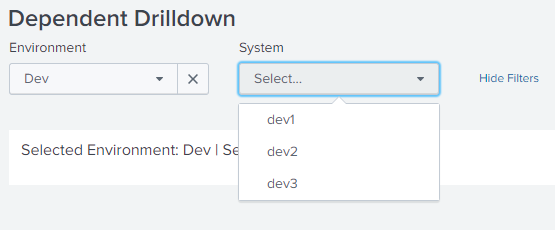
<form>
  <label>Dependent Drilldown</label>
  <fieldset submitButton="false">
    <input type="dropdown" token="tokEnvironment" searchWhenChanged="true">
      <label>Environment</label>
      <choice value="Dev">Dev</choice>
      <choice value="Test">Test</choice>
      <choice value="Prod">Prod</choice>
      <change>
        <unset token="tokSystem"></unset>
        <unset token="form.tokSystem"></unset>
      </change>
    </input>
    <input type="dropdown" token="tokSystem" searchWhenChanged="true">
      <label>System</label>
      <fieldForLabel>$tokEnvironment$</fieldForLabel>
      <fieldForValue>$tokEnvironment$</fieldForValue>
      <search>
        <query>| makeresults
| fields - _time
| eval Dev="dev1,dev2,dev3",Test="test1,test2,test3",Prod="prod1,prod2,prod3"
| fields $tokEnvironment$
| makemv $tokEnvironment$ delim=","
| mvexpand $tokEnvironment$</query>
      </search>
    </input>
  </fieldset>
  <row>
    <panel>
      <title>Selected Environment: $tokEnvironment$ | Selected System: $tokSystem$</title>
      <html></html>
    </panel>
  </row>
</form>
| makeresults | eval message= "Happy Splunking!!!"
- Mark as New
- Bookmark Message
- Subscribe to Message
- Mute Message
- Subscribe to RSS Feed
- Permalink
- Report Inappropriate Content
@ReachDataScientist, you should get Splunk Dashboard Examples app which covers Cascading Form Input example and many more 🙂
You should ideally create a lookup file with mapping of Environments with respective Systems and use lookup as Dynamic Search for dependent dropdown. This will give you flexibility and option to extend your list of systems/environments.
Following example uses run anywhere search as per your question but the same can be changed to lookup once you have it. Please try out and confirm!
<form>
  <label>Dependent Drilldown</label>
  <fieldset submitButton="false">
    <input type="dropdown" token="tokEnvironment" searchWhenChanged="true">
      <label>Environment</label>
      <choice value="Dev">Dev</choice>
      <choice value="Test">Test</choice>
      <choice value="Prod">Prod</choice>
      <change>
        <unset token="tokSystem"></unset>
        <unset token="form.tokSystem"></unset>
      </change>
    </input>
    <input type="dropdown" token="tokSystem" searchWhenChanged="true">
      <label>System</label>
      <fieldForLabel>$tokEnvironment$</fieldForLabel>
      <fieldForValue>$tokEnvironment$</fieldForValue>
      <search>
        <query>| makeresults
| fields - _time
| eval Dev="dev1,dev2,dev3",Test="test1,test2,test3",Prod="prod1,prod2,prod3"
| fields $tokEnvironment$
| makemv $tokEnvironment$ delim=","
| mvexpand $tokEnvironment$</query>
      </search>
    </input>
  </fieldset>
  <row>
    <panel>
      <title>Selected Environment: $tokEnvironment$ | Selected System: $tokSystem$</title>
      <html></html>
    </panel>
  </row>
</form>
| makeresults | eval message= "Happy Splunking!!!"
- Mark as New
- Bookmark Message
- Subscribe to Message
- Mute Message
- Subscribe to RSS Feed
- Permalink
- Report Inappropriate Content

Hi @niketnilay
I'm stucked at same kind of scenario, how we can pass input/value to system variables (Dev1,Dev2,Dev3, Test1,Test2,Test3 ,Prod1,Prod2,Prod3).
I have posted question, and it somehow related to it, could you please assist here?
https://answers.splunk.com/answers/780873/multivalve-drilldown-and-dropdown-is-not-working-i.html
link text
- Mark as New
- Bookmark Message
- Subscribe to Message
- Mute Message
- Subscribe to RSS Feed
- Permalink
- Report Inappropriate Content

- Mark as New
- Bookmark Message
- Subscribe to Message
- Mute Message
- Subscribe to RSS Feed
- Permalink
- Report Inappropriate Content
Instead of creating a lookup, how can i code the values in the xml.



Join the Splunk Community Slack to learn, troubleshoot, and make connections with fellow Splunk practitioners in real time!
Join Splunk User Groups to connect and learn in-person by region or remotely by topic or industry.
SOC4Kafka - New Kafka Connector Powered by OpenTelemetry
Rounding off the Splunk Dashboard Contest
A Four Part Event Series: AI + Observability: AI Agents, LLMs, Apps, & Infrastructure
