
Join the Conversation
- Find Answers
- :
- Using Splunk
- :
- Dashboards & Visualizations
- :
- Re: creating a dashboard with date pic
- Subscribe to RSS Feed
- Mark Topic as New
- Mark Topic as Read
- Float this Topic for Current User
- Bookmark Topic
- Subscribe to Topic
- Mute Topic
- Printer Friendly Page
- Mark as New
- Bookmark Message
- Subscribe to Message
- Mute Message
- Subscribe to RSS Feed
- Permalink
- Report Inappropriate Content
How to create a dashboard with date picture?

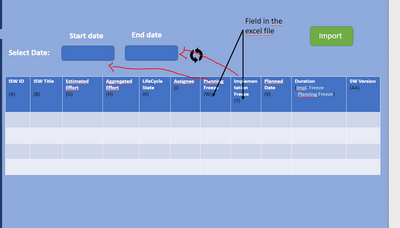
I would like to create a dashboard that shows it's output when the time is picked and the values of the time is equal to two fields in the index data itself, how can I make this ?
- Mark as New
- Bookmark Message
- Subscribe to Message
- Mute Message
- Subscribe to RSS Feed
- Permalink
- Report Inappropriate Content

Input -> Time: This will give you the traditional Splunk time picker to leverage against your search.
Input -> Submit: This will allow your users to first enter a time span before a search is initiated, I find it is just easier this way sometimes.
Simple XML Dashboards
Most of the community will be transitioning to Dashboard Studio - now is a good time to learn
https://docs.splunk.com/Documentation/Splunk/latest/DashStudio/dashEditors
- Mark as New
- Bookmark Message
- Subscribe to Message
- Mute Message
- Subscribe to RSS Feed
- Permalink
- Report Inappropriate Content
ok let me explain it to you as I don't understand your answer, I will pick a date and this date should print output to me according to comparison between the date and the field
for example the start date=08/08/2022 (I put this in time picker) so it will compare this date with field planning freeze and once it finds it, the output should appear to me
- Mark as New
- Bookmark Message
- Subscribe to Message
- Mute Message
- Subscribe to RSS Feed
- Permalink
- Report Inappropriate Content
The data picker will work in the exact same capacity as when you create your ad hoc search via the normal search bar. The SPL for your search will be the source of your table visualization.
In fact run your ad hoc query to return the results you want with appropriate field names in the output. From there use the "Save As" function to generate a dashboard. With that template you can better manipulate your end vision for your final dashboard.

Join the Splunk Community Slack to learn, troubleshoot, and make connections with fellow Splunk practitioners in real time!
Join Splunk User Groups to connect and learn in-person by region or remotely by topic or industry.
Design, Compete, Win: Submit Your Best Splunk Dashboards for a .conf26 Pass
May 2026 Splunk Expert Sessions: Security & Observability
Network to App: Observability Unlocked [May & June Series]
