
Join the Conversation
- Find Answers
- :
- Using Splunk
- :
- Dashboards & Visualizations
- :
- Re: How to clear selected Dropdown value and reset...
- Subscribe to RSS Feed
- Mark Topic as New
- Mark Topic as Read
- Float this Topic for Current User
- Bookmark Topic
- Subscribe to Topic
- Mute Topic
- Printer Friendly Page
- Mark as New
- Bookmark Message
- Subscribe to Message
- Mute Message
- Subscribe to RSS Feed
- Permalink
- Report Inappropriate Content

Hi ,
Below is my dashboard :
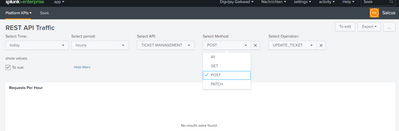
I want to clear selected Dropdown value for dropdown "Operation" and reset it to default value on selection of another dropdown named "Method" .
My dropdown population code as below :
<input type="dropdown" token="token_method" searchWhenChanged="true">
<label>Select Method:</label>
<fieldForLabel>METHOD</fieldForLabel>
<fieldForValue>METHOD</fieldForValue>
<search>
<query>| makeresults | eval API="party_interaction_rest",METHOD="Alle,GET,POST" |
append [| makeresults | eval API="ticket_mgmt_rest",METHOD="Alle,GET,POST,PATCH"] |
append [| makeresults | eval API="customer_management_rest",METHOD="Alle,GET,PATCH"] |
append [| makeresults | eval API="agreement_management_rest",METHOD="Alle,GET"] |
append [| makeresults | eval API="product_order_rest",METHOD="Alle,GET,POST,PATCH,DELETE"] |
append [| makeresults | eval API="product_inv_rest",METHOD="Alle,GET,POST,PATCH"] | eval METHOD=split(METHOD,",")
|mvexpand METHOD| table API METHOD | search API="$token_service$"</query>
</search>
<change>
<condition value="Alle">
<set token="token_method">*</set>
</condition>
</change>
<default>Alle</default>
<initialValue>Alle</initialValue>
</input>
<input type="dropdown" token="tkn_OPERATION">
<label>Select Operation:</label>
<fieldForLabel>OPERATION</fieldForLabel>
<fieldForValue>OPERATION</fieldForValue>
<search>
<query>| inputlookup append=t REST_OPERATION_LOOKUP.csv where API="$token_service$" METHOD="$token_method$"
| dedup OPERATION</query>
</search>
- Mark as New
- Bookmark Message
- Subscribe to Message
- Mute Message
- Subscribe to RSS Feed
- Permalink
- Report Inappropriate Content


In the change conditions for the METHOD dropdown add a reset to the operation token (note the form. prefix)
      <change>
        <condition value="Alle">
          <set token="token_method">*</set>
          <set token="form.tkn_OPERATION">*</set>
        </condition>
        <condition value="*">
          <set token="form.tkn_OPERATION">*</set>
        </condition>
      </change>
Something along the lines of the above, depending on your config
- Mark as New
- Bookmark Message
- Subscribe to Message
- Mute Message
- Subscribe to RSS Feed
- Permalink
- Report Inappropriate Content
Thanks for the solution , now my reset part is working fine.
- Mark as New
- Bookmark Message
- Subscribe to Message
- Mute Message
- Subscribe to RSS Feed
- Permalink
- Report Inappropriate Content
In the change conditions for the METHOD dropdown add a reset to the operation token (note the form. prefix)
      <change>
        <condition value="Alle">
          <set token="token_method">*</set>
          <set token="form.tkn_OPERATION">*</set>
        </condition>
        <condition value="*">
          <set token="form.tkn_OPERATION">*</set>
        </condition>
      </change>
Something along the lines of the above, depending on your config
- Mark as New
- Bookmark Message
- Subscribe to Message
- Mute Message
- Subscribe to RSS Feed
- Permalink
- Report Inappropriate Content
Hi @bowesmana : I see the reset operation you have added. Do you know how we can do this in dashboard studio.
I have two dropdowns. A & B.
On selection of values in A, it displays relevant values in B.
On changing selection in value A, dropdown B displays previous selection value first then listed with new selection values from A.
Regards,
PNV
- Mark as New
- Bookmark Message
- Subscribe to Message
- Mute Message
- Subscribe to RSS Feed
- Permalink
- Report Inappropriate Content
This solution is good.
But after selection, if refresh the dashboard you will lose the selection.
That is problem i am facing
Any help please

Join the Splunk Community Slack to learn, troubleshoot, and make connections with fellow Splunk practitioners in real time!
Join Splunk User Groups to connect and learn in-person by region or remotely by topic or industry.
Announcing Modern Navigation: A New Era of Splunk User Experience
Modernize your Splunk Apps – Introducing Python 3.13 in Splunk
Step into “Hunt the Insider: An Splunk ES Premier Mystery” to catch a cybercriminal ...
