
Join the Conversation
- Find Answers
- :
- Using Splunk
- :
- Dashboards & Visualizations
- :
- Re: How to change HTML Reference Background Color ...
- Subscribe to RSS Feed
- Mark Topic as New
- Mark Topic as Read
- Float this Topic for Current User
- Bookmark Topic
- Subscribe to Topic
- Mute Topic
- Printer Friendly Page
- Mark as New
- Bookmark Message
- Subscribe to Message
- Mute Message
- Subscribe to RSS Feed
- Permalink
- Report Inappropriate Content
How to change HTML Reference Background Color on Splunk Dashboard XML Source

I'm trying to create an empty panel for a custom title, but I would need to change the background, so the color wouldn't be the same as the default background color. Would this be possible?
I don't see any tag for HTML reference on the documentation. https://docs.splunk.com/Documentation/Splunk/8.0.4/Viz/PanelreferenceforSimplifiedXML#Shared_attribu...
I primarily want to change the background color of the row tag.
Current code: (the background color below only change the text line, not the entire row.)
<row>
    <panel>
      <html>
        <H1 style="text-align:center;background-color:#485959;">Transfer Review</H1>
      </html>
    </panel>
  </row>
- Mark as New
- Bookmark Message
- Subscribe to Message
- Mute Message
- Subscribe to RSS Feed
- Permalink
- Report Inappropriate Content


Hi @limalbert! That sure is possible!
There are a lot of examples here in the Splunk Community. Try something like this below to get you on your way.
  <row>
    <panel>
      <html>
        <div style="background: #485959; height: 100%; width: 100%;">
          <p style="padding: 5px; font-size: 30px; font-family: 'Arial Regular', Arial, serif; color: white;">
            Sample Heading
          </p>
          <div style="font-size: 16px; font-family: 'Arial Regular', Arial, serif; color: white; list-style-type: circle;">
            <ul>
              <li>One</li>
              <li>Two</li>
              <li>Three</li>
            </ul>
          </div>
        </div>
      </html>
    </panel>
  </row>
###
If this reply helps you, an upvote would be appreciated.
If this reply helps you, an upvote would be appreciated.
- Mark as New
- Bookmark Message
- Subscribe to Message
- Mute Message
- Subscribe to RSS Feed
- Permalink
- Report Inappropriate Content
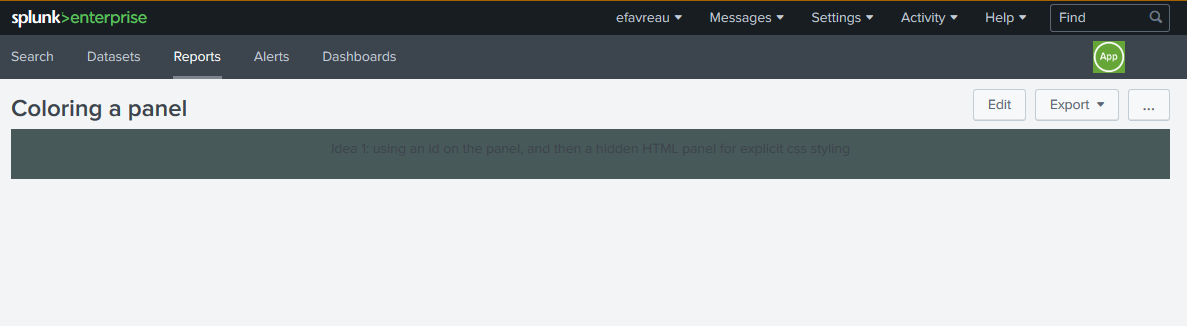
Unfortunately, the CSS only changes the text area. I'm trying to change the entire row. There are black border as shown below.

- Mark as New
- Bookmark Message
- Subscribe to Message
- Mute Message
- Subscribe to RSS Feed
- Permalink
- Report Inappropriate Content
Hi @limalbert, I think this will get you closer, if not solve it. Here is a run-anywhere example. Create a blank dashboard, edit the source, clear away everything in there, and then paste this to see if it gets you to a starting point.
<dashboard>
  <label>MyTest</label>
  <row>
    <panel id="myCSSPanelTarget001">
      <html>
          <p>
           Using an id on the panel, and then a hidden HTML panel at the bottom , which is used for explicit css styling of the entire panel.
          </p>
      </html>
    </panel>
  </row>
  <row>
    <panel>
      <html depends="$alwaysHideCSSStyle$">
         <style>
          /* Target a single panel, that has an id="myCSSPanelTarget001" */
          #myCSSPanelTarget001 .dashboard-panel{
            text-align: center !important;
            background: #485959 !important;
          }
         </style>
       </html>
    </panel>
  </row>
</dashboard>
If this isn't close, then if you can revise your question to be more specific in exactly what you are trying to achieve, what you tried but didn't work, and how what you tried didn't provide you what you were looking for, we might be able to help solve the specific obstacle.
If this reply helps you, an upvote would be appreciated.
- Mark as New
- Bookmark Message
- Subscribe to Message
- Mute Message
- Subscribe to RSS Feed
- Permalink
- Report Inappropriate Content
I would like to apply CSS on the row tag, so that the entire panel is a different color. Would this be possible?
Your solution is similar to mine as it changes on the html tag level, but not the entire panel.
- Mark as New
- Bookmark Message
- Subscribe to Message
- Mute Message
- Subscribe to RSS Feed
- Permalink
- Report Inappropriate Content
- Mark as New
- Bookmark Message
- Subscribe to Message
- Mute Message
- Subscribe to RSS Feed
- Permalink
- Report Inappropriate Content

@limalbert you can try the following CSS override which applies background color to the row (with id="row_title") as opposed to applying it to header h2.
  <row id="row_title">
    <panel>
      <html>
          <style>
            #row_title .panel-element-row{
              background-color:#485959;
            }
            #row_title .panel-element-row h1{
              text-align:center;
              color: white;
            }
          </style>
          <h1>Transfer Review</h1>
        </html>
    </panel>
  </row>
Another option would be to use Dark Mode if you are on 7.2.x+ which will automatically apply dark background color. You will have to just apply h1 font color.
Please try out and confirm!
| makeresults | eval message= "Happy Splunking!!!"
- Mark as New
- Bookmark Message
- Subscribe to Message
- Mute Message
- Subscribe to RSS Feed
- Permalink
- Report Inappropriate Content

Hi @limalbert
Try this
<dashboard theme="dark">
  <label>temp</label>
  <row depends="$hide$">
    <html>
      <style>
        #rk h2{
        text-align:center;background-color:#485959;
        }
      </style>
    </html>
  </row>
  <row>
    <panel id="rk">
      <title>Temp</title>
      <html/>
    </panel>
  </row>
</dashboard>
- Mark as New
- Bookmark Message
- Subscribe to Message
- Mute Message
- Subscribe to RSS Feed
- Permalink
- Report Inappropriate Content
this is still not quite right either. There's a big gap and the row panel still have dark borders.


Join the Splunk Community Slack to learn, troubleshoot, and make connections with fellow Splunk practitioners in real time!
Join Splunk User Groups to connect and learn in-person by region or remotely by topic or industry.
Meet the .conf26 AI Agent Buildathon Winners
Trusted Autonomy in the SOC: A Maturity Journey
Supercharging Windows Security Detection Performance: Introducing Hybrid Field ...
