
Join the Conversation
- Find Answers
- :
- Using Splunk
- :
- Dashboards & Visualizations
- :
- Re: How to Add padding between trellis single valu...
- Subscribe to RSS Feed
- Mark Topic as New
- Mark Topic as Read
- Float this Topic for Current User
- Bookmark Topic
- Subscribe to Topic
- Mute Topic
- Printer Friendly Page
- Mark as New
- Bookmark Message
- Subscribe to Message
- Mute Message
- Subscribe to RSS Feed
- Permalink
- Report Inappropriate Content
How to add padding between trellis single value blocks?

Hello Splunkers,
Is there a way to add padding or control white space between the single value blocks in the
aggregated fields? i.e I have three blocks created in single-value using the trellis viz. This creates three nice blocks, but I would like to increase the white space between them if possible.
Or use 3 separate single value viz, and space them with padding, etc.
thank you for a great resource,
eholz
- Mark as New
- Bookmark Message
- Subscribe to Message
- Mute Message
- Subscribe to RSS Feed
- Permalink
- Report Inappropriate Content


Hi @eholz1,
You can try the small/medium/large trellis sizing to see if they give you enough white space between the blocks.
If not, you can try tweaking the CSS:
<row depends="$CSS_ONLY$">
<html><style>
div.viz-facet-size-medium{border:1px solid blue;margin-right: 65px;margin-bottom:65px;}
</style></html>
</row>
The above makes my medium panels look like this:
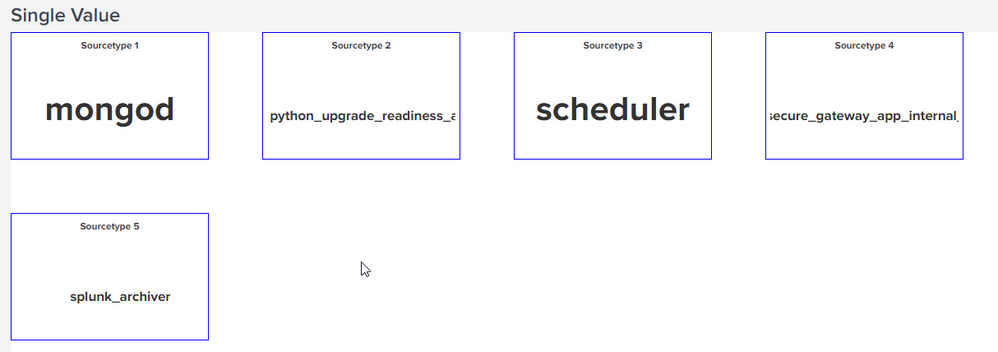
The blue outline is just to help visualize how big the gaps are.
Tweaking the margin to 5px gives:

The different CSS classes to tweak are:
- div.viz-facet-size-small{margin: 0px 15px 15px 0px;}
- div.viz-facet-size-medium{margin: 0px 15px 15px 0px;}
- div.viz-facet-size-large{margin: 0px 15px 15px 0px;}
Cheers,
Daniel


Join the Splunk Community Slack to learn, troubleshoot, and make connections with fellow Splunk practitioners in real time!
Join Splunk User Groups to connect and learn in-person by region or remotely by topic or industry.
Announcing Modern Navigation: A New Era of Splunk User Experience
Analytics Workspace removal in Splunk 10.6
Vibe-coding, AI, and Splunkcraft: Highlights from the .conf26 Builder Bar
