
Join the Conversation
- Find Answers
- :
- Using Splunk
- :
- Dashboards & Visualizations
- :
- How to add a horizontal line to a column chart?
- Subscribe to RSS Feed
- Mark Topic as New
- Mark Topic as Read
- Float this Topic for Current User
- Bookmark Topic
- Subscribe to Topic
- Mute Topic
- Printer Friendly Page
- Mark as New
- Bookmark Message
- Subscribe to Message
- Mute Message
- Subscribe to RSS Feed
- Permalink
- Report Inappropriate Content

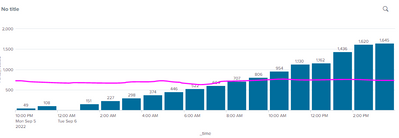
I created a column chart and I want to add a line on the y-axis as the upper limit that increases by 300 every 6 hours (pink line in image attached). How would I do this?
-->Is there an option display line I can add in dashboard under my chart code?
- Mark as New
- Bookmark Message
- Subscribe to Message
- Mute Message
- Subscribe to RSS Feed
- Permalink
- Report Inappropriate Content


Hi @ichesla1111,
if the line is a value of your search, you can use the "Overlay" option (https://docs.splunk.com/Documentation/Splunk/9.0.1/Viz/Chartcontrols#Chart_overlay).
Ciao.
Giuseppe
- Mark as New
- Bookmark Message
- Subscribe to Message
- Mute Message
- Subscribe to RSS Feed
- Permalink
- Report Inappropriate Content
thank you!
- Mark as New
- Bookmark Message
- Subscribe to Message
- Mute Message
- Subscribe to RSS Feed
- Permalink
- Report Inappropriate Content
Hi @ichesla1111,
if the line is a value of your search, you can use the "Overlay" option (https://docs.splunk.com/Documentation/Splunk/9.0.1/Viz/Chartcontrols#Chart_overlay).
Ciao.
Giuseppe
- Mark as New
- Bookmark Message
- Subscribe to Message
- Mute Message
- Subscribe to RSS Feed
- Permalink
- Report Inappropriate Content

I'm not entirely clear on whether you need the line to change value or be drawn straight across like in the graphic you attached.
For a static value, following the rest of your search that generates the above chart, do an eval to set a new field value to the limit your wanting to graph.
For example:
<YOUR SEARCH> | eval limit=300
Then under the format, Chart Overlay, click in the Overlay box and select the Limit field. This will draw that value across the chart.
If you need that line's value to change depending on other factors, including time, you can just add the appropriate calculation to limit= <calculation>.

Join the Splunk Community Slack to learn, troubleshoot, and make connections with fellow Splunk practitioners in real time!
Join Splunk User Groups to connect and learn in-person by region or remotely by topic or industry.
Design, Compete, Win: Submit Your Best Splunk Dashboards for a .conf26 Pass
May 2026 Splunk Expert Sessions: Security & Observability
Network to App: Observability Unlocked [May & June Series]
