
Join the Conversation
- Find Answers
- :
- Using Splunk
- :
- Dashboards & Visualizations
- :
- How to achieve correct chart visualization & overl...
- Subscribe to RSS Feed
- Mark Topic as New
- Mark Topic as Read
- Float this Topic for Current User
- Bookmark Topic
- Subscribe to Topic
- Mute Topic
- Printer Friendly Page
- Mark as New
- Bookmark Message
- Subscribe to Message
- Mute Message
- Subscribe to RSS Feed
- Permalink
- Report Inappropriate Content
How to achieve correct chart visualization & overlay?

Hello Splunkers
Need your help to get the desired result.
Below is the sample query for reference.
| makeresults
| eval week_year="2022-48",group="ABC",old=64,new=78
| append
[| makeresults
| eval week_year="2022-48",group="XYZ",old=35,new=15]
| append
[| makeresults
| eval week_year="2022-49",group="XYZ",old=33,new=17]
| append
[| makeresults
| eval week_year="2022-49",group="ABC",old=215,new=158]
| fields - _time
| eval target1=round((old/new)*0.17,3)*100,target2=round((old/new)*0.26,3)*100,final=round(old/new,3)*100
| table week_year group final target1 target2
|chart last(final) as final values(target1) as target1 values(target2) as target2 over group by week_year
But since values() is used we are getting target fields for each week. But expected outcome is to get one each line for target1 & target2.
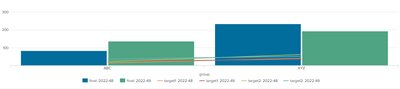
Please help me to get the visualization in correct format.
Thanks in advance!!
- Mark as New
- Bookmark Message
- Subscribe to Message
- Mute Message
- Subscribe to RSS Feed
- Permalink
- Report Inappropriate Content


It is not clear what you expect the chart to look like
Having said that, does this help:
|chart last(final) as final values(target1) as target1 values(target2) as target2 over week_year by group- Mark as New
- Bookmark Message
- Subscribe to Message
- Mute Message
- Subscribe to RSS Feed
- Permalink
- Report Inappropriate Content
Hello @ITWhisperer
If you run till the table command you will get the results as shown below.

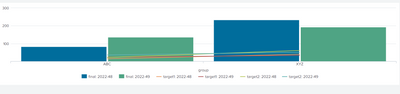
my required visualization is to show data in below similar format, but instead of 4 lines i just need one each line for both targets.
I need help on the query to get desired format.
- Mark as New
- Bookmark Message
- Subscribe to Message
- Mute Message
- Subscribe to RSS Feed
- Permalink
- Report Inappropriate Content
Given your sample data, what points do you want shown on the two lines?
- Mark as New
- Bookmark Message
- Subscribe to Message
- Mute Message
- Subscribe to RSS Feed
- Permalink
- Report Inappropriate Content
I need target1 and target2 values to be shown as line
- Mark as New
- Bookmark Message
- Subscribe to Message
- Mute Message
- Subscribe to RSS Feed
- Permalink
- Report Inappropriate Content
Which value do you want for target1 for ABC and which value do you want for target1 for XYZ? You have two possible values given the data you presented - that's why you have more lines than you were expecting; the lines are doubled up because you have two year-weeks


Join the Splunk Community Slack to learn, troubleshoot, and make connections with fellow Splunk practitioners in real time!
Join Splunk User Groups to connect and learn in-person by region or remotely by topic or industry.
Rounding off the Splunk Dashboard Contest
A Four Part Event Series: AI + Observability: AI Agents, LLMs, Apps, & Infrastructure
Splunk Technical Support Is Moving to Cisco Support Tools
