
Join the Conversation
- Find Answers
- :
- Using Splunk
- :
- Dashboards & Visualizations
- :
- Re: Stop automatic formatting from HEX to INT in S...
- Subscribe to RSS Feed
- Mark Topic as New
- Mark Topic as Read
- Float this Topic for Current User
- Bookmark Topic
- Subscribe to Topic
- Mute Topic
- Printer Friendly Page
- Mark as New
- Bookmark Message
- Subscribe to Message
- Mute Message
- Subscribe to RSS Feed
- Permalink
- Report Inappropriate Content

Hello,
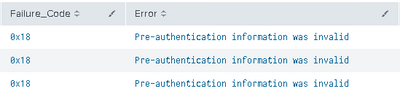
I am trying to make a table viz in my absolute dashboard studio dashboard. I have a query that has a field called "Failure_Code" that usually presents the hex values (0x18 or 0x12). When developing the query in the search app, the data gets printed in the table statistics as is (in 0x.... format) . That is how I would like it to be printed out in my dashboard.
As soon as I add the query into a table view in a dashboard, it automatically gets converted to int(24, 18...). I am not using any eval, stats or renaming on this field. I tried adding a formatting option on that column, noticed it's automatically set to "number" in the context stanza(formatting function), and modified it to "string" in the JSON source code but it didn't stop the formatting.
I tried the tonumber(myField,"hex") solution but my field was turned to null, and also replacing hex with 16. I tried printf, nothing seems to work.
Thank you for the help!
- Mark as New
- Bookmark Message
- Subscribe to Message
- Mute Message
- Subscribe to RSS Feed
- Permalink
- Report Inappropriate Content


Please try upgrading to the latest version of Splunk (it works on 9.1.0.2, but not on 8.2.2.1)
- Mark as New
- Bookmark Message
- Subscribe to Message
- Mute Message
- Subscribe to RSS Feed
- Permalink
- Report Inappropriate Content
| eval myField=tostring(myField,"hex")- Mark as New
- Bookmark Message
- Subscribe to Message
- Mute Message
- Subscribe to RSS Feed
- Permalink
- Report Inappropriate Content
Thanks for the quick reply.
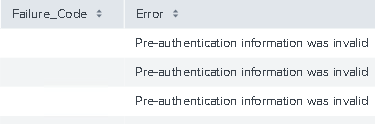
Unfortunately, using | eval Failure_Code=tostring(Failure_Code,"hex") turns the entire field to null values :
Here it is, working in a normal search query, without the eval (exact same query, opened from the dashboard panel with the "Open in search" option):
And here is the result without the eval, in the dashboard table :
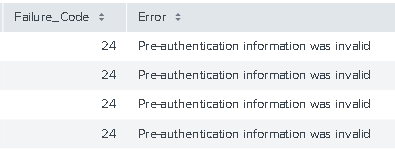
Added SS for clarification, in case my question was all over the place.
Can I use some type of sed/replace or something similar to add quotes to my failure_code or force it into a string value any other way? I'd rather just have it print out clean, like in the normal search, but dashboard studio seems to be doing some behind the scenes formatting that I don;t really get the hang of yet.
- Mark as New
- Bookmark Message
- Subscribe to Message
- Mute Message
- Subscribe to RSS Feed
- Permalink
- Report Inappropriate Content
Which version of Splunk are you using?
- Mark as New
- Bookmark Message
- Subscribe to Message
- Mute Message
- Subscribe to RSS Feed
- Permalink
- Report Inappropriate Content
Enterprise 9.0.0.1
- Mark as New
- Bookmark Message
- Subscribe to Message
- Mute Message
- Subscribe to RSS Feed
- Permalink
- Report Inappropriate Content
Please try upgrading to the latest version of Splunk (it works on 9.1.0.2, but not on 8.2.2.1)
- Mark as New
- Bookmark Message
- Subscribe to Message
- Mute Message
- Subscribe to RSS Feed
- Permalink
- Report Inappropriate Content
It's going to be a while until it's updated on my end, but I'll mark the answer and reply if it doesn't work, which I hope won't be the case 😅

Join the Splunk Community Slack to learn, troubleshoot, and make connections with fellow Splunk practitioners in real time!
Join Splunk User Groups to connect and learn in-person by region or remotely by topic or industry.
[Puzzles] Solve, Learn, Repeat: Character substitutions with Regular Expressions
Splunk Community Badges!
[Puzzles] Solve, Learn, Repeat: Matching cron expressions
