
Join the Conversation
- Find Answers
- :
- Using Splunk
- :
- Dashboards & Visualizations
- :
- How do you calculate values in 2 panels to create ...
- Subscribe to RSS Feed
- Mark Topic as New
- Mark Topic as Read
- Float this Topic for Current User
- Bookmark Topic
- Subscribe to Topic
- Mute Topic
- Printer Friendly Page
- Mark as New
- Bookmark Message
- Subscribe to Message
- Mute Message
- Subscribe to RSS Feed
- Permalink
- Report Inappropriate Content
How do you calculate values in 2 panels to create a 3rd?

I have the following search:

which produces the following results:
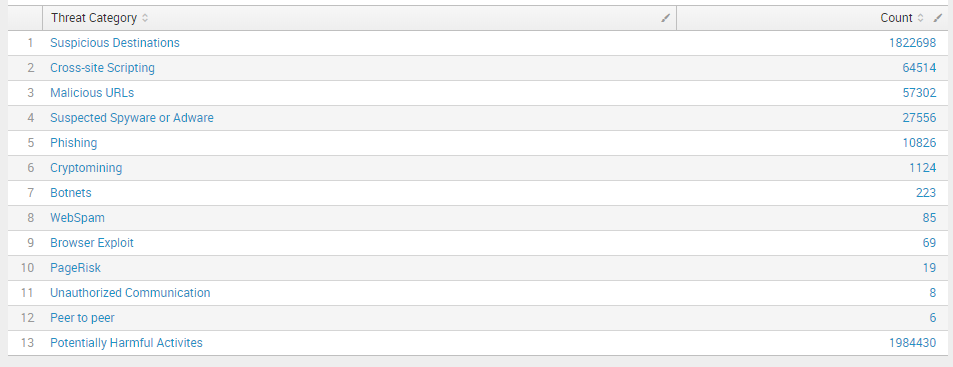
I have created a dashboard panel with this information. I'd like to do a month over month comparison, so I have created a second panel with the same search. The first panel time frame is set to search the month of September, and the second the month of October. I would like calculate the percentage change for each Threat Category and display the results in a 3rd panel.
How would I go about accessing the count values in the panel to use in the calculation? Or is it even possible?
Thanks!


- Mark as New
- Bookmark Message
- Subscribe to Message
- Mute Message
- Subscribe to RSS Feed
- Permalink
- Report Inappropriate Content
Taking from :https://answers.splunk.com/answers/185455/how-to-create-a-month-over-month-year-over-year-re.html and modifying it you could do something like:
index=zscaler urlsupercat="Advanced Security" earliest=-2month@month latest=-1month@month
| stats count as pre_month by urlcat
| join urlcat [ index=zscaler urlsupercat="Advanced Security" earliest=-1month@month latest=@month |  stats count as this_month by urlcat ]
| eval month_perc=100*(this_month / pre_month)
| rename urlcat as "Threat Category"
| table month_perc,"Threat Category"
....
You could start by creating a base search that does the combined period (remember to keep _time and just the fields you need)
HTH ...Laurie:{)

Upcoming Webinar: Unmasking Insider Threats with Slunk Enterprise Security’s UEBA
.conf25 technical session recap of Observability for Gen AI: Monitoring LLM ...
A Season of Skills: New Splunk Courses to Light Up Your Learning Journey
