
Join the Conversation
- Find Answers
- :
- Using Splunk
- :
- Dashboards & Visualizations
- :
- How do I plot 60 days worth of data on the line ch...
- Subscribe to RSS Feed
- Mark Topic as New
- Mark Topic as Read
- Float this Topic for Current User
- Bookmark Topic
- Subscribe to Topic
- Mute Topic
- Printer Friendly Page
- Mark as New
- Bookmark Message
- Subscribe to Message
- Mute Message
- Subscribe to RSS Feed
- Permalink
- Report Inappropriate Content

I have data coming in from our NetApp storage controllers that shows aggregate space free every day. I need to plot each day's values and then show a chart that shows the last 60 days as dots on a line chart. Management wants to see if storage is trending up or down. i have this search so far but it is messing up and plotting the sum of all of them over 60 days. I want each day's values plotted:
index=netapp_vault_utilization sourcetype=dbx3_netapp_vault_aggregate earliest=-60d@d latest=@h
| timechart span=60d@d sum(SpaceFree) AS aggregate_space_free_60d by name
| append [search index=netapp_vault_utilization sourcetype=dbx3_netapp_vault_aggregate earliest=-48h@h latest=24h@h
| timechart span=60d@d sum(SpaceFree) AS aggregate_space_free_60d by name]
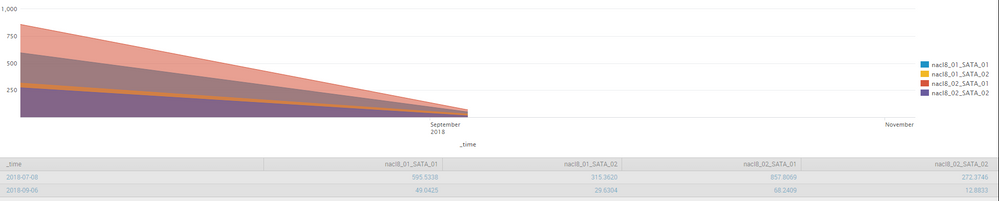
It will show the correct amount for the current day but the larger numbers above are a sum of when the oldest event is. How did i fix this? Am i even on the right path?

- Mark as New
- Bookmark Message
- Subscribe to Message
- Mute Message
- Subscribe to RSS Feed
- Permalink
- Report Inappropriate Content

@shanecifaldi,
If you need to see daily growth, set the span to 1d span=1d which will split the data into "day" buckets.
index=netapp_vault_utilization sourcetype=dbx3_netapp_vault_aggregate earliest=-60d@d latest=@h
| timechart span=1d sum(SpaceFree) AS aggregate_space_free_60d by name
What goes around comes around. If it helps, hit it with Karma 🙂
- Mark as New
- Bookmark Message
- Subscribe to Message
- Mute Message
- Subscribe to RSS Feed
- Permalink
- Report Inappropriate Content
@shanecifaldi,
If you need to see daily growth, set the span to 1d span=1d which will split the data into "day" buckets.
index=netapp_vault_utilization sourcetype=dbx3_netapp_vault_aggregate earliest=-60d@d latest=@h
| timechart span=1d sum(SpaceFree) AS aggregate_space_free_60d by name
What goes around comes around. If it helps, hit it with Karma 🙂
- Mark as New
- Bookmark Message
- Subscribe to Message
- Mute Message
- Subscribe to RSS Feed
- Permalink
- Report Inappropriate Content
Wow..something so simple, duh! Thanks for the help!

Data Management Digest – December 2025
Index This | What is broken 80% of the time by February?
Unlock Faster Time-to-Value on Edge and Ingest Processor with New SPL2 Pipeline ...
