
Join the Conversation
- Find Answers
- :
- Using Splunk
- :
- Dashboards & Visualizations
- :
- How do I parse my XML data into multiple fields?
- Subscribe to RSS Feed
- Mark Topic as New
- Mark Topic as Read
- Float this Topic for Current User
- Bookmark Topic
- Subscribe to Topic
- Mute Topic
- Printer Friendly Page
- Mark as New
- Bookmark Message
- Subscribe to Message
- Mute Message
- Subscribe to RSS Feed
- Permalink
- Report Inappropriate Content
How do I parse my XML data into multiple fields?


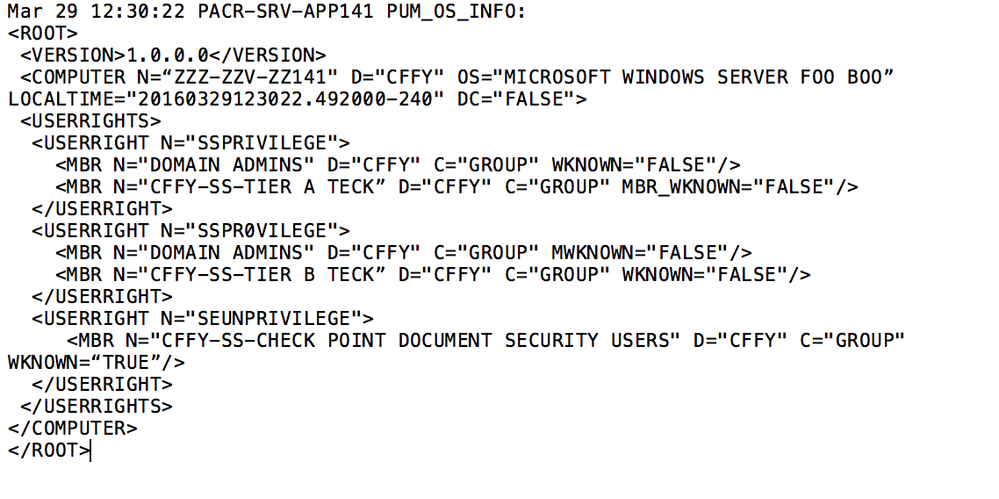
Is there a way to break this xml into fields. Customer needs it broken like such:
Would you use spath on something like this?
FIELDNAME/Key1:
COMPUTER.USERRIGHT.MBR.N.D.C.WKNOWN
VALUE1:
ZZZ-ZZV-ZZ141.SSPRIVILEGE.MBR."Domain Admins".CFFY.GROUP.FALSE
FIELDNAME/Key2:
COMPUTER.USERRIGHT.MBR.N.D.C.MBR_WKNOWN
VALUE2:
ZZZ-ZZV-ZZ141.SSPRIVILEGE.MBR."CFFY-SS-TIER A TECK".CFFY.GROUP.FALSE
- Mark as New
- Bookmark Message
- Subscribe to Message
- Mute Message
- Subscribe to RSS Feed
- Permalink
- Report Inappropriate Content

Typically I add a statement in props.conf to let Splunk know it is XML.
[yoursourcetype]
 KV_MODE = xml
 NO_BINARY_CHECK = 1
 SHOULD_LINEMERGE = false
 TRUNCATE = 0
 pulldown_type = 1
- Mark as New
- Bookmark Message
- Subscribe to Message
- Mute Message
- Subscribe to RSS Feed
- Permalink
- Report Inappropriate Content
Thanks, I did add that.
- Mark as New
- Bookmark Message
- Subscribe to Message
- Mute Message
- Subscribe to RSS Feed
- Permalink
- Report Inappropriate Content
Then to combine the fields that were extracted you can use the eval command to join different fields together.
- Mark as New
- Bookmark Message
- Subscribe to Message
- Mute Message
- Subscribe to RSS Feed
- Permalink
- Report Inappropriate Content
You may have to just extract all of the values as separate fields first, e.g. computer, MBR, ... Then do an eval to create the fields that you actually want from the extracted fields.
- Mark as New
- Bookmark Message
- Subscribe to Message
- Mute Message
- Subscribe to RSS Feed
- Permalink
- Report Inappropriate Content
I think you are right. I will let this post linger for a while and see if someone has a "silver bullet" answer.



Join the Splunk Community Slack to learn, troubleshoot, and make connections with fellow Splunk practitioners in real time!
Join Splunk User Groups to connect and learn in-person by region or remotely by topic or industry.
SOC4Kafka - New Kafka Connector Powered by OpenTelemetry
Event Series: Level up your SOC: Advancing with Splunk Enterprise Security
Announcing Modern Navigation: A New Era of Splunk User Experience
