
Join the Conversation
- Find Answers
- :
- Using Splunk
- :
- Dashboards & Visualizations
- :
- How do I make HTML keep the same formatting as the...
- Subscribe to RSS Feed
- Mark Topic as New
- Mark Topic as Read
- Float this Topic for Current User
- Bookmark Topic
- Subscribe to Topic
- Mute Topic
- Printer Friendly Page
- Mark as New
- Bookmark Message
- Subscribe to Message
- Mute Message
- Subscribe to RSS Feed
- Permalink
- Report Inappropriate Content
How do I make HTML keep the same formatting as the rest of my dashboard after Generate PDF in Splunk 5.0.3?

I am including some HTML in my XML dashboard, but when I generate a PDF the HTML does not have the same formatting as the rest of the other dashboard elements(Panels).
How do I make my html have the same formatting as the rest of my dashboard after PDF is generated?
do I need to add any Splunk tag?
My splunk version is 5.0.3
  <html>
    <h1>Page Description</h1>
     <p>
        <ul style="color:#1a7996">
            <li>Search: User performed search</li>
            <li>Document: User viewed a document</li>
            <li>Index: User returned to the home or index page</li>
            <li>Help: User selected Help</li>
            <li>Contact: User selected Contact page</li>
            <li>Link: User selected an external link from the page</li>
        </ul>
    </p>
    <blockquote>
         <p><b>Note:</b> This is a description.</p>
    </blockquote>
    </html>
Thank you,
- Mark as New
- Bookmark Message
- Subscribe to Message
- Mute Message
- Subscribe to RSS Feed
- Permalink
- Report Inappropriate Content
You probably will get better / more answers with some attached screenshots of what you are actually trying to accomplish ... and you have read what you can about the pdf generation and the constraints that it has.
Otherwise what you need to do is to use some css magic in your html code to make it fit your report and make it look the way you want.
Using a debugger / web developer tools in chrome, firefox, safari will probably help you find some tags for you to add, change, etc.
- Mark as New
- Bookmark Message
- Subscribe to Message
- Mute Message
- Subscribe to RSS Feed
- Permalink
- Report Inappropriate Content
- Mark as New
- Bookmark Message
- Subscribe to Message
- Mute Message
- Subscribe to RSS Feed
- Permalink
- Report Inappropriate Content
I am soirry but cant see any pics .. however i discovered this app today; https://apps.splunk.com/app/2614/
Try to upgrade to 6.2 or install a separate new searchhead and see if not this app will help you, it seems it will bypass many of the limitations with the built in pdf-generation .. (and ... version 6.2 > are definitly worth the upgrade 🙂 )
- Mark as New
- Bookmark Message
- Subscribe to Message
- Mute Message
- Subscribe to RSS Feed
- Permalink
- Report Inappropriate Content
alt text
- Mark as New
- Bookmark Message
- Subscribe to Message
- Mute Message
- Subscribe to RSS Feed
- Permalink
- Report Inappropriate Content
lmyrefelt,
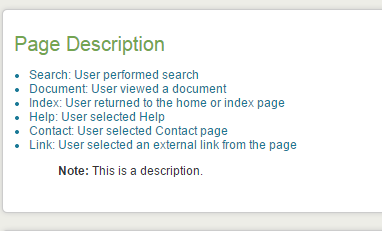
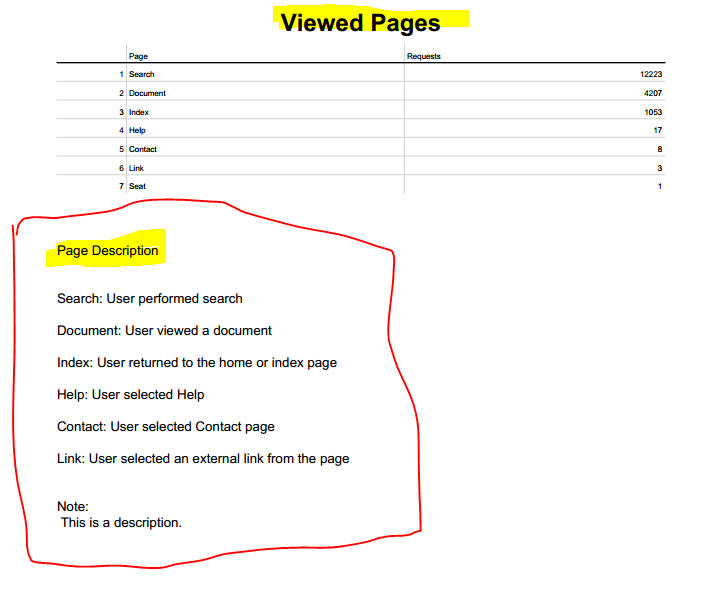
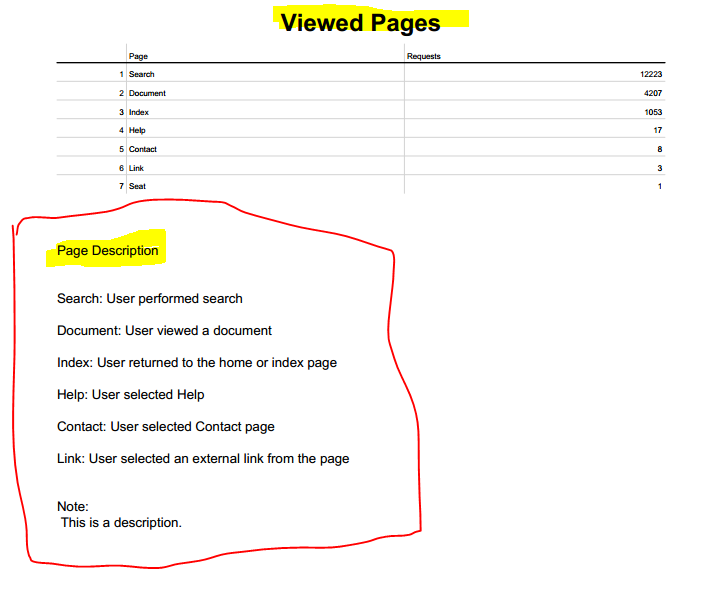
On the dashboard side I can make the HTML look like the rest of the dashboard, but when I generate the PDF that code(section with HTML code on the dashboard) does not have the same look as the rest of the PDF. You can see that there is a difference on the PDF report on the formatting of the HTML code and the other table or view.! alt text
HTML on my dashboard
PDF:

- Mark as New
- Bookmark Message
- Subscribe to Message
- Mute Message
- Subscribe to RSS Feed
- Permalink
- Report Inappropriate Content
Does anybody have any idea how to do that?

Join the Splunk Community Slack to learn, troubleshoot, and make connections with fellow Splunk practitioners in real time!
Join Splunk User Groups to connect and learn in-person by region or remotely by topic or industry.
May 2026 Splunk Expert Sessions: Security & Observability
Network to App: Observability Unlocked [May & June Series]
SPL2 Deep Dives, AppDynamics Integrations, SAML Made Simple and Much More on Splunk ...
