
Are you a member of the Splunk Community?
- Find Answers
- :
- Using Splunk
- :
- Dashboards & Visualizations
- :
- Re: How can I pass a multivalue token value betwee...
- Subscribe to RSS Feed
- Mark Topic as New
- Mark Topic as Read
- Float this Topic for Current User
- Bookmark Topic
- Subscribe to Topic
- Mute Topic
- Printer Friendly Page
- Mark as New
- Bookmark Message
- Subscribe to Message
- Mute Message
- Subscribe to RSS Feed
- Permalink
- Report Inappropriate Content

Hello everyone,
I am implementing a solution found here: How to pass multivalue tokens to other splunk dashboard URL
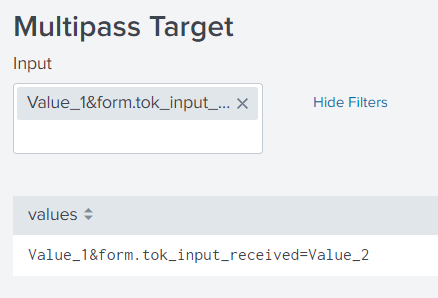
This solution uses token play to construct a string using each selected multivalue value and then pass it to another dashboard. I have managed to set up the framework, but it is not working as expected. The problem in a nutshell is that the & and = characters in the token string are converted into their HTML encoding, %26 and %3D respectively. This causes the receiving token to interpret it as a single value which of course is invalid.
Here is the code for two connected run anywhere dashboards that demonstrate the issue:
Sending side:
<form>
<label>Multipass</label>
<fieldset submitButton="false">
<input type="multiselect" token="tok_input">
<label>Input</label>
<choice value="*">All</choice>
<choice value="Value_1">Value_1</choice>
<choice value="Value_2">Value_2</choice>
<default>*</default>
<initialValue>*</initialValue>
<delimiter> </delimiter>
<change>
<set token="tok_input_send" delimiter="&form.tok_input_received=">$value$</set>
</change>
</input>
</fieldset>
<row>
<panel>
<table>
<search>
<query>| makeresults
| eval values="$tok_input_send$"
| table values</query>
<earliest>-24h@h</earliest>
<latest>now</latest>
<sampleRatio>1</sampleRatio>
</search>
<option name="count">20</option>
<option name="dataOverlayMode">none</option>
<option name="drilldown">cell</option>
<option name="percentagesRow">false</option>
<option name="rowNumbers">false</option>
<option name="totalsRow">false</option>
<option name="wrap">true</option>
<drilldown>
<link target="_blank">/app/search/multipass_target?form.tok_input_received=$tok_input_send$</link>
</drilldown>
</table>
</panel>
</row>
</form>
Receiving side:
<form>
  <label>Multipass Target</label>
  <fieldset submitButton="false">
    <input type="multiselect" token="tok_input_received">
      <label>Input</label>
      <choice value="*">All</choice>
      <choice value="Value_1">Value_1</choice>
      <choice value="Value_2">Value_2</choice>
      <default>*</default>
      <initialValue>*</initialValue>
      <delimiter> </delimiter>
    </input>
  </fieldset>
  <row>
    <panel>
      <table>
        <search>
          <query>| makeresults
| eval values="$tok_input_received$"
| table values</query>
          <earliest>-24h@h</earliest>
          <latest>now</latest>
          <sampleRatio>1</sampleRatio>
        </search>
        <option name="count">20</option>
        <option name="dataOverlayMode">none</option>
        <option name="drilldown">none</option>
        <option name="percentagesRow">false</option>
        <option name="refresh.display">progressbar</option>
        <option name="rowNumbers">false</option>
        <option name="totalsRow">false</option>
        <option name="wrap">true</option>
      </table>
    </panel>
  </row>
</form>
You'll see that sending the following:
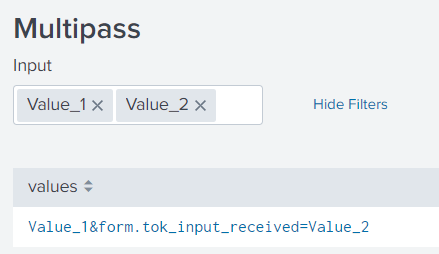
is interpreted like this:
Can somebody help to solve this approach, or propose another?
Thanks!
Andrew
- Mark as New
- Bookmark Message
- Subscribe to Message
- Mute Message
- Subscribe to RSS Feed
- Permalink
- Report Inappropriate Content

Hi Andrew
Try to insert your multivalue token's link into <![CDATA and to add the "|n" character to your token value like this
<drilldown>
<link target="_blank"><![CDATA[/app/<APP NAME>/<DASHBOARD TARGET NAME>form.<tok_name>=$<multivalue_token_name>|n$]]></link>
</drilldown>
It works for me!!
- Mark as New
- Bookmark Message
- Subscribe to Message
- Mute Message
- Subscribe to RSS Feed
- Permalink
- Report Inappropriate Content
Hello I have the same issue but using href
for example:
</div>
<div style="float:right">
<a href="/app/search/request_alert?form.reporter_token=$reporter$ class="btn btn-primary" target="_blank">Request</a>
</div>
I need to pass the token $reporter$ as it is, without being encoded.
Thanks.
- Mark as New
- Bookmark Message
- Subscribe to Message
- Mute Message
- Subscribe to RSS Feed
- Permalink
- Report Inappropriate Content
Hi Andrew
Try to insert your multivalue token's link into <![CDATA and to add the "|n" character to your token value like this
<drilldown>
<link target="_blank"><![CDATA[/app/<APP NAME>/<DASHBOARD TARGET NAME>form.<tok_name>=$<multivalue_token_name>|n$]]></link>
</drilldown>
It works for me!!
- Mark as New
- Bookmark Message
- Subscribe to Message
- Mute Message
- Subscribe to RSS Feed
- Permalink
- Report Inappropriate Content
@Federico92 This works like a charm! Thank you!
- Mark as New
- Bookmark Message
- Subscribe to Message
- Mute Message
- Subscribe to RSS Feed
- Permalink
- Report Inappropriate Content
In the receiving dashboard try like this:
<input type="multiselect" token="tok_input_received">
      <label>Input</label>
      <choice value="*">All</choice>
      <choice value="Value_1">Value_1</choice>
      <choice value="Value_2">Value_2</choice>
      <default>$form.tok_input_received$</default>
      <initialValue>*</initialValue>
      <delimiter> </delimiter>
</input>- Mark as New
- Bookmark Message
- Subscribe to Message
- Mute Message
- Subscribe to RSS Feed
- Permalink
- Report Inappropriate Content

Hi @andrewtrobec , on the receiving dashboard you can use javascript to decode the encode url and reload the page.

Splunk Enterprise Security(ES) 7.3 is approaching the end of support. Get ready for ...
Splunk Enterprise Security 8.x: The Essential Upgrade for Threat Detection, ...
Splunk Observability for AI
