
Turn on suggestions
Auto-suggest helps you quickly narrow down your search results by suggesting possible matches as you type.
Dashboards & Visualizations
×
Join the Conversation
Without signing in, you're just watching from the sidelines. Sign in or Register to connect, share, and be part of the Splunk Community.
Turn on suggestions
Auto-suggest helps you quickly narrow down your search results by suggesting possible matches as you type.
- Find Answers
- :
- Using Splunk
- :
- Dashboards & Visualizations
- :
- How can I edit the XML for a dashboard I created t...
Options
- Subscribe to RSS Feed
- Mark Topic as New
- Mark Topic as Read
- Float this Topic for Current User
- Bookmark Topic
- Subscribe to Topic
- Mute Topic
- Printer Friendly Page
- Mark as New
- Bookmark Message
- Subscribe to Message
- Mute Message
- Subscribe to RSS Feed
- Permalink
- Report Inappropriate Content
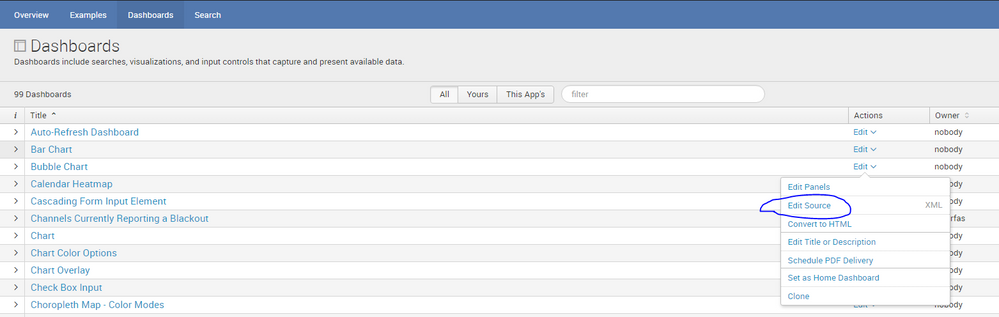
How can I edit the XML for a dashboard I created that will not load properly?

asarran
Path Finder
10-17-2016
08:44 AM
Good Morning,
I'm having issues with a Dashboard I created. I made some changes to the XML code, but unfortunately, the XML is not valid. I saved the results in the Dashboard, but now I'm unable to revisit the Dashboard. I believe it's attempting to load the incorrect XML script. Would there be away to edit the XML prior to loading?
- Mark as New
- Bookmark Message
- Subscribe to Message
- Mute Message
- Subscribe to RSS Feed
- Permalink
- Report Inappropriate Content

cmerriman
Super Champion
10-17-2016
09:06 AM

- Mark as New
- Bookmark Message
- Subscribe to Message
- Mute Message
- Subscribe to RSS Feed
- Permalink
- Report Inappropriate Content

skoelpin

SplunkTrust
10-17-2016
08:52 AM
It should let you edit the source code directly. What happens when you go to the dashboard view and hit edit source?
- Mark as New
- Bookmark Message
- Subscribe to Message
- Mute Message
- Subscribe to RSS Feed
- Permalink
- Report Inappropriate Content

gcusello
SplunkTrust
10-17-2016
08:48 AM
go back in your browser until the source page, it should run!
otherwise access the source xml and modify it (remeber that you have to restart Splunk).
Bye.
Giuseppe

Get Updates on the Splunk Community!
Data Management Digest – December 2025
Welcome to the December edition of Data Management Digest!
As we continue our journey of data innovation, the ...
Index This | What is broken 80% of the time by February?
December 2025 Edition
Hayyy Splunk Education Enthusiasts and the Eternally Curious!
We’re back with this ...
Unlock Faster Time-to-Value on Edge and Ingest Processor with New SPL2 Pipeline ...
Hello Splunk Community,
We're thrilled to share an exciting update that will help you manage your data more ...
