
Join the Conversation
- Find Answers
- :
- Using Splunk
- :
- Dashboards & Visualizations
- :
- Re: How can I display images in my dashboard?
- Subscribe to RSS Feed
- Mark Topic as New
- Mark Topic as Read
- Float this Topic for Current User
- Bookmark Topic
- Subscribe to Topic
- Mute Topic
- Printer Friendly Page
- Mark as New
- Bookmark Message
- Subscribe to Message
- Mute Message
- Subscribe to RSS Feed
- Permalink
- Report Inappropriate Content

- Mark as New
- Bookmark Message
- Subscribe to Message
- Mute Message
- Subscribe to RSS Feed
- Permalink
- Report Inappropriate Content

Hello gcescatto
Try installing the Splunk Dashboard Examples app. Though you'll have to do some customization, the codes can be copy-pasted and is very straightforward.
Here's the link:
https://splunkbase.splunk.com/app/1603/
You'll have to provide your own set of smileys and assign a number range from it.
Check this blog below for more details:
https://www.splunk.com/blog/2014/03/17/custom-icons-in-splunk-6-tables.html
Hope it helps!
Thanks!
- Mark as New
- Bookmark Message
- Subscribe to Message
- Mute Message
- Subscribe to RSS Feed
- Permalink
- Report Inappropriate Content

@wgcescatto, you can also consider Status Indicator Custom Visualization App: https://splunkbase.splunk.com/app/3119/
which uses Font Awesome svg icons : http://fontawesome.io/icons/
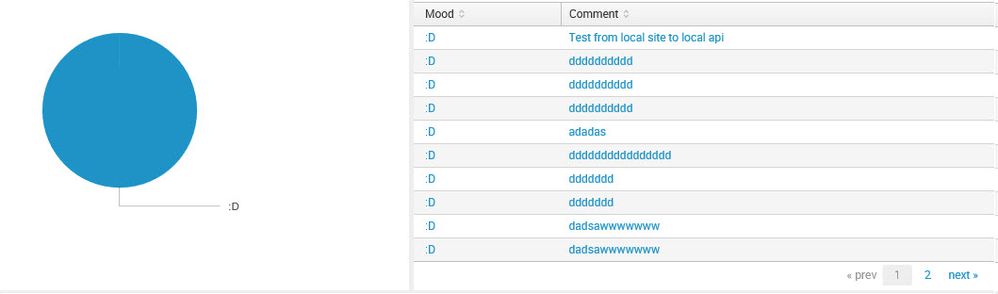
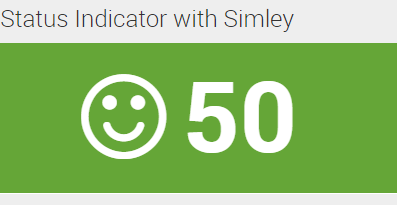
Status Indicator can definitely apply to replace Pie Chart on the left. But, if you are on Splunk Enterprise 6.6 or higher, you can use Trellis Layout along with Status Indicator to Split the table columns as Rows with Status Indicator for your stats. Refer to one of the answers below: https://answers.splunk.com/answers/577760/how-can-i-create-a-visual-progress-bar-tracker-in.html
Please find below run anywhere example to mock data and show Status Indicator with Smiley (to use instead of Pie Chart)

<dashboard>
  <label>Status Indicator with Simly</label>
  <row>
    <panel>
      <viz type="status_indicator_app.status_indicator">
        <search>
          <query>|  makeresults
|  eval ":D"=50
|  eval color="#65a637"
|  eval icon="smile-o"
|  table ":D" icon color</query>
          <earliest>-24h@h</earliest>
          <latest>now</latest>
          <sampleRatio>1</sampleRatio>
        </search>
        <option name="drilldown">none</option>
        <option name="status_indicator_app.status_indicator.colorBy">field_value</option>
        <option name="status_indicator_app.status_indicator.fillTarget">background</option>
        <option name="status_indicator_app.status_indicator.fixIcon">warning</option>
        <option name="status_indicator_app.status_indicator.icon">field_value</option>
        <option name="status_indicator_app.status_indicator.precision">0</option>
        <option name="status_indicator_app.status_indicator.showOption">1</option>
        <option name="status_indicator_app.status_indicator.staticColor">#65a637</option>
        <option name="status_indicator_app.status_indicator.useColors">true</option>
        <option name="status_indicator_app.status_indicator.useThousandSeparator">true</option>
        <option name="trellis.enabled">0</option>
        <option name="trellis.scales.shared">1</option>
        <option name="trellis.size">medium</option>
        <option name="height">150</option>
      </viz>
    </panel>
  </row>
</dashboard>
| makeresults | eval message= "Happy Splunking!!!"

- Mark as New
- Bookmark Message
- Subscribe to Message
- Mute Message
- Subscribe to RSS Feed
- Permalink
- Report Inappropriate Content

@niketnilay what can you please specify the
field values for 😞 for | eval icon="smile-o"
Thanks
- Mark as New
- Bookmark Message
- Subscribe to Message
- Mute Message
- Subscribe to RSS Feed
- Permalink
- Report Inappropriate Content
@ssadanala1, Status Indicator Custom Visualization uses Font Awesome SVG icon library. (It is not the latest version though, most of the latest SVG Icons might not work).
Refer to Splunk Documentation with a link to Font Awesome Icons
Hopefully this information is what you are looking for. If not please let us know the details.
| makeresults | eval message= "Happy Splunking!!!"
- Mark as New
- Bookmark Message
- Subscribe to Message
- Mute Message
- Subscribe to RSS Feed
- Permalink
- Report Inappropriate Content
Hello gcescatto
Try installing the Splunk Dashboard Examples app. Though you'll have to do some customization, the codes can be copy-pasted and is very straightforward.
Here's the link:
https://splunkbase.splunk.com/app/1603/
You'll have to provide your own set of smileys and assign a number range from it.
Check this blog below for more details:
https://www.splunk.com/blog/2014/03/17/custom-icons-in-splunk-6-tables.html
Hope it helps!
Thanks!
- Mark as New
- Bookmark Message
- Subscribe to Message
- Mute Message
- Subscribe to RSS Feed
- Permalink
- Report Inappropriate Content
Hope this is helpful!
https://answers.splunk.com/answers/136162/add-picture-to-dashboard.html
- Mark as New
- Bookmark Message
- Subscribe to Message
- Mute Message
- Subscribe to RSS Feed
- Permalink
- Report Inappropriate Content
I'm using only the only application, not the downloaded one. Is it possible still?

Join the Splunk Community Slack to learn, troubleshoot, and make connections with fellow Splunk practitioners in real time!
Join Splunk User Groups to connect and learn in-person by region or remotely by topic or industry.
Network to App: Observability Unlocked [May & June Series]
SPL2 Deep Dives, AppDynamics Integrations, SAML Made Simple and Much More on Splunk ...
[Puzzles] Solve, Learn, Repeat: Matching cron expressions
