
Join the Conversation
- Find Answers
- :
- Using Splunk
- :
- Dashboards & Visualizations
- :
- How can I change the charting legend placement?
- Subscribe to RSS Feed
- Mark Topic as New
- Mark Topic as Read
- Float this Topic for Current User
- Bookmark Topic
- Subscribe to Topic
- Mute Topic
- Printer Friendly Page
- Mark as New
- Bookmark Message
- Subscribe to Message
- Mute Message
- Subscribe to RSS Feed
- Permalink
- Report Inappropriate Content

I have a dashboard panel as below
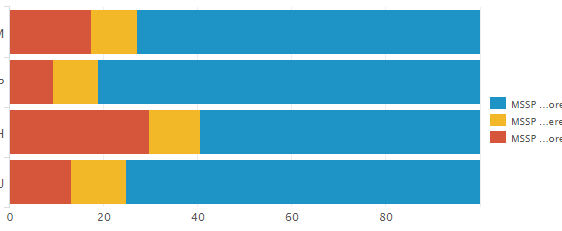
As you can see on the color representatio(MSSP ..)n since the words are large they aren't visible on the dashboard. Instead I want to display those 3 on the top instead of right. In-order to do that where exactly should I have to modify the html tags.
- Mark as New
- Bookmark Message
- Subscribe to Message
- Mute Message
- Subscribe to RSS Feed
- Permalink
- Report Inappropriate Content

there are a couple of options for this.
https://docs.splunk.com/Documentation/Splunk/7.0.0/Viz/ChartConfigurationReference#General_chart_pro...
you can edit the xml source code in the dashboad and use
<option name="charting.legend.labelStyle.overflowMode">ellipsisNone</option>
<option name="charting.legend.placement">top</option>
Otherwise, you can do this in the UI by pressing on the little paintbrush format button at the top of the chart/panel and on the left of the new window, there should be a toggle button called Legend. when you click on that, there should be legend options, such as placement, to display or hide it, etc.
EDIT:
after re-reading, if you're dealing with an HTML dashboard, go into the code and find the element you need. if you named the panel, you should be able to find the title. figure out what id your chart is.
for example:
 <div class="panel-element-row">
                <div id="element2" class="dashboard-element chart" style="width: 100%">
                    <div class="panel-head">
                        <h3>header</h3>
                    </div>
                    <div class="panel-body"></div>
                </div>
            </div>
i needed to find later on in the code element2
then you see something like this towards the bottom:
var element2 = new ChartElement({
            "id": "element2",
            "charting.drilldown": "all",
            "charting.axisLabelsX.majorLabelStyle.rotation": "0",
            "charting.legend.placement": "top",
            ........
and that's where you change the legend placement/ellipsis
- Mark as New
- Bookmark Message
- Subscribe to Message
- Mute Message
- Subscribe to RSS Feed
- Permalink
- Report Inappropriate Content

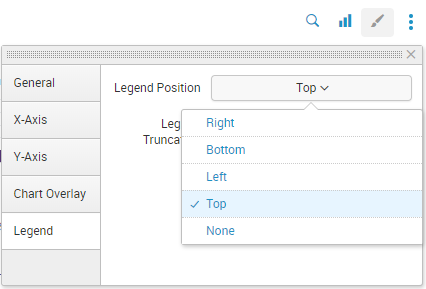
If you'd like the legend to appear above the chart, rather than to the right of it, you should put the dashboard into Edit mode, click on the "Format Visualization" icon, which looks like a paintbrush, and select "Legend" from the options at the left side of the pop-up. From the "Legend Position" drop-down, select "Top". Here's a screenshot:


- Mark as New
- Bookmark Message
- Subscribe to Message
- Mute Message
- Subscribe to RSS Feed
- Permalink
- Report Inappropriate Content
there are a couple of options for this.
https://docs.splunk.com/Documentation/Splunk/7.0.0/Viz/ChartConfigurationReference#General_chart_pro...
you can edit the xml source code in the dashboad and use
<option name="charting.legend.labelStyle.overflowMode">ellipsisNone</option>
<option name="charting.legend.placement">top</option>
Otherwise, you can do this in the UI by pressing on the little paintbrush format button at the top of the chart/panel and on the left of the new window, there should be a toggle button called Legend. when you click on that, there should be legend options, such as placement, to display or hide it, etc.
EDIT:
after re-reading, if you're dealing with an HTML dashboard, go into the code and find the element you need. if you named the panel, you should be able to find the title. figure out what id your chart is.
for example:
 <div class="panel-element-row">
                <div id="element2" class="dashboard-element chart" style="width: 100%">
                    <div class="panel-head">
                        <h3>header</h3>
                    </div>
                    <div class="panel-body"></div>
                </div>
            </div>
i needed to find later on in the code element2
then you see something like this towards the bottom:
var element2 = new ChartElement({
            "id": "element2",
            "charting.drilldown": "all",
            "charting.axisLabelsX.majorLabelStyle.rotation": "0",
            "charting.legend.placement": "top",
            ........
and that's where you change the legend placement/ellipsis

Join the Splunk Community Slack to learn, troubleshoot, and make connections with fellow Splunk practitioners in real time!
Join Splunk User Groups to connect and learn in-person by region or remotely by topic or industry.
Index This | What travels the world but is also stuck in place?
Discover New Use Cases: Unlock Greater Value from Your Existing Splunk Data
Continue Your Journey: Join Session 2 of the Data Management and Federation Bootcamp ...
