
Are you a member of the Splunk Community?
- Find Answers
- :
- Using Splunk
- :
- Dashboards & Visualizations
- :
- Re: Hide Search produced no results error from da...
- Subscribe to RSS Feed
- Mark Topic as New
- Mark Topic as Read
- Float this Topic for Current User
- Bookmark Topic
- Subscribe to Topic
- Mute Topic
- Printer Friendly Page
- Mark as New
- Bookmark Message
- Subscribe to Message
- Mute Message
- Subscribe to RSS Feed
- Permalink
- Report Inappropriate Content

I have a dynamically populated dropdown. Depending on other input values, no values should be populated. However, when this is the case, this error message is displayed below the dropdown, "Search produced no results". How can I stop this error message from displaying?
- Mark as New
- Bookmark Message
- Subscribe to Message
- Mute Message
- Subscribe to RSS Feed
- Permalink
- Report Inappropriate Content


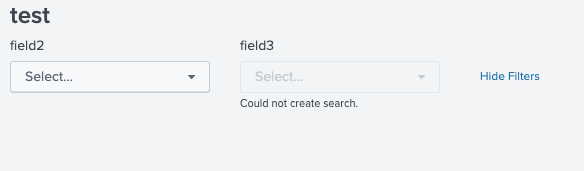
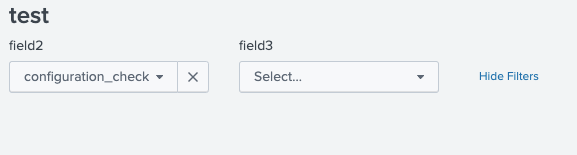
The message "could not create search" will not disappear until you choose you value from category input. because subcategory field search might be expecting value from category.
make sure you are getting values into subcategory when chosen value in category.
If this helps, give a like below.
- Mark as New
- Bookmark Message
- Subscribe to Message
- Mute Message
- Subscribe to RSS Feed
- Permalink
- Report Inappropriate Content
Not sure how you are using the input parameter in dashboard search.
you can create static values in the input you have created and being populated based on another input and set static value as default. So you will have always a value in the input even if the Search which is used in input generating no results.
If this helps, give a like below.
- Mark as New
- Bookmark Message
- Subscribe to Message
- Mute Message
- Subscribe to RSS Feed
- Permalink
- Report Inappropriate Content
Hi, I have 2 values category and sub category . Sub category is dependent on category . so I have created lookup to get these values in dropdown.. I just want to remove below error below the sub category field.

- Mark as New
- Bookmark Message
- Subscribe to Message
- Mute Message
- Subscribe to RSS Feed
- Permalink
- Report Inappropriate Content
The message "could not create search" will not disappear until you choose you value from category input. because subcategory field search might be expecting value from category.
make sure you are getting values into subcategory when chosen value in category.
If this helps, give a like below.


Introduction to Splunk AI
Splunk + ThousandEyes: Correlate frontend, app, and network data to troubleshoot ...
Maximizing the Value of Splunk ES 8.x
