
Join the Conversation
- Find Answers
- :
- Using Splunk
- :
- Dashboards & Visualizations
- :
- Re: Hide Error Message on a Dashboard
- Subscribe to RSS Feed
- Mark Topic as New
- Mark Topic as Read
- Float this Topic for Current User
- Bookmark Topic
- Subscribe to Topic
- Mute Topic
- Printer Friendly Page
- Mark as New
- Bookmark Message
- Subscribe to Message
- Mute Message
- Subscribe to RSS Feed
- Permalink
- Report Inappropriate Content
Hide Error Message on a Dashboard

Hello Splunkers,
I am getting the following Error message which might be the result of to many concurrent searches.
Configuration initialization for C:\Program Files\Splunk\etc took longer than expected (1500ms) when dispatching a search with search ID
I am trying to just hide these messages as they alter the format of the dashboard as shown below:
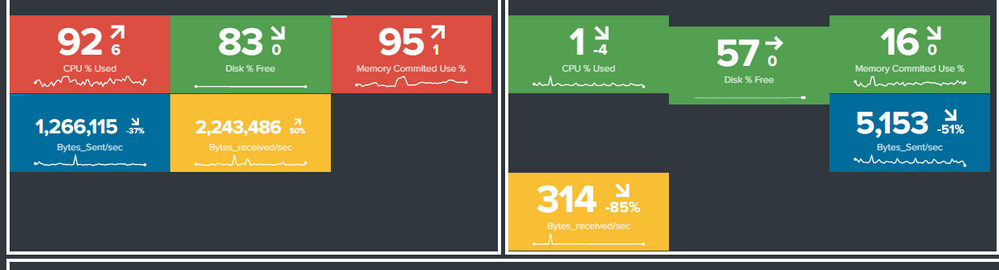
The format should be displayed like the left panel and is altered when the error message appears like on the right panel which is really annoying.
I have managed to hide the warning icon with html but the banner which the error warning appears on is still causing an issue even though the popup banner is now empty.
How can I stop this banner appearing and altering the dashboard.
TIA

- Mark as New
- Bookmark Message
- Subscribe to Message
- Mute Message
- Subscribe to RSS Feed
- Permalink
- Report Inappropriate Content
@nathanluke86
Have your try this ?
<row depends="$hidden$">
         <panel>
           <html>
              <style>
                .dashboard-row .dashboard-panel .error-details .error-indicator {
                 display: none; !important;
                }
              </style>
            </html>
         </panel>
       </row>
- Mark as New
- Bookmark Message
- Subscribe to Message
- Mute Message
- Subscribe to RSS Feed
- Permalink
- Report Inappropriate Content
i think you can use some custom css for this Dashboard and set the error message element with something like this
visibility: hidden;
- Mark as New
- Bookmark Message
- Subscribe to Message
- Mute Message
- Subscribe to RSS Feed
- Permalink
- Report Inappropriate Content
Thanks @mblietz
So far I have:
 <style>
        .dashboard-master{
             background-color:blue !important;
         }
        .dashboard-row .dashboard-panel{
             background-color:transparent !important;
         } .dashboard-row .dashboard-panel { border: 3px solid white;
}.dashboard-row .dashboard-panel .error-details .error-indicator {
display: none; !important;
This only removes the warning icon from the popup banner and doesn't actually prevent the banner from popping up.
I am unsure how to write this within the xml.
Help would be greatly appreciated.
Thanks
- Mark as New
- Bookmark Message
- Subscribe to Message
- Mute Message
- Subscribe to RSS Feed
- Permalink
- Report Inappropriate Content
I think the error message is in an additional element. I need the html code to find the right element. I have no example in my Splunk instances. So i cannot test it.

Splunk Observability for AI
[Puzzles] Solve, Learn, Repeat: Dereferencing XML to Fixed-length events
Stay Connected: Your Guide to December Tech Talks, Office Hours, and Webinars!
