
Join the Conversation
- Find Answers
- :
- Using Splunk
- :
- Dashboards & Visualizations
- :
- Re: Graph
- Subscribe to RSS Feed
- Mark Topic as New
- Mark Topic as Read
- Float this Topic for Current User
- Bookmark Topic
- Subscribe to Topic
- Mute Topic
- Printer Friendly Page
- Mark as New
- Bookmark Message
- Subscribe to Message
- Mute Message
- Subscribe to RSS Feed
- Permalink
- Report Inappropriate Content
Graph

Hi, we have two fields, latency and partition. I want to graph the latency vs. time on one of our machines for each of our partitions. So the resulting panel will have four separate line graphs. The log output we have is:
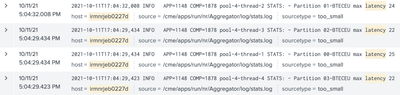
As you can see, there are 4 different partitions 00-BTECEU, 01-BTECEU, 02-BTECEU, 03-BTECEU. I was able to parse for the partition, but I'm having issues separating the latency for each partition.
Here's the query I tried, but the resulting table is empty:
host=irmnrjeb0227d AND latency | reverse | rex field=name "Partition\s(?<pName>\d\d\W\w+)" | streamstats current=f last(latency) as previouslatency by pName | rename latency as currentLatency | eval delta = currentLatency - previouslatency | timechart span=30s first(delta) as Delta by pName
Any help is appreciated, thanks!
- Mark as New
- Bookmark Message
- Subscribe to Message
- Mute Message
- Subscribe to RSS Feed
- Permalink
- Report Inappropriate Content


If you are looking for the rex statement to extract both fields, then use this
| rex field=name "Partition\s(?<pName>\d\d\W\w+)\smax\slatency\s(?<latency>\d+)" Note that the rename command is redundant, as you could use latency in the delta calculation


Join the Splunk Community Slack to learn, troubleshoot, and make connections with fellow Splunk practitioners in real time!
Join Splunk User Groups to connect and learn in-person by region or remotely by topic or industry.
Vibe-coding, AI, and Splunkcraft: Highlights from the .conf26 Builder Bar
Thanks for the Memories: .conf26 Took Learning to New Heights
Best Practices: Splunk auto adjust pipeline queue
