
Join the Conversation
- Find Answers
- :
- Using Splunk
- :
- Dashboards & Visualizations
- :
- Getting to combine all the inputs in a list assign...
- Subscribe to RSS Feed
- Mark Topic as New
- Mark Topic as Read
- Float this Topic for Current User
- Bookmark Topic
- Subscribe to Topic
- Mute Topic
- Printer Friendly Page
- Mark as New
- Bookmark Message
- Subscribe to Message
- Mute Message
- Subscribe to RSS Feed
- Permalink
- Report Inappropriate Content
Getting to combine all the inputs in a list assigned to All Button

I am trying to develop a dashboard with various dependent dropbox getting their data from a lookup table.
Like the below one
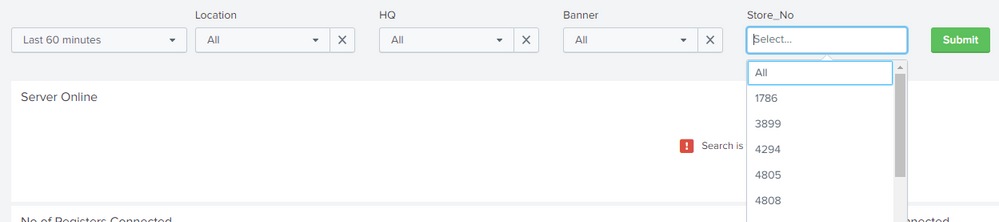
If the user selects the All button and clicks on the submit button, I just want the details of the data based on the filters to be used in my search. The store no is multi-select and all other filters are dropdowns.
I am using this store no as my base of the search for the rest of the dashboard details.
Looking for suggestions.
PS: I am a newbie to Splunk.
- Mark as New
- Bookmark Message
- Subscribe to Message
- Mute Message
- Subscribe to RSS Feed
- Permalink
- Report Inappropriate Content

This seems to be straight forwards as per the details/screenshot provided. Could you please add what is not working for you right now? What do you mean by "If the user selects the All button and clicks on the submit button"? Would it be possible for you to add your Simple XML right now? and also what SPL you are trying to run?
| makeresults | eval message= "Happy Splunking!!!"
- Mark as New
- Bookmark Message
- Subscribe to Message
- Mute Message
- Subscribe to RSS Feed
- Permalink
- Report Inappropriate Content


It's all about using tokens generated from one input in the search that populates the next, for example
      <input type="dropdown" token="region_state" searchWhenChanged="true">
        <label>State</label>
        <fieldForLabel>STATE</fieldForLabel>
        <fieldForValue>STATE</fieldForValue>
        <search>
          <query>| inputlookup patient_lookup.csv
  | stats count by STATE
  | fields STATE</query>
        </search>
        <default>*</default>
        <initialValue>*</initialValue>
        <choice value="*">All</choice>
      </input>
      <input type="dropdown" token="region_suburb" searchWhenChanged="true">
        <label>Suburb</label>
        <fieldForLabel>SUBURB</fieldForLabel>
        <fieldForValue>SUBURB</fieldForValue>
        <search>
          <query>| inputlookup patient_lookup.csv where STATE=$region_state$
  | stats count by SUBURB
  | fields SUBURB</query>
        </search>
        <choice value="*">All</choice>
        <default>*</default>
        <initialValue>*</initialValue>
      </input>
As you can see from above, the first dropdown supports selection of STATE into token region_state and the second lookup populates its options by using the $region_state$ in its populating search.

New Year, New Changes for Splunk Certifications
Stay Connected: Your Guide to January Tech Talks, Office Hours, and Webinars!
[Puzzles] Solve, Learn, Repeat: Reprocessing XML into Fixed-Length Events
