
Turn on suggestions
Auto-suggest helps you quickly narrow down your search results by suggesting possible matches as you type.
Dashboards & Visualizations
×
Join the Conversation
Without signing in, you're just watching from the sidelines. Sign in or Register to connect, share, and be part of the Splunk Community.
- Find Answers
- :
- Using Splunk
- :
- Dashboards & Visualizations
- :
- Re: Error in 'where' command
Options
- Subscribe to RSS Feed
- Mark Topic as New
- Mark Topic as Read
- Float this Topic for Current User
- Bookmark Topic
- Subscribe to Topic
- Mute Topic
- Printer Friendly Page
- Mark as New
- Bookmark Message
- Subscribe to Message
- Mute Message
- Subscribe to RSS Feed
- Permalink
- Report Inappropriate Content

rkris
Explorer
08-09-2020
09:14 AM
I get this error when i select the 'All' value from my dropdown input option as shown below
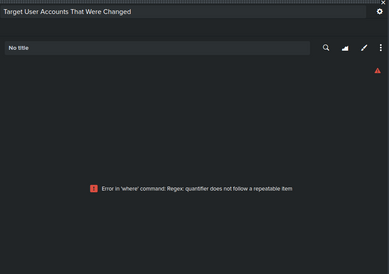
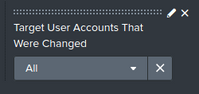
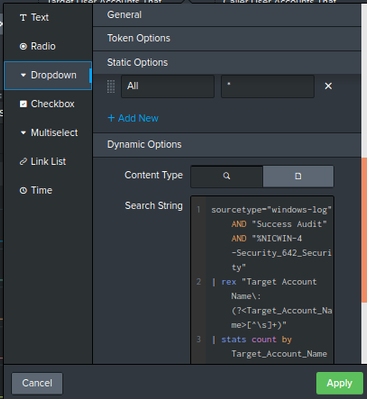
These are the static and dynamic options that i've added in my dropdown input
This is the search query i used for the panel where i received the error
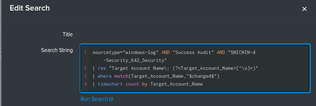
How do I fix this error?
1 Solution
- Mark as New
- Bookmark Message
- Subscribe to Message
- Mute Message
- Subscribe to RSS Feed
- Permalink
- Report Inappropriate Content

thambisetty

SplunkTrust
08-09-2020
09:28 AM
I believe you are matching Target_Account_Name from the dropdown variable $changed$
is ALL in dropdown set to *?
is that right?
if yes, replace where with below
| search Target_Account_Name=*$changed$*
————————————
If this helps, give a like below.
If this helps, give a like below.
- Mark as New
- Bookmark Message
- Subscribe to Message
- Mute Message
- Subscribe to RSS Feed
- Permalink
- Report Inappropriate Content
thambisetty
SplunkTrust
08-09-2020
09:28 AM
I believe you are matching Target_Account_Name from the dropdown variable $changed$
is ALL in dropdown set to *?
is that right?
if yes, replace where with below
| search Target_Account_Name=*$changed$*
————————————
If this helps, give a like below.
If this helps, give a like below.
- Mark as New
- Bookmark Message
- Subscribe to Message
- Mute Message
- Subscribe to RSS Feed
- Permalink
- Report Inappropriate Content
rkris
Explorer
08-09-2020
09:38 AM
@thambisetty Thank you for the solution


Got questions? Get answers!
Join the Splunk Community Slack to learn, troubleshoot, and make connections with fellow Splunk practitioners in real time!
Meet up IRL or virtually!
Join Splunk User Groups to connect and learn in-person by region or remotely by topic or industry.
Get Updates on the Splunk Community!
Federated Search for Snowflake Is Now Generally Available on Splunk Cloud Platform
Splunk is excited to announce the General Availability (GA) of Federated Search for ...
Help Us Build Better Splunk Regex Puzzles (And Win Prizes!)
If you’ve spent any time in the Splunk Community Slack, you’ve likely seen our resident Splunk Trust ...
Fuel Your Journey: What’s Waiting for You at the .conf26 Acceleration Station
Navigating the show floor at .conf26 isn't just about keynotes and technical breakout sessions; it's also ...
