
Join the Conversation
- Find Answers
- :
- Using Splunk
- :
- Dashboards & Visualizations
- :
- Re: Drilldown- set 2 token based on one click(row....
- Subscribe to RSS Feed
- Mark Topic as New
- Mark Topic as Read
- Float this Topic for Current User
- Bookmark Topic
- Subscribe to Topic
- Mute Topic
- Printer Friendly Page
- Mark as New
- Bookmark Message
- Subscribe to Message
- Mute Message
- Subscribe to RSS Feed
- Permalink
- Report Inappropriate Content

Hi,
I'm finding a way to set 2 token based on one click.
something like
<drilldown>
<set token="tag_click">$row.tag$</set>
<set token="tag_click2">$row-1.tag$</set>
</drilldown>
my statistics table.....
| tag | score |
| tag_a | 55 |
| tag_b | 80 |
| tag_c | 90 |
Desired output:
1)when i click on tag_c, $tag_click$= tag_c, $tag_click2$= tag_b
2)when i click on tag_b, $tag_click$= tag_b, $tag_click2$= tag_a
3)when i click on tag_a, $tag_click$= tag_a, $tag_click2$= ""
Is there a way to do this?
- Mark as New
- Bookmark Message
- Subscribe to Message
- Mute Message
- Subscribe to RSS Feed
- Permalink
- Report Inappropriate Content


Save this dashboard and take a look at the XML - it's using streamstats and the <fields> control to limit what's shown.
<dashboard>
  <label>clickprevrow</label>
  <row>
    <panel>
      <html>
        <h1>Click any row and a new panel will show you the tag from the clicked row and the tag from the previous row</h1>
      </html>
    </panel>
  </row>
  <row>
    <panel>
      <table>
        <search>
          <query>| makeresults
| eval _raw="tag	score
tag_a	55
tag_b	80
tag_c	90"
| multikv forceheader=1
| table tag score
| streamstats window=1 current=f first(tag) as prev_tag
          </query>
          <earliest>-24h@h</earliest>
          <latest>now</latest>
          <sampleRatio>1</sampleRatio>
        </search>
        <option name="count">100</option>
        <option name="dataOverlayMode">none</option>
        <option name="drilldown">row</option>
        <option name="percentagesRow">false</option>
        <option name="rowNumbers">false</option>
        <option name="totalsRow">false</option>
        <option name="wrap">true</option>
        <fields>tag score</fields>
        <drilldown>
          <set token="tag_click_current_row">$row.tag$</set>
          <eval token="tag_click_previous_row">if(isnull($row.prev_tag$),"Clicked on first row", $row.prev_tag$)</eval>
          <eval token="tag_click_previous_row_colour">if(isnull($row.prev_tag$),"red", "green")</eval>
          <set token="last_click">Tag clicked</set>
        </drilldown>
      </table>
    </panel>
    <panel depends="$last_click$">
      <html>
        <h1>Tag clicked</h1>
        <h2>Tag value clicked <b style="color:blue">$tag_click_current_row$</b></h2>
        <h2>Tag value from previous row <b style="color:$tag_click_previous_row_colour$">$tag_click_previous_row$</b></h2>
      </html>
    </panel>
  </row>
</dashboard>- Mark as New
- Bookmark Message
- Subscribe to Message
- Mute Message
- Subscribe to RSS Feed
- Permalink
- Report Inappropriate Content
Great, thanks for the solution, appreciate that
- Mark as New
- Bookmark Message
- Subscribe to Message
- Mute Message
- Subscribe to RSS Feed
- Permalink
- Report Inappropriate Content
Save this dashboard and take a look at the XML - it's using streamstats and the <fields> control to limit what's shown.
<dashboard>
  <label>clickprevrow</label>
  <row>
    <panel>
      <html>
        <h1>Click any row and a new panel will show you the tag from the clicked row and the tag from the previous row</h1>
      </html>
    </panel>
  </row>
  <row>
    <panel>
      <table>
        <search>
          <query>| makeresults
| eval _raw="tag	score
tag_a	55
tag_b	80
tag_c	90"
| multikv forceheader=1
| table tag score
| streamstats window=1 current=f first(tag) as prev_tag
          </query>
          <earliest>-24h@h</earliest>
          <latest>now</latest>
          <sampleRatio>1</sampleRatio>
        </search>
        <option name="count">100</option>
        <option name="dataOverlayMode">none</option>
        <option name="drilldown">row</option>
        <option name="percentagesRow">false</option>
        <option name="rowNumbers">false</option>
        <option name="totalsRow">false</option>
        <option name="wrap">true</option>
        <fields>tag score</fields>
        <drilldown>
          <set token="tag_click_current_row">$row.tag$</set>
          <eval token="tag_click_previous_row">if(isnull($row.prev_tag$),"Clicked on first row", $row.prev_tag$)</eval>
          <eval token="tag_click_previous_row_colour">if(isnull($row.prev_tag$),"red", "green")</eval>
          <set token="last_click">Tag clicked</set>
        </drilldown>
      </table>
    </panel>
    <panel depends="$last_click$">
      <html>
        <h1>Tag clicked</h1>
        <h2>Tag value clicked <b style="color:blue">$tag_click_current_row$</b></h2>
        <h2>Tag value from previous row <b style="color:$tag_click_previous_row_colour$">$tag_click_previous_row$</b></h2>
      </html>
    </panel>
  </row>
</dashboard>- Mark as New
- Bookmark Message
- Subscribe to Message
- Mute Message
- Subscribe to RSS Feed
- Permalink
- Report Inappropriate Content
@bowesmana
One question, how do i unshow the prev_tag when i display the table as line chart.
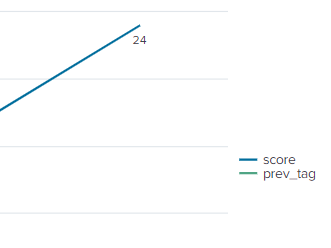
Using syntax (<fields>["tag","score"]</fields>) do hide the prev_tag as table but actually i plan to display the table as line chart.
The drilldown do function perfectly just if there any method to remove prev_tag when display it as line chart
- Mark as New
- Bookmark Message
- Subscribe to Message
- Mute Message
- Subscribe to RSS Feed
- Permalink
- Report Inappropriate Content
OK, so what do you want to be possible from drilldown in the line chart?
What would you intend to show on the X/Y axis from that chart relating to these tags?
The <fields> statement cannot be used in a chart like it is in table.
- Mark as New
- Bookmark Message
- Subscribe to Message
- Mute Message
- Subscribe to RSS Feed
- Permalink
- Report Inappropriate Content
Nevermind, I thinks it's okay, just asking if there is a way to hide the prev_tag from line chart. If no, its still worked perfectly when i click on the point(line chart) it do 'token' the "tag_click_current_row" and "tag_click_previous_row"
Thanks.
- Mark as New
- Bookmark Message
- Subscribe to Message
- Mute Message
- Subscribe to RSS Feed
- Permalink
- Report Inappropriate Content
It would probably be possible to 'hide' the legend with CSS, if you know how to use CSS, then you should look at using the g.highcharts-legend-item element to disable the display for that field name prev_tag
I am not sure how to do that, but perhaps open a new question and ask there.

Join the Splunk Community Slack to learn, troubleshoot, and make connections with fellow Splunk practitioners in real time!
Join Splunk User Groups to connect and learn in-person by region or remotely by topic or industry.
[Puzzles] Solve, Learn, Repeat: Matching cron expressions
Design, Compete, Win: Submit Your Best Splunk Dashboards for a .conf26 Pass
May 2026 Splunk Expert Sessions: Security & Observability
