
Join the Conversation
- Find Answers
- :
- Using Splunk
- :
- Dashboards & Visualizations
- :
- Different colors for each column in chart?
- Subscribe to RSS Feed
- Mark Topic as New
- Mark Topic as Read
- Float this Topic for Current User
- Bookmark Topic
- Subscribe to Topic
- Mute Topic
- Printer Friendly Page
- Mark as New
- Bookmark Message
- Subscribe to Message
- Mute Message
- Subscribe to RSS Feed
- Permalink
- Report Inappropriate Content

Hi everyone,
I have a column chart visualized by this SPL search:
index="orders"
| eval TimeOfTheDay=case(date_hour>=0 AND date_hour<=6,"Dawn",
date_hour>6 AND date_hour<=12,"Morning",
date_hour>12 AND date_hour<=18,"Afternoon",
date_hour>18 AND date_hour<=23,"Evening")
| eval orderedTimeOfTheDay=case(TimeOfTheDay=="Dawn",1,TimeOfTheDay=="Morning",2,TimeOfTheDay=="Afternoon",3,TimeOfTheDay=="Evening",4)
| stats count(order_id) as Orders by orderedTimeOfTheDay, TimeOfTheDay
| table TimeOfTheDay, Orders
And here is the chart visualized: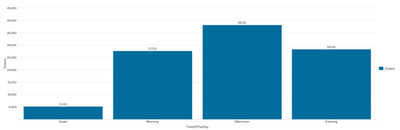
How I can set different colors for each column in the above visualization?
Thank you in advance.
- Mark as New
- Bookmark Message
- Subscribe to Message
- Mute Message
- Subscribe to RSS Feed
- Permalink
- Report Inappropriate Content

@dominhthe110 try the following with | eval {splitField}=overField option. You will have to enable chart stacking. Since you will always have 4 splits, it is better to use Bar Chart.

<dashboard theme="dark">
<label>Chart with Field Colors</label>
<row>
<panel>
<chart>
<search>
<query>index=_internal
| eval TimeOfTheDay=case(date_hour>=0 AND date_hour<=6,"Dawn",
date_hour>6 AND date_hour<=12,"Morning",
date_hour>12 AND date_hour<=18,"Afternoon",
date_hour>18 AND date_hour<=23,"Evening")
| eval orderedTimeOfTheDay=case(TimeOfTheDay=="Dawn","1.".TimeOfTheDay,TimeOfTheDay=="Morning","2.".TimeOfTheDay,TimeOfTheDay=="Afternoon","3.".TimeOfTheDay,TimeOfTheDay=="Evening","4.".TimeOfTheDay)
| stats count as Orders by orderedTimeOfTheDay
| eval {orderedTimeOfTheDay}=Orders
| fields - Orders
| eval orderedTimeOfTheDay=replace(orderedTimeOfTheDay,"\d+\.","")
| rename "1.*" as *, "2.*" as *,"3.*" as *,"4.*" as *</query>
<earliest>-24h@h</earliest>
<latest>now</latest>
<sampleRatio>1</sampleRatio>
</search>
<option name="charting.axisLabelsX.majorLabelStyle.overflowMode">ellipsisNone</option>
<option name="charting.axisLabelsX.majorLabelStyle.rotation">0</option>
<option name="charting.axisTitleX.visibility">collapsed</option>
<option name="charting.axisTitleY.visibility">visible</option>
<option name="charting.axisTitleY2.visibility">visible</option>
<option name="charting.axisX.abbreviation">none</option>
<option name="charting.axisX.scale">linear</option>
<option name="charting.axisY.abbreviation">auto</option>
<option name="charting.axisY.scale">linear</option>
<option name="charting.axisY2.abbreviation">none</option>
<option name="charting.axisY2.enabled">0</option>
<option name="charting.axisY2.scale">inherit</option>
<option name="charting.chart">bar</option>
<option name="charting.chart.bubbleMaximumSize">50</option>
<option name="charting.chart.bubbleMinimumSize">10</option>
<option name="charting.chart.bubbleSizeBy">area</option>
<option name="charting.chart.nullValueMode">gaps</option>
<option name="charting.chart.showDataLabels">none</option>
<option name="charting.chart.sliceCollapsingThreshold">0.01</option>
<option name="charting.chart.stackMode">stacked</option>
<option name="charting.chart.style">shiny</option>
<option name="charting.drilldown">none</option>
<option name="charting.fieldColors">{"Dawn":"#FACDB3","Morning":"#F1813F","Afternoon":"#F8BE34","Evening":"#E1E6EB"}</option>
<option name="charting.layout.splitSeries">0</option>
<option name="charting.layout.splitSeries.allowIndependentYRanges">0</option>
<option name="charting.legend.labelStyle.overflowMode">ellipsisMiddle</option>
<option name="charting.legend.mode">standard</option>
<option name="charting.legend.placement">none</option>
<option name="charting.lineWidth">2</option>
<option name="trellis.enabled">0</option>
<option name="trellis.scales.shared">1</option>
<option name="trellis.size">medium</option>
</chart>
</panel>
</row>
</dashboard>
| makeresults | eval message= "Happy Splunking!!!"
- Mark as New
- Bookmark Message
- Subscribe to Message
- Mute Message
- Subscribe to RSS Feed
- Permalink
- Report Inappropriate Content
@dominhthe110 try the following with | eval {splitField}=overField option. You will have to enable chart stacking. Since you will always have 4 splits, it is better to use Bar Chart.
<dashboard theme="dark">
<label>Chart with Field Colors</label>
<row>
<panel>
<chart>
<search>
<query>index=_internal
| eval TimeOfTheDay=case(date_hour>=0 AND date_hour<=6,"Dawn",
date_hour>6 AND date_hour<=12,"Morning",
date_hour>12 AND date_hour<=18,"Afternoon",
date_hour>18 AND date_hour<=23,"Evening")
| eval orderedTimeOfTheDay=case(TimeOfTheDay=="Dawn","1.".TimeOfTheDay,TimeOfTheDay=="Morning","2.".TimeOfTheDay,TimeOfTheDay=="Afternoon","3.".TimeOfTheDay,TimeOfTheDay=="Evening","4.".TimeOfTheDay)
| stats count as Orders by orderedTimeOfTheDay
| eval {orderedTimeOfTheDay}=Orders
| fields - Orders
| eval orderedTimeOfTheDay=replace(orderedTimeOfTheDay,"\d+\.","")
| rename "1.*" as *, "2.*" as *,"3.*" as *,"4.*" as *</query>
<earliest>-24h@h</earliest>
<latest>now</latest>
<sampleRatio>1</sampleRatio>
</search>
<option name="charting.axisLabelsX.majorLabelStyle.overflowMode">ellipsisNone</option>
<option name="charting.axisLabelsX.majorLabelStyle.rotation">0</option>
<option name="charting.axisTitleX.visibility">collapsed</option>
<option name="charting.axisTitleY.visibility">visible</option>
<option name="charting.axisTitleY2.visibility">visible</option>
<option name="charting.axisX.abbreviation">none</option>
<option name="charting.axisX.scale">linear</option>
<option name="charting.axisY.abbreviation">auto</option>
<option name="charting.axisY.scale">linear</option>
<option name="charting.axisY2.abbreviation">none</option>
<option name="charting.axisY2.enabled">0</option>
<option name="charting.axisY2.scale">inherit</option>
<option name="charting.chart">bar</option>
<option name="charting.chart.bubbleMaximumSize">50</option>
<option name="charting.chart.bubbleMinimumSize">10</option>
<option name="charting.chart.bubbleSizeBy">area</option>
<option name="charting.chart.nullValueMode">gaps</option>
<option name="charting.chart.showDataLabels">none</option>
<option name="charting.chart.sliceCollapsingThreshold">0.01</option>
<option name="charting.chart.stackMode">stacked</option>
<option name="charting.chart.style">shiny</option>
<option name="charting.drilldown">none</option>
<option name="charting.fieldColors">{"Dawn":"#FACDB3","Morning":"#F1813F","Afternoon":"#F8BE34","Evening":"#E1E6EB"}</option>
<option name="charting.layout.splitSeries">0</option>
<option name="charting.layout.splitSeries.allowIndependentYRanges">0</option>
<option name="charting.legend.labelStyle.overflowMode">ellipsisMiddle</option>
<option name="charting.legend.mode">standard</option>
<option name="charting.legend.placement">none</option>
<option name="charting.lineWidth">2</option>
<option name="trellis.enabled">0</option>
<option name="trellis.scales.shared">1</option>
<option name="trellis.size">medium</option>
</chart>
</panel>
</row>
</dashboard>
| makeresults | eval message= "Happy Splunking!!!"
- Mark as New
- Bookmark Message
- Subscribe to Message
- Mute Message
- Subscribe to RSS Feed
- Permalink
- Report Inappropriate Content
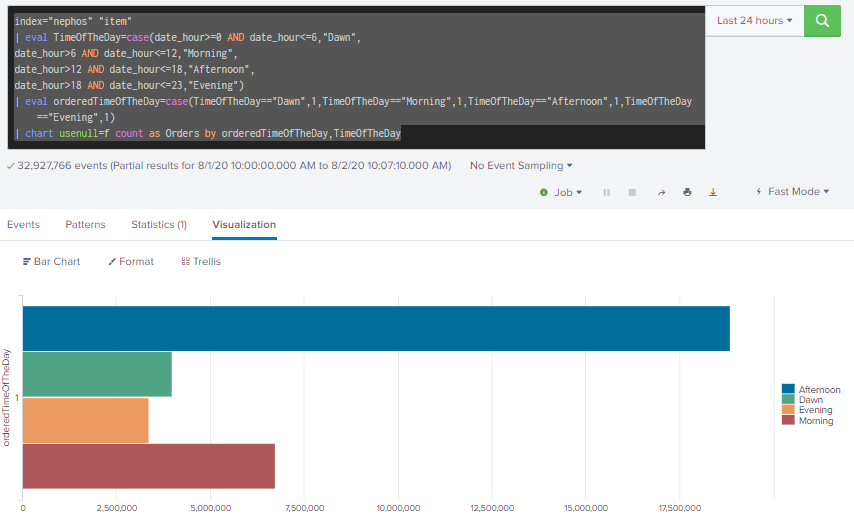
If you want simplified version then you can use "Chart" instead of "Stats" like below.
index="nephos" "item"
| eval TimeOfTheDay=case(date_hour>=0 AND date_hour<=6,"Dawn",
date_hour>6 AND date_hour<=12,"Morning",
date_hour>12 AND date_hour<=18,"Afternoon",
date_hour>18 AND date_hour<=23,"Evening")
| eval orderedTimeOfTheDay=case(TimeOfTheDay=="Dawn",1,TimeOfTheDay=="Morning",1,TimeOfTheDay=="Afternoon",1,TimeOfTheDay=="Evening",1)
| chart usenull=f count as Orders by orderedTimeOfTheDay,TimeOfTheDay
- Mark as New
- Bookmark Message
- Subscribe to Message
- Mute Message
- Subscribe to RSS Feed
- Permalink
- Report Inappropriate Content

sample:
index=_internal
| eval TimeOfTheDay=case(date_hour>=0 AND date_hour<=6,"Dawn",
date_hour>6 AND date_hour<=12,"Morning",
date_hour>12 AND date_hour<=18,"Afternoon",
date_hour>18 AND date_hour<=23,"Evening")
| eval orderedTimeOfTheDay=case(TimeOfTheDay=="Dawn",1,TimeOfTheDay=="Morning",2,TimeOfTheDay=="Afternoon",3,TimeOfTheDay=="Evening",4)
| stats count as Orders by orderedTimeOfTheDay, TimeOfTheDay
| table TimeOfTheDay, Orders
| xyseries TimeOfTheDay, TimeOfTheDay, Orders
How about xyseries ?

A Season of Skills: New Splunk Courses to Light Up Your Learning Journey
Announcing the Migration of the Splunk Add-on for Microsoft Azure Inputs to ...
Splunk Observability for AI
