
Join the Conversation
- Find Answers
- :
- Using Splunk
- :
- Dashboards & Visualizations
- :
- Dashboard Search Bug
- Subscribe to RSS Feed
- Mark Topic as New
- Mark Topic as Read
- Float this Topic for Current User
- Bookmark Topic
- Subscribe to Topic
- Mute Topic
- Printer Friendly Page
- Mark as New
- Bookmark Message
- Subscribe to Message
- Mute Message
- Subscribe to RSS Feed
- Permalink
- Report Inappropriate Content
Dashboard Search Bug

Hi all,
I have created a dashboard which takes input from multiple searches based on the radio button selected. The problem is, when I select a different radio button, the search does not change UNLESS I delete the text in the search box and Re-enter it. View the picture below for an example.
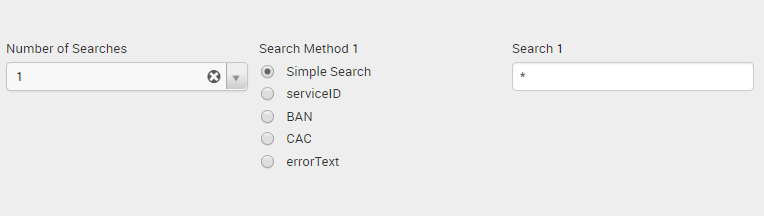
If I click simple search and hit submit, it works as intended. However, once I select another radio field such as serviceID, the search does not change unless I manually re-enter the *.
NOTE: This seems to work before I had the multiple searches included. Logic behind the multiple searches is so that users are able to search for fields that include both ServiceID and Error Text for example.
- Mark as New
- Bookmark Message
- Subscribe to Message
- Mute Message
- Subscribe to RSS Feed
- Permalink
- Report Inappropriate Content


Can you please provide sample events, and the dashboard code? Otherwise it will be like asking the magic number 8 ball 😉
cheers, MuS
- Mark as New
- Bookmark Message
- Subscribe to Message
- Mute Message
- Subscribe to RSS Feed
- Permalink
- Report Inappropriate Content
Apologies, here is the source code:
Experiment
<input type="time" token="field1">
  <label>TimePicker</label>
  <default>
    <earliest>-60m@m</earliest>
    <latest>now</latest>
  </default>
</input>
<input type="dropdown" token="multisearch" searchWhenChanged="false">
  <label>Number of Searches</label>
  <choice value="1">1</choice>
  <choice value="2">2</choice>
  <change>
    <condition value="1">
      <set token="hideSearch2">2</set>
    </condition>
    <condition value="2">
      <unset token="hideSearch2"></unset>
    </condition>
  </change>
  <default>1</default>
  <initialValue>1</initialValue>
</input>
<input type="radio" token="radioSearchFilter1" searchWhenChanged="false">
  <label>Search Method 1</label>
  <choice value="">Simple Search</choice>
  <choice value="foo=">foo</choice>
  <choice value="bar=">bar</choice>
  <default></default>
</input>
<input type="text" token="searchString1" searchWhenChanged="false">
  <label>Search 1</label>
  <default>*</default>
  <prefix>$radioSearchFilter1$"*</prefix>
  <suffix>*"</suffix>
</input>
<input type="radio" token="radioSearchFilter2" searchWhenChanged="false" rejects="$hideSearch2$">
  <label>Search Method 2</label>
  <choice value="">Simple Search</choice>
  <choice value="Foo=">Foo</choice>
  <choice value="Bar=">Bar</choice>
  <default></default>
</input>
<input type="text" token="searchString2" searchWhenChanged="true" rejects="$hideSearch2$">
  <label>Search 2</label>
  <default>*</default>
  <prefix>$radioSearchFilter2$"*</prefix>
  <suffix>*"</suffix>
</input>


<panel>
  <event>
    <title>Raw Events</title>
    <search>
      <query>index="foo"
| convert ctime(_time) AS TimeStamp
| search $searchString1$ $searchString2$
| table TimeStamp
| sort _time desc
none
progressbar



Join the Splunk Community Slack to learn, troubleshoot, and make connections with fellow Splunk practitioners in real time!
Join Splunk User Groups to connect and learn in-person by region or remotely by topic or industry.
Persistent Queue at TcpOut — One of Splunk's Most Practical Features
Skip the Awkward Silence: Have a .conf-ersation at .conf26
Rethinking Zero Trust: From Product Purchases to Logical Control Evidence
