
Join the Conversation
- Find Answers
- :
- Using Splunk
- :
- Dashboards & Visualizations
- :
- Change y axis scale to logarithmic scale
- Subscribe to RSS Feed
- Mark Topic as New
- Mark Topic as Read
- Float this Topic for Current User
- Bookmark Topic
- Subscribe to Topic
- Mute Topic
- Printer Friendly Page
- Mark as New
- Bookmark Message
- Subscribe to Message
- Mute Message
- Subscribe to RSS Feed
- Permalink
- Report Inappropriate Content

I know it is possible to change the scale of the y axis to log scale but I am not having any luck finding the answer. Can someone point me in the right direction or give me the XML option code that will do this for my line chart?
Thanks!
- Mark as New
- Bookmark Message
- Subscribe to Message
- Mute Message
- Subscribe to RSS Feed
- Permalink
- Report Inappropriate Content
<option name="charting.axisY.scale">log</option>
Appears to be answer.
- Mark as New
- Bookmark Message
- Subscribe to Message
- Mute Message
- Subscribe to RSS Feed
- Permalink
- Report Inappropriate Content
A simple and direct answer for this is to use "Format Visualization". I found this in the Search Tutorial manual (after looking in several other manuals, experimenting unsuccessfully in my case using the log() function with the timechart command; also found only way in Splunk Light Cloud to edit the formatting xml to be in the Dashboard feature, not right in Visualization).
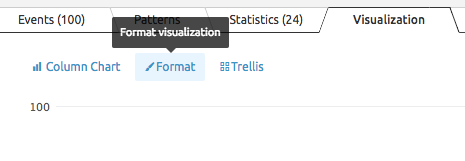
Working in Splunk Light Cloud, display results with Visualization tab; in the upper left there are three links - click the Format one:
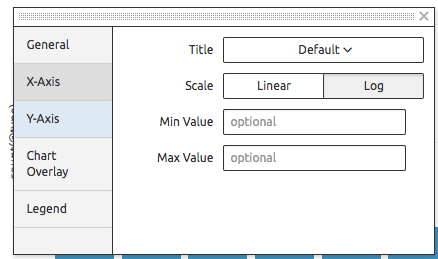
In that dialog, pick the Y-Axis button on the left and change the Scale from Linear to Log:


- Mark as New
- Bookmark Message
- Subscribe to Message
- Mute Message
- Subscribe to RSS Feed
- Permalink
- Report Inappropriate Content
<option name="charting.axisY.scale">log</option>
Appears to be answer.
- Mark as New
- Bookmark Message
- Subscribe to Message
- Mute Message
- Subscribe to RSS Feed
- Permalink
- Report Inappropriate Content
Another option that doesn't require manual editing of the panel is computing the log, like: ... | eval a=log(validated_count) | timechart sum(a)
- Mark as New
- Bookmark Message
- Subscribe to Message
- Mute Message
- Subscribe to RSS Feed
- Permalink
- Report Inappropriate Content

Maybe you are looking for this flag:
Log span syntax

<log-span>
Syntax: [<num>]log[<num>]
Description: Sets to log-based span. The first number is a
coefficient. The second number is the
base. If the first number is supplied,
it must be a real number >= 1.0 and <
base. Base, if supplied, must be real
number > 1.0 (strictly greater than1).
http://www.splunk.com/base/Documentation/latest/SearchReference/Timechart1).
- Mark as New
- Bookmark Message
- Subscribe to Message
- Mute Message
- Subscribe to RSS Feed
- Permalink
- Report Inappropriate Content
Thank you for the response.
I saw this but I dont know how to use this option. Could you please give an example where this is used to convert the Y axis of a timechart into logarithmic scale?
Any help is greatly appreciated.
- Mark as New
- Bookmark Message
- Subscribe to Message
- Mute Message
- Subscribe to RSS Feed
- Permalink
- Report Inappropriate Content
It is an option for the timechart search command:
http://docs.splunk.com/Documentation/Splunk/6.1/SearchReference/timechart

Join the Splunk Community Slack to learn, troubleshoot, and make connections with fellow Splunk practitioners in real time!
Join Splunk User Groups to connect and learn in-person by region or remotely by topic or industry.
Network to App: Observability Unlocked [May & June Series]
SPL2 Deep Dives, AppDynamics Integrations, SAML Made Simple and Much More on Splunk ...
[Puzzles] Solve, Learn, Repeat: Matching cron expressions
