
Turn on suggestions
Auto-suggest helps you quickly narrow down your search results by suggesting possible matches as you type.
Dashboards & Visualizations
×
Are you a member of the Splunk Community?
Sign in or Register with your Splunk account to get your questions answered, access valuable resources and connect with experts!
Turn on suggestions
Auto-suggest helps you quickly narrow down your search results by suggesting possible matches as you type.
- Find Answers
- :
- Using Splunk
- :
- Dashboards & Visualizations
- :
- Change color of single value visualization above c...
Options
- Subscribe to RSS Feed
- Mark Topic as New
- Mark Topic as Read
- Float this Topic for Current User
- Bookmark Topic
- Subscribe to Topic
- Mute Topic
- Printer Friendly Page
- Mark as New
- Bookmark Message
- Subscribe to Message
- Mute Message
- Subscribe to RSS Feed
- Permalink
- Report Inappropriate Content
Change color of single value visualization above certain number

tomabrz344
Observer
07-26-2021
07:50 AM
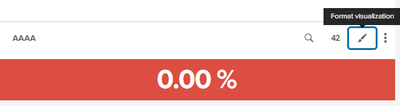
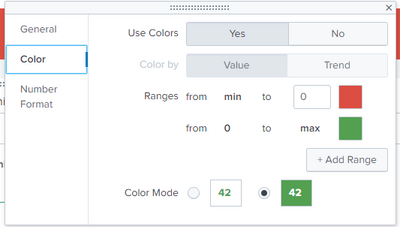
I need to set the dashboard so that numbers equal to 0 and above are highlighted in green and all others in red. Splunk automatically marks numbers less than and equal to 0 in red. How do I change this in the "other way"?
- Mark as New
- Bookmark Message
- Subscribe to Message
- Mute Message
- Subscribe to RSS Feed
- Permalink
- Report Inappropriate Content

richgalloway

SplunkTrust
07-26-2021
08:10 AM
Have you tried setting the red range to min to -0.01?
---
If this reply helps you, Karma would be appreciated.
If this reply helps you, Karma would be appreciated.
- Mark as New
- Bookmark Message
- Subscribe to Message
- Mute Message
- Subscribe to RSS Feed
- Permalink
- Report Inappropriate Content
tomabrz344
Observer
07-26-2021
09:26 AM
Unfortunately, some values look like this: -0.000005. It must be as I wrote in the post

Get Updates on the Splunk Community!
Index This | What’s a riddle wrapped in an enigma?
September 2025 Edition
Hayyy Splunk Education Enthusiasts and the Eternally Curious!
We’re back with this ...
BORE at .conf25
Boss Of Regular Expression (BORE) was an interactive session run again this year at .conf25 by the brilliant ...
OpenTelemetry for Legacy Apps? Yes, You Can!
This article is a follow-up to my previous article posted on the OpenTelemetry Blog, "Your Critical Legacy App ...
