
Are you a member of the Splunk Community?
- Find Answers
- :
- Using Splunk
- :
- Dashboards & Visualizations
- :
- Re: After creating a custom visualisation, why do ...
- Subscribe to RSS Feed
- Mark Topic as New
- Mark Topic as Read
- Float this Topic for Current User
- Bookmark Topic
- Subscribe to Topic
- Mute Topic
- Printer Friendly Page
- Mark as New
- Bookmark Message
- Subscribe to Message
- Mute Message
- Subscribe to RSS Feed
- Permalink
- Report Inappropriate Content
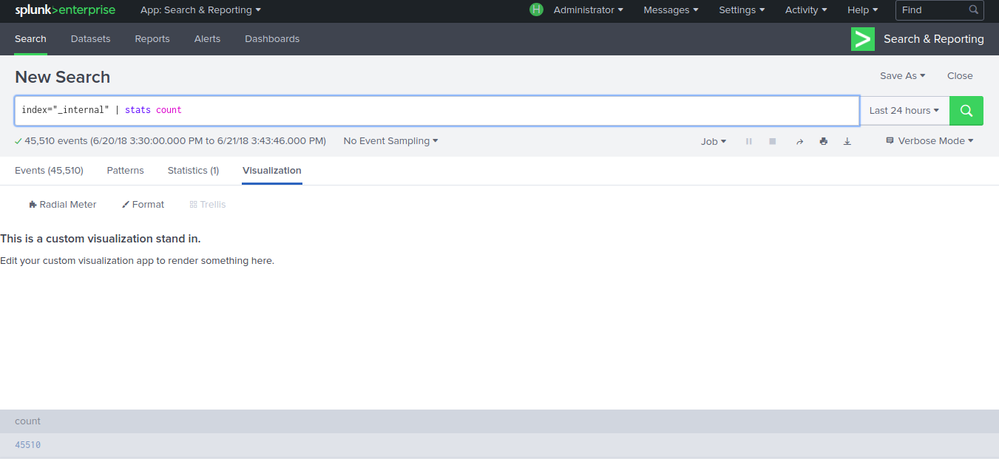
After creating a custom visualisation, why do i get "This is a custom visualization stand in. Edit your custom visualization app to render something here."?

Following the tutorial for creating a custom visualization app, got
This is a custom visualization stand in.

Edit your custom visualization app to render something here.
when i chose the custom visualisation . How do i correct this?

- Mark as New
- Bookmark Message
- Subscribe to Message
- Mute Message
- Subscribe to RSS Feed
- Permalink
- Report Inappropriate Content
@niketnilay can you please help?
- Mark as New
- Bookmark Message
- Subscribe to Message
- Mute Message
- Subscribe to RSS Feed
- Permalink
- Report Inappropriate Content

@bangalorep, if you have used the steps from Build Custom Visualization documentation about Splunk's Custom Visualization API, seems like you have missed some steps to add your Visualization code. Can you please verify that visualization_source.js has the required code as per the documentation?
If you are just trying the example all the steps before Try out the visualization should be completed first.
| makeresults | eval message= "Happy Splunking!!!"
- Mark as New
- Bookmark Message
- Subscribe to Message
- Mute Message
- Subscribe to RSS Feed
- Permalink
- Report Inappropriate Content
Hi niketnilay,
Yes i have completed all steps before Try out the visualization and also visualization_source.js has the required code as per the documentation.

Observability Unlocked: Kubernetes Monitoring with Splunk Observability Cloud
Wrapping Up Cybersecurity Awareness Month
🌟 From Audit Chaos to Clarity: Welcoming Audit Trail v2
