
Join the Conversation
- Find Answers
- :
- Using Splunk
- :
- Dashboards & Visualizations
- :
- Re: Advanced Dashboard using external picture
- Subscribe to RSS Feed
- Mark Topic as New
- Mark Topic as Read
- Float this Topic for Current User
- Bookmark Topic
- Subscribe to Topic
- Mute Topic
- Printer Friendly Page
- Mark as New
- Bookmark Message
- Subscribe to Message
- Mute Message
- Subscribe to RSS Feed
- Permalink
- Report Inappropriate Content
Advanced Dashboard using external picture

Hi folks,
I need show the status of some places that have some servers and IT objects in one picture attached. I have ideia that how I need do the querys but how I put the results in each piece of picture? Example: For the Build 1, I have X query, For the Build 2, I have Z query until now ok, but how I put each query in each square?
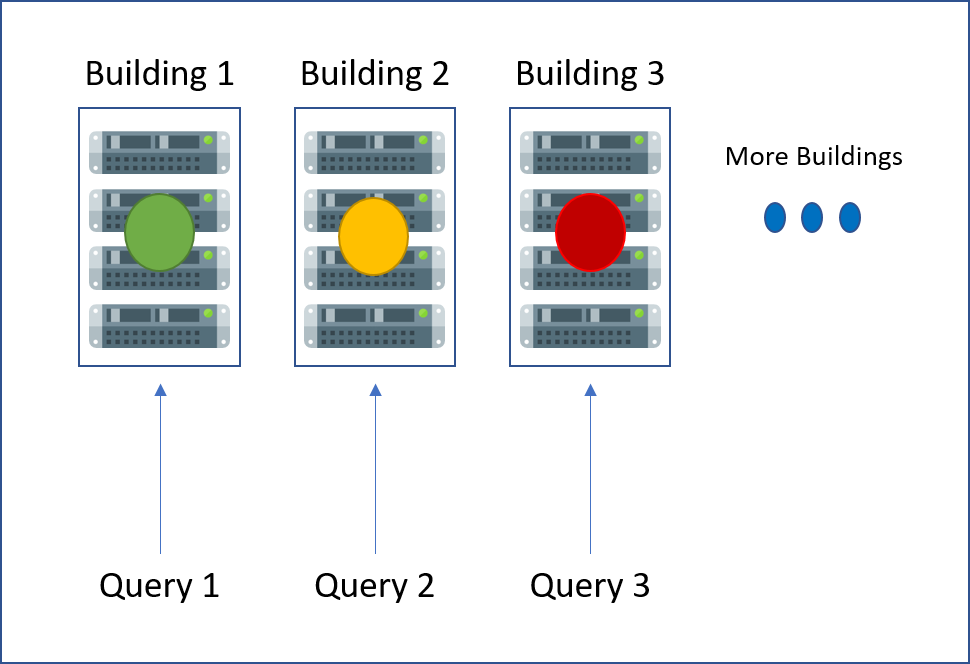
[ ]s
Rafael Martins
- Mark as New
- Bookmark Message
- Subscribe to Message
- Mute Message
- Subscribe to RSS Feed
- Permalink
- Report Inappropriate Content


Hi rafamss,
I think that using js it's possible to answer to you need.
If not, I can suggest a workaround that I used for a customer:
I used a backgroup image with a graphic schema and in the front I displayed green or red icons generated from different queries.
I realized this following indications in Splunk 6.x Dashboard Examples app ( https://splunkbase.splunk.com/app/1603/ ).
Examples to use are:
- "Image Overlay with Single Values" for the background image;
- "Table Icon Set (Rangemap)" or "Custom Decorations" for rge front icons.
Bye.
Giuseppe
- Mark as New
- Bookmark Message
- Subscribe to Message
- Mute Message
- Subscribe to RSS Feed
- Permalink
- Report Inappropriate Content
I will try this and back to you.
Tks!
Rafael Martins



Join the Splunk Community Slack to learn, troubleshoot, and make connections with fellow Splunk practitioners in real time!
Join Splunk User Groups to connect and learn in-person by region or remotely by topic or industry.
Self-Healing Pipeline Is Now Generally Available: AI-Powered CIM Compliance
Meet Splunk Observability Studio: AI-Assisted OpenTelemetry Instrumentation Without ...
Federated Search for Cisco Security and Analytics Logging (SAL) is now GA on Splunk ...
