
Join the Conversation
- Find Answers
- :
- Using Splunk
- :
- Splunk Search
- :
- using inputlookup command on csv file
- Subscribe to RSS Feed
- Mark Topic as New
- Mark Topic as Read
- Float this Topic for Current User
- Bookmark Topic
- Subscribe to Topic
- Mute Topic
- Printer Friendly Page
- Mark as New
- Bookmark Message
- Subscribe to Message
- Mute Message
- Subscribe to RSS Feed
- Permalink
- Report Inappropriate Content

Hi,
I am new to Splunk.
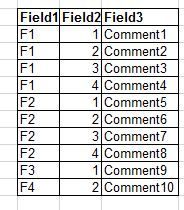
Attached screenshot is the data of my csv file. Please provide me a query to display the value of Field 3 for corresponding Field1 and Field2 values using inputlookup or lookup command.
Regards,
Vandana

- Mark as New
- Bookmark Message
- Subscribe to Message
- Mute Message
- Subscribe to RSS Feed
- Permalink
- Report Inappropriate Content
I found the answer:
|inputlookup file.csv | where Colum1="$Column1$" AND Column2="$Clomun2" | return $Column3
- Mark as New
- Bookmark Message
- Subscribe to Message
- Mute Message
- Subscribe to RSS Feed
- Permalink
- Report Inappropriate Content
I found the answer:
|inputlookup file.csv | where Column1="$Column1$" AND Column2="$Column2$" | return $Column3
- Mark as New
- Bookmark Message
- Subscribe to Message
- Mute Message
- Subscribe to RSS Feed
- Permalink
- Report Inappropriate Content
I found the answer:
|inputlookup file.csv | where Colum1="$Column1$" AND Column2="$Clomun2" | return $Column3
- Mark as New
- Bookmark Message
- Subscribe to Message
- Mute Message
- Subscribe to RSS Feed
- Permalink
- Report Inappropriate Content
| lookup lookup_name field1, field2 OUTPUTNEW field3
- Mark as New
- Bookmark Message
- Subscribe to Message
- Mute Message
- Subscribe to RSS Feed
- Permalink
- Report Inappropriate Content

See this on how to upload your csv file as lookup table file.
https://docs.splunk.com/Documentation/Splunk/7.2.3/Knowledge/Usefieldlookupstoaddinformationtoyourev...
Once you've the lookup table in your Splunk instance, you can use the lookup table as described here:
https://docs.splunk.com/Documentation/Splunk/7.2.3/SearchReference/Lookup
- Mark as New
- Bookmark Message
- Subscribe to Message
- Mute Message
- Subscribe to RSS Feed
- Permalink
- Report Inappropriate Content


What have you tried so far? What results did you get?
If this reply helps you, Karma would be appreciated.

App Platform's 2025 Year in Review: A Year of Innovation, Growth, and Community
Operationalizing Entity Risk Score with Enterprise Security 8.3+
Unlock Database Monitoring with Splunk Observability Cloud
