
Join the Conversation
- Find Answers
- :
- Apps & Add-ons
- :
- All Apps and Add-ons
- :
- increase the height of sunburst chart
- Subscribe to RSS Feed
- Mark Topic as New
- Mark Topic as Read
- Float this Topic for Current User
- Bookmark Topic
- Subscribe to Topic
- Mute Topic
- Printer Friendly Page
- Mark as New
- Bookmark Message
- Subscribe to Message
- Mute Message
- Subscribe to RSS Feed
- Permalink
- Report Inappropriate Content

Hi ,
i am trying to increase the height of sunburst chart height with below code.
<option name="sunburst_viz.sunburst_viz.height">850</option>
but its not working. could you please help.
- Mark as New
- Bookmark Message
- Subscribe to Message
- Mute Message
- Subscribe to RSS Feed
- Permalink
- Report Inappropriate Content

Hi @supraja
Not sure how to set it exactly for the required height without changing the CSS. But you can play around with the height & width of the panel as per your dashboard. Use the panel resizing (DOT) seen under the visualization and align with the other panels on the dashboard.
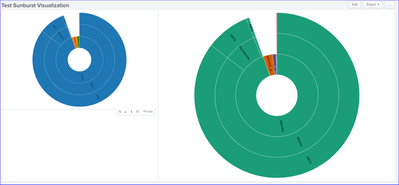
<dashboard>
  <label>Test Sunburst Visualization</label>
  <row>
    <panel id="sunburst_panel1">
      <viz type="sunburst_viz.sunburst_viz">
        <search>
          <query>index=_internal | eval component = coalesce(component,"") | eval log_level = coalesce(log_level,"") | stats count by sourcetype component log_level</query>
          <earliest>-24h@h</earliest>
          <latest>now</latest>
          <sampleRatio>1</sampleRatio>
        </search>
        <option name="drilldown">none</option>
        <option name="height">422</option>
        <option name="trellis.enabled">0</option>
        <option name="trellis.scales.shared">1</option>
        <option name="trellis.size">medium</option>
      </viz>
    </panel>
    <panel id="sunburst_panel2">
      <viz type="sunburst_viz.sunburst_viz">
        <search>
          <query>index=_internal | eval component = coalesce(component,"") | eval log_level = coalesce(log_level,"") | stats count by sourcetype component log_level</query>
          <earliest>-24h@h</earliest>
          <latest>now</latest>
          <sampleRatio>1</sampleRatio>
        </search>
        <option name="drilldown">none</option>
        <option name="height">466</option>
        <option name="sunburst_viz.sunburst_viz.breadcrumbs">hide</option>
        <option name="sunburst_viz.sunburst_viz.color">schemeDark2</option>
        <option name="sunburst_viz.sunburst_viz.colormode">root</option>
        <option name="sunburst_viz.sunburst_viz.labelcolor">#000000</option>
        <option name="sunburst_viz.sunburst_viz.labels">show</option>
        <option name="sunburst_viz.sunburst_viz.labelsize">100</option>
        <option name="sunburst_viz.sunburst_viz.labelwidth">100</option>
        <option name="sunburst_viz.sunburst_viz.maxrows">1500</option>
        <option name="sunburst_viz.sunburst_viz.mode">static</option>
        <option name="trellis.enabled">0</option>
        <option name="trellis.scales.shared">1</option>
        <option name="trellis.size">medium</option>
      </viz>
    </panel>
  </row>
  <row depends="$alwaysHidden$">
    <panel>
      <html>
      <style>
        #sunburst_panel1{
          height: 60% !important;
          width: 40% !important;}
        #sunburst_panel2{
          height: 60% !important;
          width: 60% !important;}
      </style>
    </html>
    </panel>
  </row>
</dashboard>
If it helps, an upvote will be appreciated!
- Mark as New
- Bookmark Message
- Subscribe to Message
- Mute Message
- Subscribe to RSS Feed
- Permalink
- Report Inappropriate Content
Hi @supraja
Not sure how to set it exactly for the required height without changing the CSS. But you can play around with the height & width of the panel as per your dashboard. Use the panel resizing (DOT) seen under the visualization and align with the other panels on the dashboard.
<dashboard>
  <label>Test Sunburst Visualization</label>
  <row>
    <panel id="sunburst_panel1">
      <viz type="sunburst_viz.sunburst_viz">
        <search>
          <query>index=_internal | eval component = coalesce(component,"") | eval log_level = coalesce(log_level,"") | stats count by sourcetype component log_level</query>
          <earliest>-24h@h</earliest>
          <latest>now</latest>
          <sampleRatio>1</sampleRatio>
        </search>
        <option name="drilldown">none</option>
        <option name="height">422</option>
        <option name="trellis.enabled">0</option>
        <option name="trellis.scales.shared">1</option>
        <option name="trellis.size">medium</option>
      </viz>
    </panel>
    <panel id="sunburst_panel2">
      <viz type="sunburst_viz.sunburst_viz">
        <search>
          <query>index=_internal | eval component = coalesce(component,"") | eval log_level = coalesce(log_level,"") | stats count by sourcetype component log_level</query>
          <earliest>-24h@h</earliest>
          <latest>now</latest>
          <sampleRatio>1</sampleRatio>
        </search>
        <option name="drilldown">none</option>
        <option name="height">466</option>
        <option name="sunburst_viz.sunburst_viz.breadcrumbs">hide</option>
        <option name="sunburst_viz.sunburst_viz.color">schemeDark2</option>
        <option name="sunburst_viz.sunburst_viz.colormode">root</option>
        <option name="sunburst_viz.sunburst_viz.labelcolor">#000000</option>
        <option name="sunburst_viz.sunburst_viz.labels">show</option>
        <option name="sunburst_viz.sunburst_viz.labelsize">100</option>
        <option name="sunburst_viz.sunburst_viz.labelwidth">100</option>
        <option name="sunburst_viz.sunburst_viz.maxrows">1500</option>
        <option name="sunburst_viz.sunburst_viz.mode">static</option>
        <option name="trellis.enabled">0</option>
        <option name="trellis.scales.shared">1</option>
        <option name="trellis.size">medium</option>
      </viz>
    </panel>
  </row>
  <row depends="$alwaysHidden$">
    <panel>
      <html>
      <style>
        #sunburst_panel1{
          height: 60% !important;
          width: 40% !important;}
        #sunburst_panel2{
          height: 60% !important;
          width: 60% !important;}
      </style>
    </html>
    </panel>
  </row>
</dashboard>
If it helps, an upvote will be appreciated!

Accelerating Observability as Code with the Splunk AI Assistant
Integrating Splunk Search API and Quarto to Create Reproducible Investigation ...
Congratulations to the 2025-2026 SplunkTrust!
