
Join the Conversation
- Find Answers
- :
- Apps & Add-ons
- :
- All Apps and Add-ons
- :
- All Apps and Add-ons
- :
- Re: dont work Juniper SSG Firewall Log Analysis ap...
- Subscribe to RSS Feed
- Mark Topic as New
- Mark Topic as Read
- Float this Topic for Current User
- Bookmark Topic
- Subscribe to Topic
- Mute Topic
- Printer Friendly Page
- Mark as New
- Bookmark Message
- Subscribe to Message
- Mute Message
- Subscribe to RSS Feed
- Permalink
- Report Inappropriate Content
dont work Juniper SSG Firewall Log Analysis app

hello ,
how i can add this app to splunk , when i add to splunk and copy extract file" Juniper SSG Firewall Log Analysis" to $splunk/etc/app , dont show to me any things in dashboard,
please help me
- Mark as New
- Bookmark Message
- Subscribe to Message
- Mute Message
- Subscribe to RSS Feed
- Permalink
- Report Inappropriate Content

As jkat54 mentioned, the Splunk Add-on for Juniper is required in order to create the Splunk parsers for Juniper logs. In addition to that, make sure that you run the setup for the Firegen for Juniper app (it should launch automatically when you use it first time). During the setup you have to specify or confirm the index used to collect the Juniper logs. For example, if you collect your logs through an index called "ssg", the setup page should look like this:
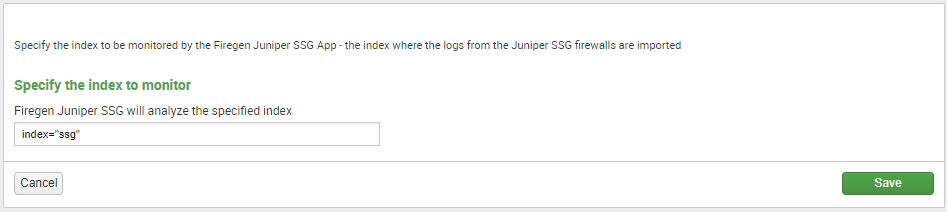
This setting configures the ssg_index macro used by the analyzer app. If the app still doesn't show any stats after you configure the index, make sure that indeed you do have log entries for the time interval that you are trying to analyze. Open a regular search box and just enter the index and the time interval. The search should return the Juniper entries. Confirm that the entries contain fields such as src, dst, action, service, dst_port, sent and rcvd:
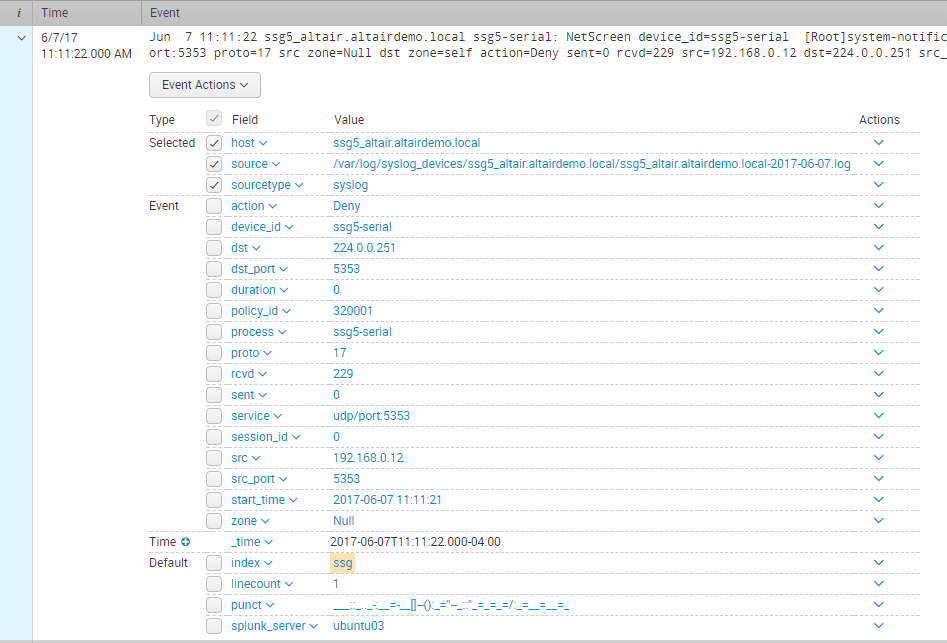
If the fields are not present then it's possible that the Splunk Add-on for Juniper is not installed properly or the log entries are not in the format expected by the add-on. Post a screenshot with the extracted fields if that's the case so we can take a look.


- Mark as New
- Bookmark Message
- Subscribe to Message
- Mute Message
- Subscribe to RSS Feed
- Permalink
- Report Inappropriate Content


The app requires the Splunk Add-On for Juniper (https://splunkbase.splunk.com/app/2847) in order to create the required sourcetypes.
Do you have the add on installed too?

Join the Splunk Community Slack to learn, troubleshoot, and make connections with fellow Splunk practitioners in real time!
Join Splunk User Groups to connect and learn in-person by region or remotely by topic or industry.
May 2026 Splunk Expert Sessions: Security & Observability
Network to App: Observability Unlocked [May & June Series]
SPL2 Deep Dives, AppDynamics Integrations, SAML Made Simple and Much More on Splunk ...
