
Turn on suggestions
Auto-suggest helps you quickly narrow down your search results by suggesting possible matches as you type.
All Apps and Add-ons
×
Join the Conversation
Without signing in, you're just watching from the sidelines. Sign in or Register to connect, share, and be part of the Splunk Community.
Turn on suggestions
Auto-suggest helps you quickly narrow down your search results by suggesting possible matches as you type.
- Find Answers
- :
- Apps & Add-ons
- :
- All Apps and Add-ons
- :
- Why is Splunk Alert to MS Teams not Working?
Options
- Subscribe to RSS Feed
- Mark Topic as New
- Mark Topic as Read
- Float this Topic for Current User
- Bookmark Topic
- Subscribe to Topic
- Mute Topic
- Printer Friendly Page
- Mark as New
- Bookmark Message
- Subscribe to Message
- Mute Message
- Subscribe to RSS Feed
- Permalink
- Report Inappropriate Content
Why is Splunk Alert to MS Teams not Working?

smanojkumar
Contributor
06-26-2023
01:41 AM
Hi Team,
Good day!
I need to send alert notification to teams by connectors, I had filled the mandatory fields in Alert actions in MS Teams, But I can't see notifications in MS Teams I can see as a triggered alerts,
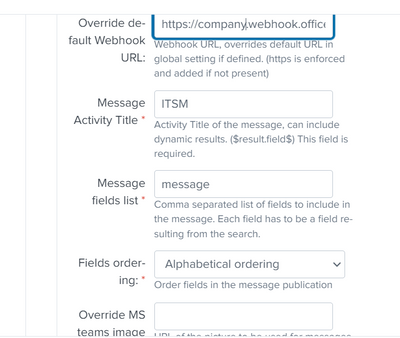
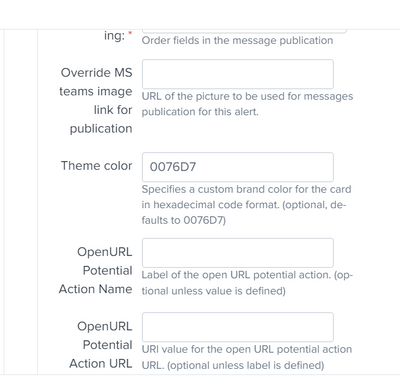
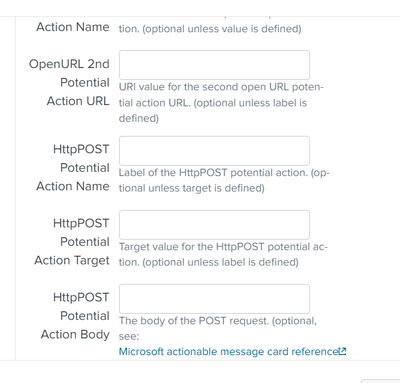
Can any one help me to sort it out,
Thanks in Advance!
Manoj Kumar S
- Mark as New
- Bookmark Message
- Subscribe to Message
- Mute Message
- Subscribe to RSS Feed
- Permalink
- Report Inappropriate Content

richgalloway

SplunkTrust
06-26-2023
05:27 AM
Have you confirmed the Splunk server has access to the Teams server? Perhaps a firewall is blocking connections.
Have you checked the logs?
---
If this reply helps you, Karma would be appreciated.
If this reply helps you, Karma would be appreciated.
- Mark as New
- Bookmark Message
- Subscribe to Message
- Mute Message
- Subscribe to RSS Feed
- Permalink
- Report Inappropriate Content
smanojkumar
Contributor
06-26-2023
06:34 AM
Hi @richgalloway ,
Thanks for your response,
I'm new to the Splunk, Can you please help how to conform the access?
Thanks in Advance!
Manoj Kumar S
- Mark as New
- Bookmark Message
- Subscribe to Message
- Mute Message
- Subscribe to RSS Feed
- Permalink
- Report Inappropriate Content
richgalloway
SplunkTrust
06-26-2023
06:43 AM
That's not a Splunk task. Use standard network tools (curl, nc, telnet, etc.) to confirm access or contact your Network Admin.
---
If this reply helps you, Karma would be appreciated.
If this reply helps you, Karma would be appreciated.

Get Updates on the Splunk Community!
Your Guide to Splunk Digital Experience Monitoring
A flawless digital experience isn't just an advantage, it's key to customer loyalty and business success. But ...
Data Management Digest – November 2025
Welcome to the inaugural edition of Data Management Digest!
As your trusted partner in data innovation, the ...
Upcoming Webinar: Unmasking Insider Threats with Slunk Enterprise Security’s UEBA
Join us on Wed, Dec 10. at 10AM PST / 1PM EST for a live webinar and demo with Splunk experts! Discover how ...
