
Join the Conversation
- Find Answers
- :
- Apps & Add-ons
- :
- All Apps and Add-ons
- :
- All Apps and Add-ons
- :
- Splunk DB Connect 2: Metadata configuration proble...
- Subscribe to RSS Feed
- Mark Topic as New
- Mark Topic as Read
- Float this Topic for Current User
- Bookmark Topic
- Subscribe to Topic
- Mute Topic
- Printer Friendly Page
- Mark as New
- Bookmark Message
- Subscribe to Message
- Mute Message
- Subscribe to RSS Feed
- Permalink
- Report Inappropriate Content


I am trying to change the index that the data is going into from DB Connect, but I am unable to change it from main. In the configuration, I change the index in the Metadata section to an existing index, but I get an error when I save the configuration saying "Review this step before saving" and it NEVER saves, even if I hit the save button again.
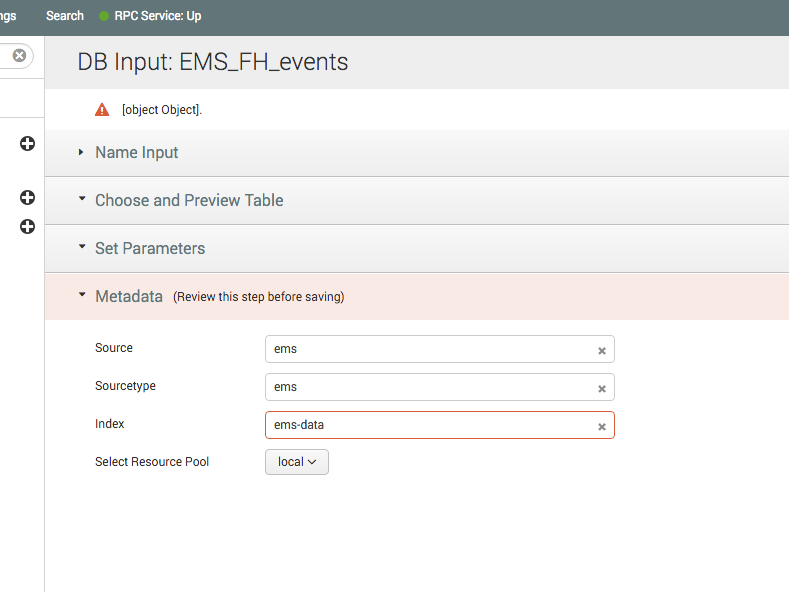
Does anyone know why this is happening, or how to get this to save and work?
This is from the Operations tab, in the DB Inputs side menu option, and the change to the index is the only thing that causes this to fail, so it seems to be related only to that parameter and no other.

- Mark as New
- Bookmark Message
- Subscribe to Message
- Mute Message
- Subscribe to RSS Feed
- Permalink
- Report Inappropriate Content
The problem was with the index name. It couldn't have the hyphen/dash (-) in the name, which was strange, since it allowed that index to be created. But now we all know that if this shows up, look for (and remove) any hyphens is the index name.
- Mark as New
- Bookmark Message
- Subscribe to Message
- Mute Message
- Subscribe to RSS Feed
- Permalink
- Report Inappropriate Content
The problem was with the index name. It couldn't have the hyphen/dash (-) in the name, which was strange, since it allowed that index to be created. But now we all know that if this shows up, look for (and remove) any hyphens is the index name.

Join the Splunk Community Slack to learn, troubleshoot, and make connections with fellow Splunk practitioners in real time!
Join Splunk User Groups to connect and learn in-person by region or remotely by topic or industry.
[Puzzles] Solve, Learn, Repeat: Character substitutions with Regular Expressions
Splunk Community Badges!
[Puzzles] Solve, Learn, Repeat: Matching cron expressions
