
Join the Conversation
- Find Answers
- :
- Apps & Add-ons
- :
- All Apps and Add-ons
- :
- All Apps and Add-ons
- :
- Re: Splunk App name not visible after copying
- Subscribe to RSS Feed
- Mark Topic as New
- Mark Topic as Read
- Float this Topic for Current User
- Bookmark Topic
- Subscribe to Topic
- Mute Topic
- Printer Friendly Page
- Mark as New
- Bookmark Message
- Subscribe to Message
- Mute Message
- Subscribe to RSS Feed
- Permalink
- Report Inappropriate Content
Splunk App name not visible after copying

Hello,
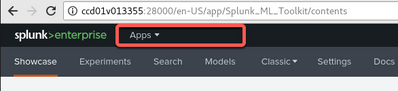
I copied some apps from one instance to another and surprisingly the name of the app is not shown anymore. When I expand the App-dropdown, the app is there and I can choose it, but I would like to have the app-name permanently displayed that the users knows which app they are in.
I am not able to figure out what is the issue here. This is the case for both my own apps but also for the standard Splunk apps, like the ML Toolkit, see the screenshots below.
Is it because of copying? I did not install it new, just copied the folder from the os unix "splunk" account.
Perhaps this is about the Splunk version: I am copying from 8.0.6 to 8.1.2.
Could anyone help?
Kind Regards,
Kamil

- Mark as New
- Bookmark Message
- Subscribe to Message
- Mute Message
- Subscribe to RSS Feed
- Permalink
- Report Inappropriate Content
Hi
we have updated from 8.0.8 to 8.1.6 now and we have the same experience, some app names are shown like "App: Splunk DB connect" and for other apps it's only showing "Apps".
Can anybody explain this or maybe tell us how to fix it?
regards
Thomas
- Mark as New
- Bookmark Message
- Subscribe to Message
- Mute Message
- Subscribe to RSS Feed
- Permalink
- Report Inappropriate Content

@damucka , Yes! But these are only displayed when we navigate to inputs, configuration pages that are custom to the add-on's but when we navigate to "search" tab under the Db connect app for example, again the app name disappears from the top left section. same as the case with webtools.
- Mark as New
- Bookmark Message
- Subscribe to Message
- Mute Message
- Subscribe to RSS Feed
- Permalink
- Report Inappropriate Content

It is due to different Splunk versions. Prior to the 8.1 versions, the MenuButton label was App: <APPNAME>. Now it is just Apps.
- Mark as New
- Bookmark Message
- Subscribe to Message
- Mute Message
- Subscribe to RSS Feed
- Permalink
- Report Inappropriate Content
Thank you.
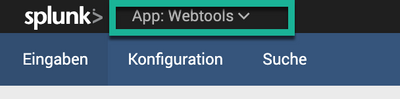
But, are you positive on this? Because interestingly for some Apps the names are still showing ... e.g. DB Connect or Webtools Apps, see the screenshots.
Kind Regards,
Kamil


Join the Splunk Community Slack to learn, troubleshoot, and make connections with fellow Splunk practitioners in real time!
Join Splunk User Groups to connect and learn in-person by region or remotely by topic or industry.
Design, Compete, Win: Submit Your Best Splunk Dashboards for a .conf26 Pass
May 2026 Splunk Expert Sessions: Security & Observability
Network to App: Observability Unlocked [May & June Series]
