
Join the Conversation
- Find Answers
- :
- Apps & Add-ons
- :
- All Apps and Add-ons
- :
- All Apps and Add-ons
- :
- Re: Splunk App for Windows Infrastructure and Wind...
- Subscribe to RSS Feed
- Mark Topic as New
- Mark Topic as Read
- Float this Topic for Current User
- Bookmark Topic
- Subscribe to Topic
- Mute Topic
- Printer Friendly Page
- Mark as New
- Bookmark Message
- Subscribe to Message
- Mute Message
- Subscribe to RSS Feed
- Permalink
- Report Inappropriate Content

Fresh install (not in production yet) so I can reconfigure as necessary.
Distributed deployment, all Splunk servers are Linux; 1 search head, 3 indexer cluster, 1 deployment server
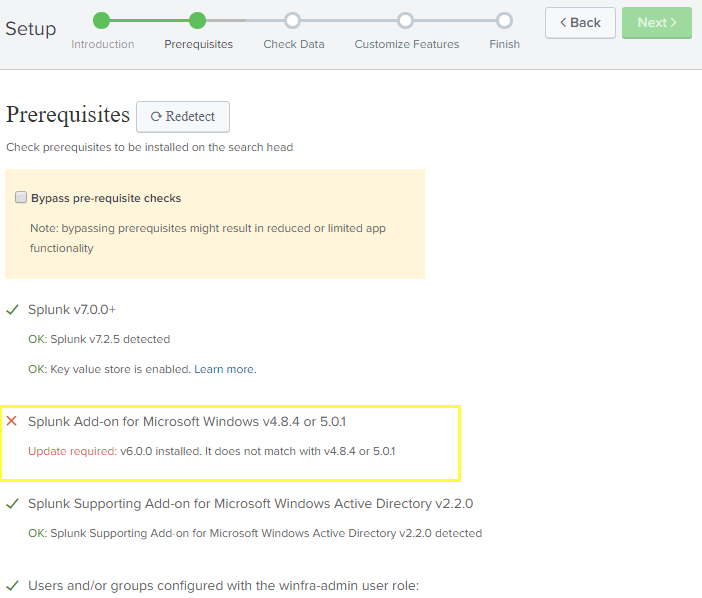
Getting an error during guided setup re version 6 of the add-on is installed.
Have been following this guide:
https://docs.splunk.com/Documentation/MSApp/1.5.1/MSInfra/AbouttheSplunkAppforMSInfrastructurea
Okay to bypass this error?
- Mark as New
- Bookmark Message
- Subscribe to Message
- Mute Message
- Subscribe to RSS Feed
- Permalink
- Report Inappropriate Content

- Mark as New
- Bookmark Message
- Subscribe to Message
- Mute Message
- Subscribe to RSS Feed
- Permalink
- Report Inappropriate Content
You could use v6, but you would have to bypass the pre-requisite checks. However, please note that you have to complete certain steps prior to deploying v6. Right now, I personally feel it isn't worth the headache. I've come across various issues with dashboards and data not ingesting correctly.
- Mark as New
- Bookmark Message
- Subscribe to Message
- Mute Message
- Subscribe to RSS Feed
- Permalink
- Report Inappropriate Content
install the TA that matches the requirement, 5.0.1 or 4.8.4
- Mark as New
- Bookmark Message
- Subscribe to Message
- Mute Message
- Subscribe to RSS Feed
- Permalink
- Report Inappropriate Content
I used the 5.x version and it's working. Not sure why Splunk released the 6.x version and didn't include it as part of this. Must be for something else.



Join the Splunk Community Slack to learn, troubleshoot, and make connections with fellow Splunk practitioners in real time!
Join Splunk User Groups to connect and learn in-person by region or remotely by topic or industry.
Vibe-coding, AI, and Splunkcraft: Highlights from the .conf26 Builder Bar
Thanks for the Memories: .conf26 Took Learning to New Heights
Best Practices: Splunk auto adjust pipeline queue
