
Join the Conversation
- Find Answers
- :
- Apps & Add-ons
- :
- All Apps and Add-ons
- :
- All Apps and Add-ons
- :
- Splunk App for AWS: Where are AWS Dashboards in Sp...
- Subscribe to RSS Feed
- Mark Topic as New
- Mark Topic as Read
- Float this Topic for Current User
- Bookmark Topic
- Subscribe to Topic
- Mute Topic
- Printer Friendly Page
- Mark as New
- Bookmark Message
- Subscribe to Message
- Mute Message
- Subscribe to RSS Feed
- Permalink
- Report Inappropriate Content

We noticed when we enter the "Splunk App for AWS" that we can not see our AWS dashboards. Every time when we click in the toolbar (upper right corner) on "dashboard" we enter the dashboard screen of Splunk Light. Is this a software bug in the cloud version because on the local installed Splunk Light version everything seems to be okay (both have the same version number 6.5.1)?
Currently we find those dashboards only via url splunkurl/en-US/app/splunk_app_aws/dashboards
Does anybody know how to enter the Splunk App for AWS dashboard in the graphical interface of Splunk Light Cloud?
- Mark as New
- Bookmark Message
- Subscribe to Message
- Mute Message
- Subscribe to RSS Feed
- Permalink
- Report Inappropriate Content

Hi fitx,
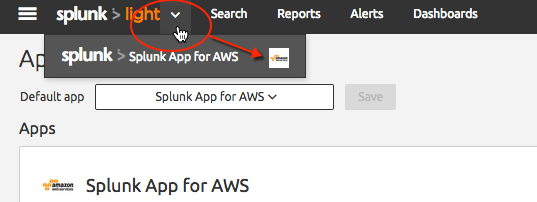
The issue in Splunk Light cloud service affecting the App for AWS from displaying correctly has been fixed. In the Splunk Light user interface, go to the Apps and Add-ons page and confirm the App for AWS is installed/enabled, and the Add-on for Amazon Web Services is installed/enabled. Restart if you haven't already done so. The App for AWS menu bar should be available in the page header by clicking the caret on the Splunk Light logo to toggle to the App for AWS page. You should see the App for AWS configuration menu and dashboard. See the attached screenshots. Let me know if you are still having issues. Thanks
- Mark as New
- Bookmark Message
- Subscribe to Message
- Mute Message
- Subscribe to RSS Feed
- Permalink
- Report Inappropriate Content
Hi fitx,
The issue in Splunk Light cloud service affecting the App for AWS from displaying correctly has been fixed. In the Splunk Light user interface, go to the Apps and Add-ons page and confirm the App for AWS is installed/enabled, and the Add-on for Amazon Web Services is installed/enabled. Restart if you haven't already done so. The App for AWS menu bar should be available in the page header by clicking the caret on the Splunk Light logo to toggle to the App for AWS page. You should see the App for AWS configuration menu and dashboard. See the attached screenshots. Let me know if you are still having issues. Thanks
- Mark as New
- Bookmark Message
- Subscribe to Message
- Mute Message
- Subscribe to RSS Feed
- Permalink
- Report Inappropriate Content

- Mark as New
- Bookmark Message
- Subscribe to Message
- Mute Message
- Subscribe to RSS Feed
- Permalink
- Report Inappropriate Content


- Mark as New
- Bookmark Message
- Subscribe to Message
- Mute Message
- Subscribe to RSS Feed
- Permalink
- Report Inappropriate Content
Thanks for bringing this issue to our attention. This is a known issue for Splunk Light cloud service, v6.5.1612, and our dev team is addressing the issue to fix as soon as possible. I suggest continuing to access your dashboards through the URL until fixed. Apologies for the inconvenience at this time.

Join the Splunk Community Slack to learn, troubleshoot, and make connections with fellow Splunk practitioners in real time!
Join Splunk User Groups to connect and learn in-person by region or remotely by topic or industry.
Design, Compete, Win: Submit Your Best Splunk Dashboards for a .conf26 Pass
May 2026 Splunk Expert Sessions: Security & Observability
Network to App: Observability Unlocked [May & June Series]
