
Join the Conversation
- Find Answers
- :
- Apps & Add-ons
- :
- All Apps and Add-ons
- :
- Splunk Add-on for Microsoft Windows: Why are sever...
- Subscribe to RSS Feed
- Mark Topic as New
- Mark Topic as Read
- Float this Topic for Current User
- Bookmark Topic
- Subscribe to Topic
- Mute Topic
- Printer Friendly Page
- Mark as New
- Bookmark Message
- Subscribe to Message
- Mute Message
- Subscribe to RSS Feed
- Permalink
- Report Inappropriate Content

I have a single Splunk light search head. I noticed EventCode and other windows log fields are missing from "Selected Fields."
So I enabled Splunk Add-on for Microsoft Windows. Still not shown.
All fields show are;
host, index, linecount, source, sourcetype, and splunk_server.
Do I need further configuration?
- Mark as New
- Bookmark Message
- Subscribe to Message
- Mute Message
- Subscribe to RSS Feed
- Permalink
- Report Inappropriate Content


I suspect you are displaying results in 'Fast' mode, which doesn't do all the work to find/display the fields like that. You can change it by a drop-down under your "Time" dropdown. It probably says 'Fast' or 'Smart' (where mine in the below example already showed 'Verbose Mode'.)
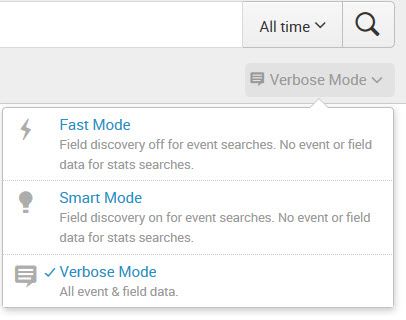
You will want to pick "Verbose" then rerun your search.
You may be interested in a free e-learning course from Splunk: the Splunk Tutorial. I'm not positive it covers fast vs. verbose mode, but it has lots of useful "getting started" nuggets in it.

- Mark as New
- Bookmark Message
- Subscribe to Message
- Mute Message
- Subscribe to RSS Feed
- Permalink
- Report Inappropriate Content
I suspect you are displaying results in 'Fast' mode, which doesn't do all the work to find/display the fields like that. You can change it by a drop-down under your "Time" dropdown. It probably says 'Fast' or 'Smart' (where mine in the below example already showed 'Verbose Mode'.)
You will want to pick "Verbose" then rerun your search.
You may be interested in a free e-learning course from Splunk: the Splunk Tutorial. I'm not positive it covers fast vs. verbose mode, but it has lots of useful "getting started" nuggets in it.
- Mark as New
- Bookmark Message
- Subscribe to Message
- Mute Message
- Subscribe to RSS Feed
- Permalink
- Report Inappropriate Content
Thank you so much for your answer. I started the Tutorial you mentioned, which is very helpful! It did refer to the "verbose Mode," hinted for more fields.

Upcoming Webinar: Unmasking Insider Threats with Slunk Enterprise Security’s UEBA
.conf25 technical session recap of Observability for Gen AI: Monitoring LLM ...
A Season of Skills: New Splunk Courses to Light Up Your Learning Journey
