
Join the Conversation
- Find Answers
- :
- Apps & Add-ons
- :
- All Apps and Add-ons
- :
- All Apps and Add-ons
- :
- Re: Splunk Add-on for Java Management Extensions E...
- Subscribe to RSS Feed
- Mark Topic as New
- Mark Topic as Read
- Float this Topic for Current User
- Bookmark Topic
- Subscribe to Topic
- Mute Topic
- Printer Friendly Page
- Mark as New
- Bookmark Message
- Subscribe to Message
- Mute Message
- Subscribe to RSS Feed
- Permalink
- Report Inappropriate Content

Hello,
We have noticed the following errors comming from our Search Heads from Splunk_TA_jmx:
ERROR ExecProcessor [57556 ExecProcessor] - message from "/opt/splunk/bin/python3.7 /opt/splunk/etc/apps/Splunk_TA_jmx/bin/jmx.py" File "/opt/splunk/etc/apps/Splunk_TA_jmx/lib/solnlib/conf_manager.py", line 459, in get_conf
ERROR ExecProcessor [57556 ExecProcessor] - message from "/opt/splunk/bin/python3.7 /opt/splunk/etc/apps/Splunk_TA_jmx/bin/jmx.py" WARNING:root:Run function: get_conf failed: Traceback (most recent call last):
ERROR ExecProcessor [57556 ExecProcessor] - Ignoring: "'/.\bin\scripted_inputs\ftr_lookups.py'"
ERROR ExecProcessor [57556 ExecProcessor] - message from "/opt/splunk/bin/python3.7 /opt/splunk/etc/apps/Splunk_TA_jmx/bin/jmx.py" return super(Collection, self).get(name, owner, app, sharing, **query)
ERROR ExecProcessor [57556 ExecProcessor] - message from "/opt/splunk/bin/python3.7 /opt/splunk/etc/apps/Splunk_TA_jmx/bin/jmx.py" splunklib.binding.HTTPError: HTTP 404 Not Found -- jmx_tasks does not exist
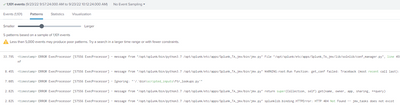
Input is configured on Heavy Forwarder and works finee, but as in https://docs.splunk.com/Documentation/AddOns/released/JMX/Hardwareandsoftwarerequirements we have installed the addon also on Search Heads and we're not sure sure what to adjust/change.
Does anyone have any idea on how to get rid of these errors?
Greetings,
Justyna
- Mark as New
- Bookmark Message
- Subscribe to Message
- Mute Message
- Subscribe to RSS Feed
- Permalink
- Report Inappropriate Content


As per the error(splunklib.binding.HTTPError: HTTP 404 Not Found -- jmx_tasks does not exist).
So make sure you successfully configured inputs with JVM / JAVA Beans. Check in the addon's local folder whether configured inputs are created or not. Just search for jmx_tasks.conf file. You will get the idea.
Installation Guide.
The Addon should installed in Heavy Forwarders and need to configure inputs as per your requirements.
For Search Heads & Indexers, just install it (for parsing and extraction purposes), no need to configure any inputs
I hope this will help you.
Thanks
KV
If any of my replies help you to solve the problem Or gain knowledge, an upvote would be appreciated.
- Mark as New
- Bookmark Message
- Subscribe to Message
- Mute Message
- Subscribe to RSS Feed
- Permalink
- Report Inappropriate Content
As per the error(splunklib.binding.HTTPError: HTTP 404 Not Found -- jmx_tasks does not exist).
So make sure you successfully configured inputs with JVM / JAVA Beans. Check in the addon's local folder whether configured inputs are created or not. Just search for jmx_tasks.conf file. You will get the idea.
Installation Guide.
The Addon should installed in Heavy Forwarders and need to configure inputs as per your requirements.
For Search Heads & Indexers, just install it (for parsing and extraction purposes), no need to configure any inputs
I hope this will help you.
Thanks
KV
If any of my replies help you to solve the problem Or gain knowledge, an upvote would be appreciated.
- Mark as New
- Bookmark Message
- Subscribe to Message
- Mute Message
- Subscribe to RSS Feed
- Permalink
- Report Inappropriate Content
Hi @kamlesh_vaghela, thanks for replying!
We have not configured any inputs on SearchHeads and Indexers, but your comment just reminded me about https://docs.splunk.com/Documentation/AddOns/released/Overview/Distributedinstall
We have deleted default inputs.conf and inputs.conf.spec from Splunk_TA_jmx on SHs and the errors are gone!
Thank you 🙂


Join the Splunk Community Slack to learn, troubleshoot, and make connections with fellow Splunk practitioners in real time!
Join Splunk User Groups to connect and learn in-person by region or remotely by topic or industry.
A Four-Part Event Series: Full Stack Observability For the AI Era
SOC4Kafka - New Kafka Connector Powered by OpenTelemetry
Event Series: Level up your SOC: Advancing with Splunk Enterprise Security
